WhatsApp shared inbox: one number, your whole team.
A WhatsApp shared inbox lets several people answer one WhatsApp Business number, each from their own login. In Asks, every chat on your number lands in one team inbox: the AI agent answers first, and teammates take over, transfer, leave internal notes and see each customer's history. Starter includes 10 teammates.
By Ray, founder of Asks · Updated · Product facts verified against Asks on Nov 17, 2026
7-day free trial · card required · cancel anytime
On one number
The AI answers, your team steps in.
A customer writes to your WhatsApp Business number. The AI agent answers what your content covers; when the question needs a person, the chat moves to your team's queue with the history attached, on the same number, in the same WhatsApp thread. The customer never has to repeat themselves or switch channels.
Why not just share the phone? The WhatsApp app links up to four devices to one account, and linked devices sign out when the main phone goes unused for 14 days (WhatsApp Help Center, checked Nov 2026). A shared inbox gives each teammate a login instead, with a clear owner for every chat.
what happens · documented behaviour
How it works
How the WhatsApp team inbox works in Asks
Six steps from one phone passed around the office to a team inbox. Screenshots are real captures from the Aurelia demo workspace (a fictional store).
- Step 01
Connect your WhatsApp Business number
In Channels → WhatsApp, click Connect WhatsApp and finish Meta's Embedded Signup. A new number connects on the Cloud API. A number you already use in the WhatsApp Business app connects in coexistence mode: you confirm with a QR scan, the app keeps working on your phone, and you can import up to six months of chat history. Owners and admins connect channels.
WhatsApp setup docs ↗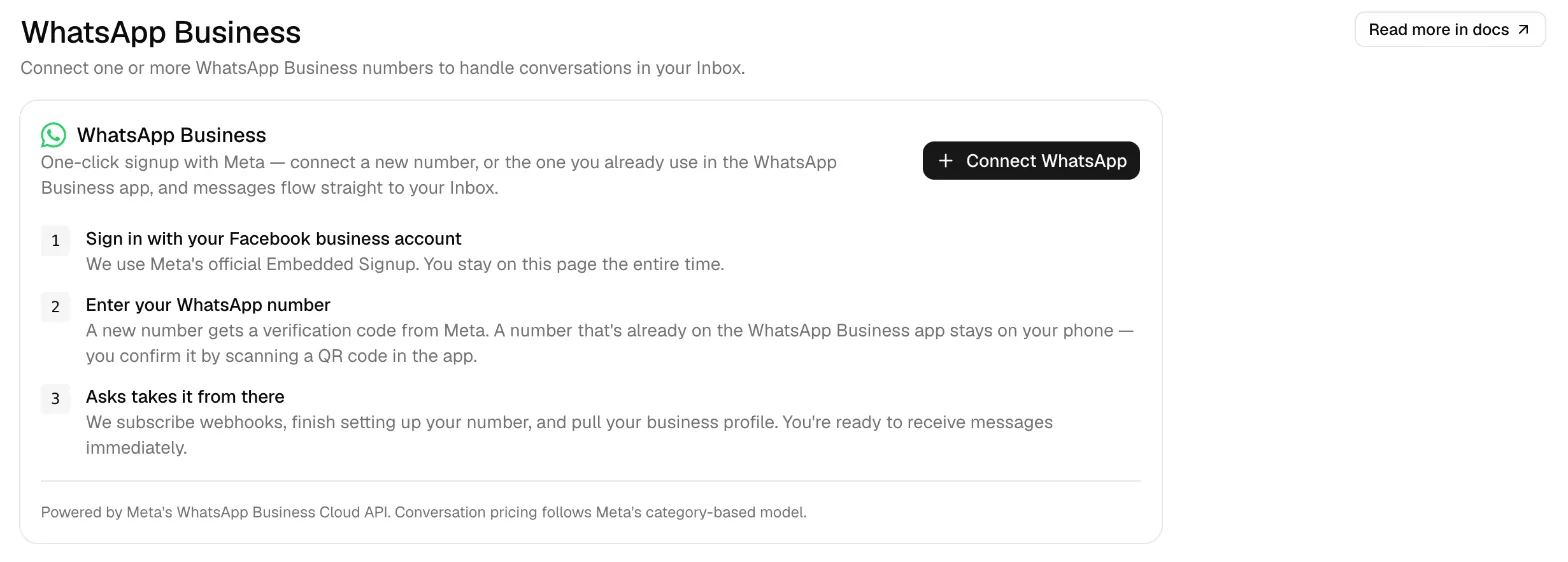
Channels → WhatsApp: one button for a new number or the one already in your WhatsApp Business app (coexistence). - Step 02
Invite your team
Each teammate gets their own login, works from any browser, and sees the same conversations at the same time. Starter includes 10 teammates, Business 25 and Premium 50; extra seats are an add-on.
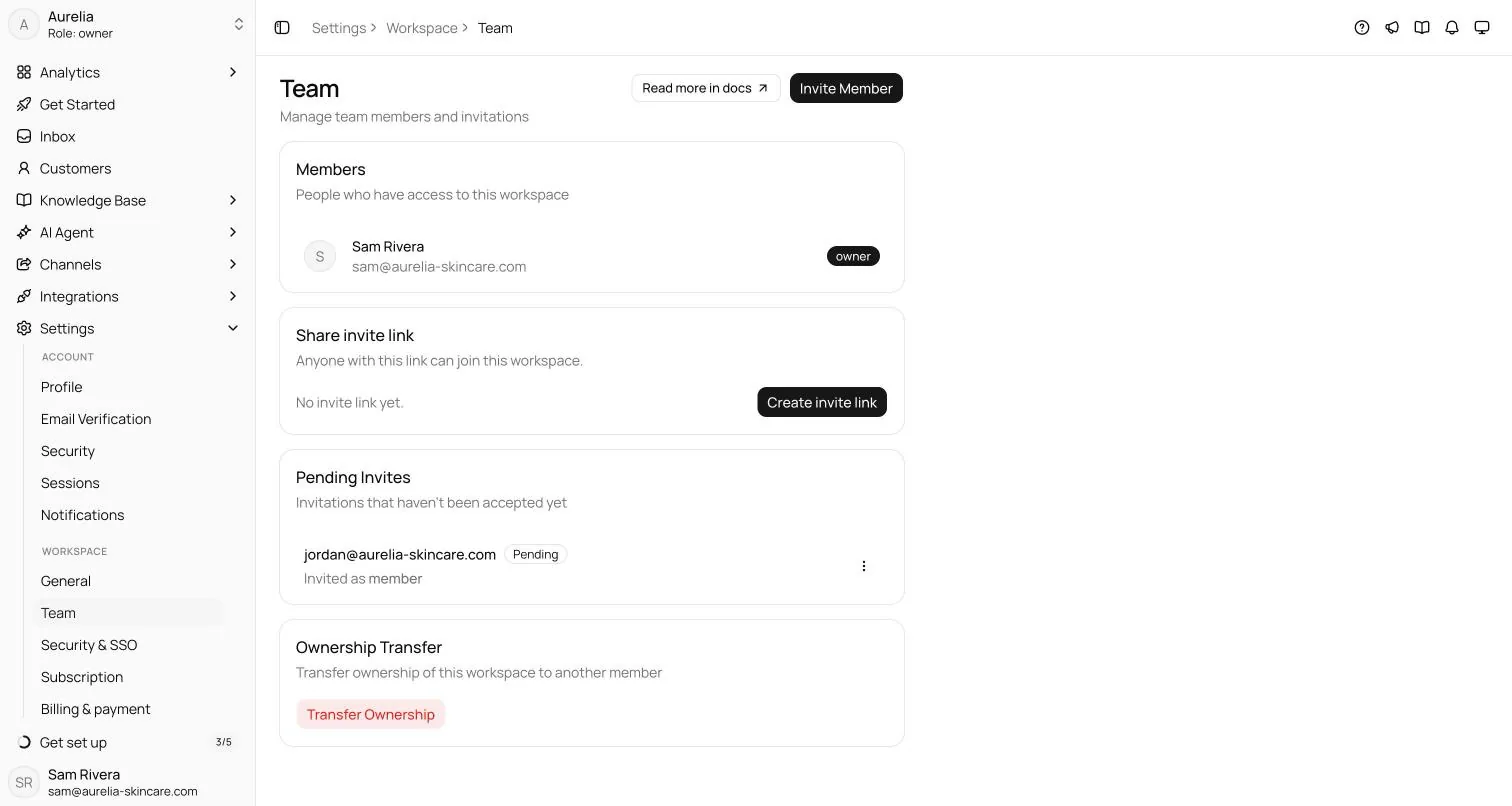
Settings → Team: invite each teammate by email or with an invite link. Everyone gets their own login. - Step 03
Let the AI agent answer first
Switch on WhatsApp under AI Agent → Deploy. The agent answers inside WhatsApp's 24-hour window from your website, help center and files, and escalates what it can't answer to your team as Needs human. It never sends templates on its own. Prefer people only? Leave it off and every chat waits for your team.
Deploy docs ↗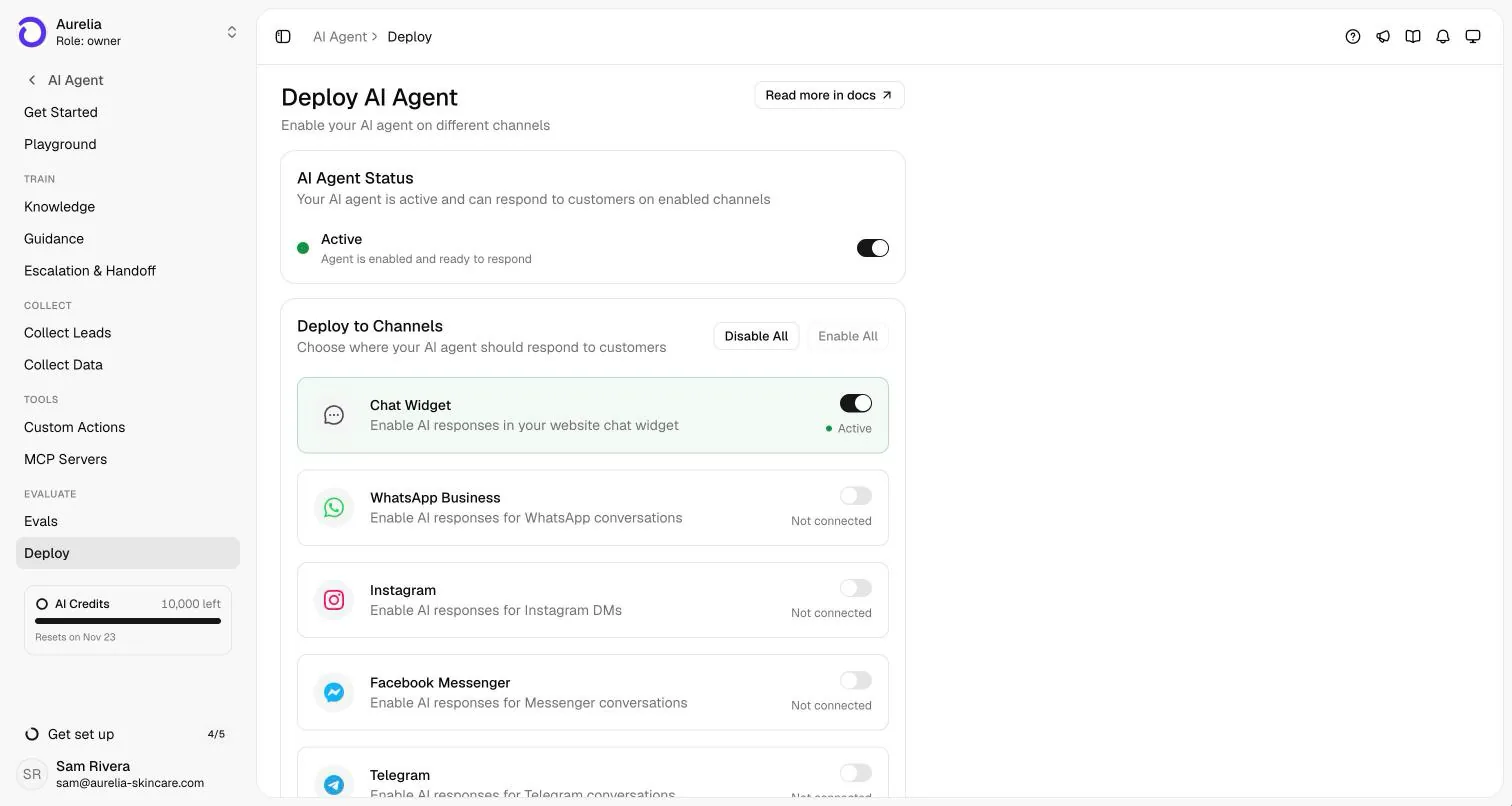
AI Agent → Deploy: the AI answers WhatsApp only once you switch it on there. Until then, every chat waits for your team. - Step 04
Take over, transfer, hand back
Take over from AI assigns the chat to you and stops the AI immediately. Transfer passes it to a teammate, Hand back to AI returns it, and Unassign releases it. Filters show what is yours, what the AI is handling and what needs a human. Every conversation also gets a ticket number, priority and tags.
Handoff docs ↗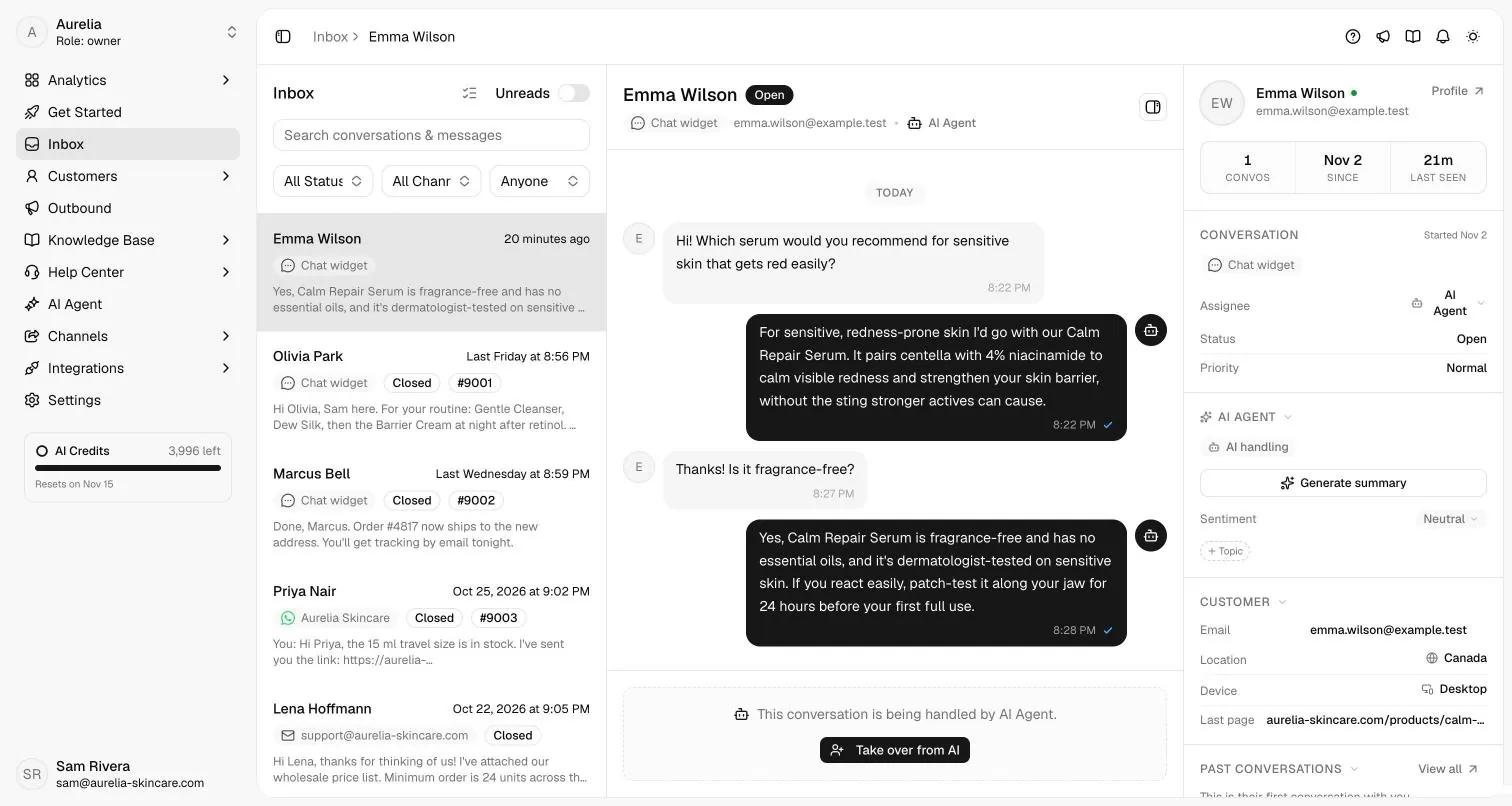
The inbox: every channel in one list, each row naming the number or account it came in on. Take over from AI stops the AI at once. - Step 05
Coordinate with internal notes
Flip the composer's Internal switch to leave a note for the team. Notes stay in the thread with a lock icon, are never sent to the customer and are never fed to the AI. Replies a teammate sends from the WhatsApp Business app on the phone appear in the same thread, labelled, and take the conversation over from the AI.
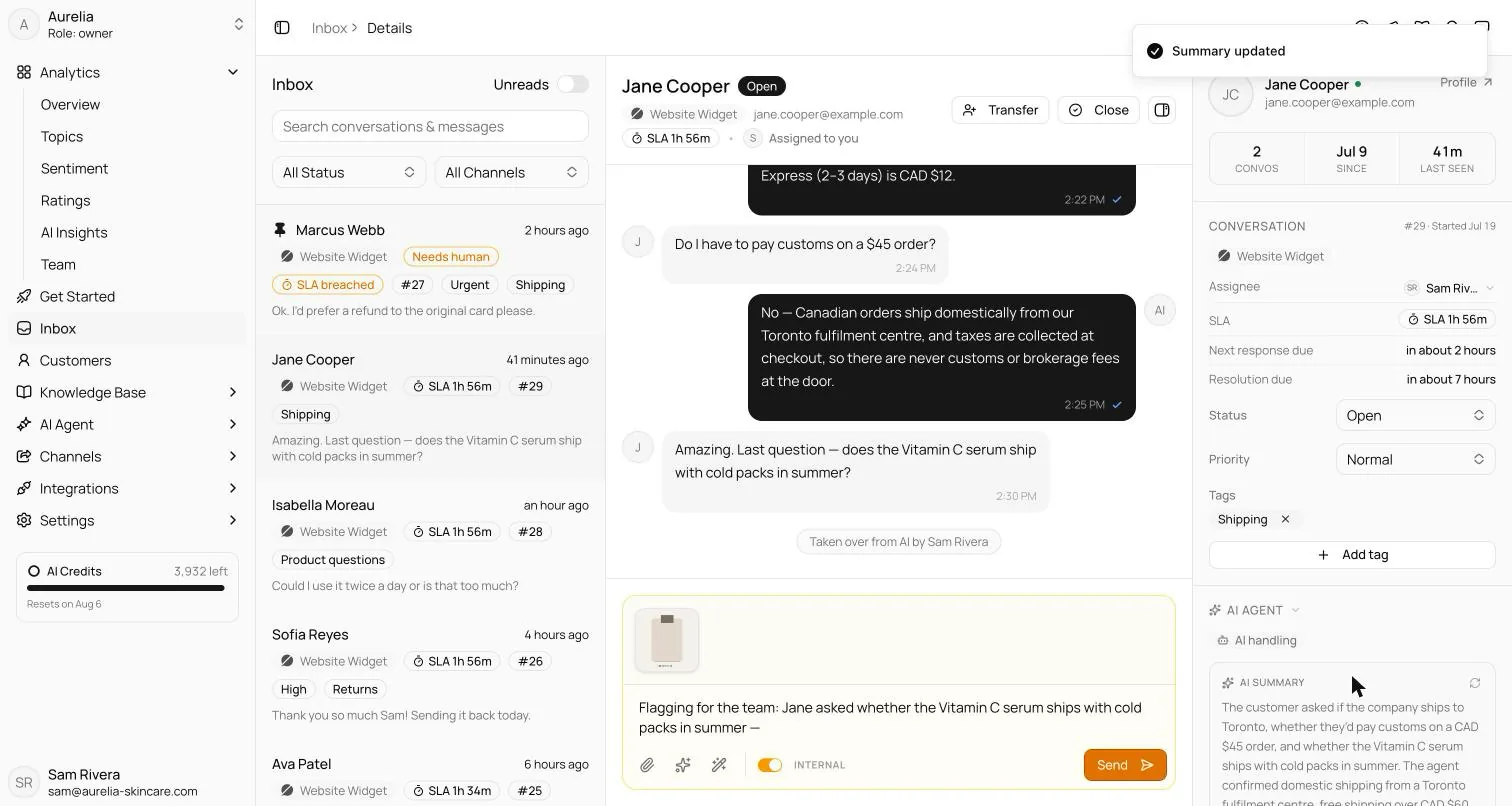
After a takeover: the composer's Internal switch writes a note only your team sees, and the AI summary sits in the side panel. - Step 06
Know the customer before you reply
Each customer has one profile across WhatsApp, your website chat, Instagram, email and the other channels: past conversations with AI summaries, team notes, tags, contact details and anything the AI collected, such as a phone number or lead details. It works like CRM-style customer records inside the inbox. It isn't a sales CRM: there are no deals or pipelines.
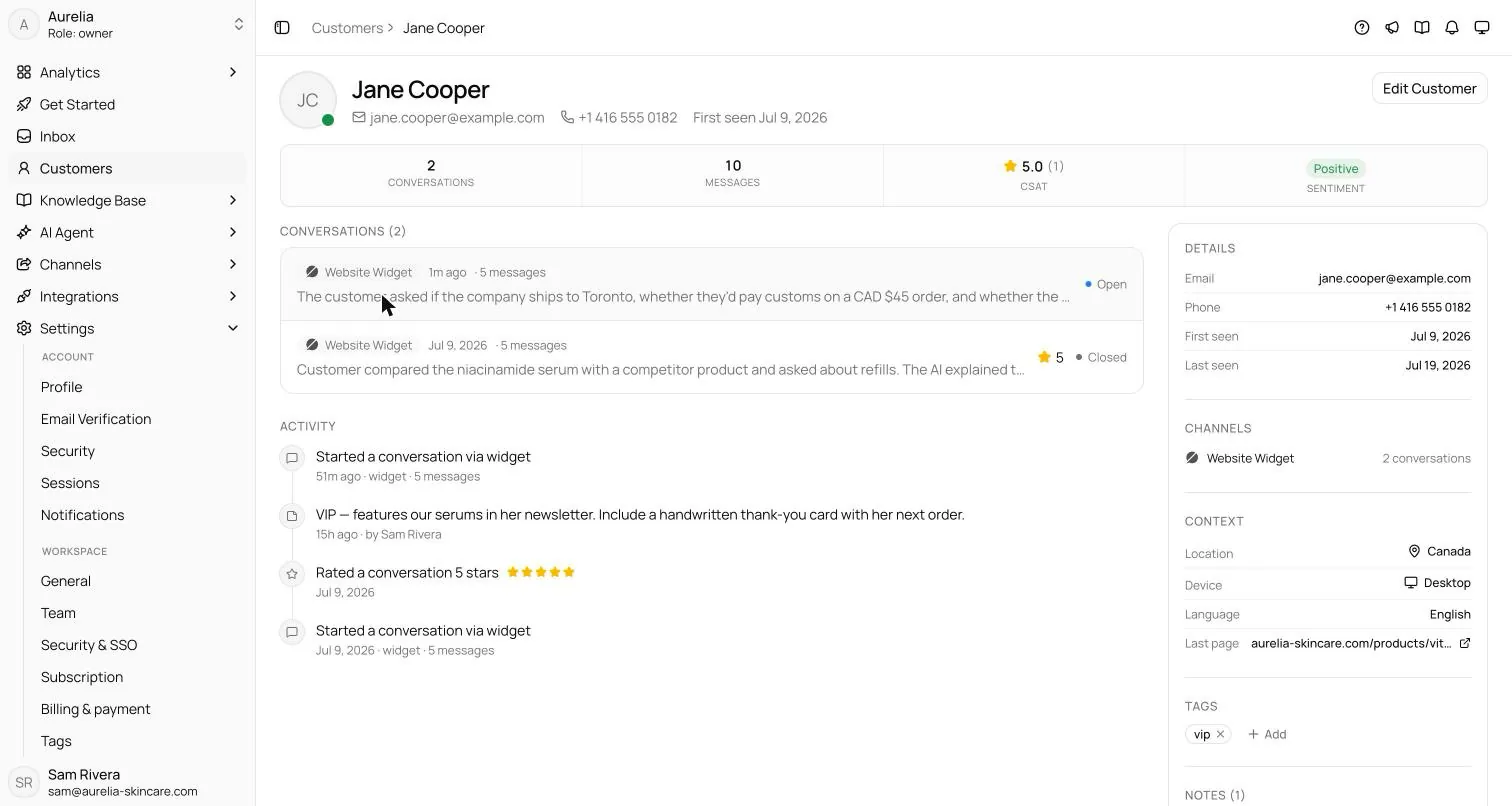
Customers → profile: one record per person across channels, with past conversations, notes, tags and what the AI collected.
Capabilities and limits
What it does, and what it won't
What it does
- Puts every WhatsApp chat in one inbox next to your website chat, Instagram, Messenger, Telegram, Slack and email.
- Lets the whole team answer the same number at once, each with their own login, with one owner per conversation.
- Answers first with an AI agent trained on your content, and hands off with the history attached (an AI handoff summary from Business up).
- Keeps internal notes, tags, priority and a ticket number on every conversation; search covers messages and notes.
- Shows live countdowns for WhatsApp's 24-hour window and offers Send template once it has closed.
- Tracks response and resolution targets with SLA policies from Business up.
What it won't do
- Share one connection between numbers: each WhatsApp number is its own channel (connect several if you need them).
- Distribute chats by round robin. Teammates take over or transfer conversations themselves.
- Replace a sales CRM: customer profiles have notes, tags and history, but no deals or pipelines.
- Send free-form messages after WhatsApp's 24-hour window: that needs an approved template.
- Sync WhatsApp group chats, calls or status updates.
- Cover Meta's message fees. Meta bills your WhatsApp Business account directly (estimate them).
Plans
What each plan includes
The WhatsApp channel and the shared inbox are on every plan; plans differ in teammates, AI credits and a few team features. Extra teammates are an add-on (1 seat for $25 a month).
| Plan | Starter | Business | Premium |
|---|---|---|---|
| Price, billed yearly | $29/mo ($39/mo monthly) | $119/mo ($149/mo monthly) | $279/mo ($349/mo monthly) |
| Teammates included | 10 | 25 | 50 |
| WhatsApp numbers (each one its own channel) | Multiple | Multiple | Multiple |
| AI credits per month | 500 | 4,000 | 10,000 |
| WhatsApp campaigns with approved templates | Included | Included | Included |
| AI summary on handoff | — | Included | Included |
| SLA targets in the inbox | — | Included | Included |
| API and webhooks | — | Included | Included |
Enterprise adds custom limits and SAML SSO: talk to sales. Every self-serve plan starts with a 7-day free trial, card required, cancel anytime. Compare plans.
FAQ
Questions, answered.
01Can multiple people use one WhatsApp Business number?
Yes, with a shared inbox. The WhatsApp app links up to four devices to one account; a shared inbox such as Asks connects the number through Meta's WhatsApp Business Platform instead, so every teammate answers it from their own login (Starter includes 10 teammates, Business 25 and Premium 50).
02Can I keep the WhatsApp Business app on my phone?
Yes. A number already on the WhatsApp Business app connects in coexistence mode: the app keeps working, messages you send from it appear in the same Asks conversation, and you can import up to six months of history. Open the app at least once every 13 days or Meta disconnects coexistence. Group chats, calls and status updates aren't synced.
03How are WhatsApp chats assigned to agents?
The AI agent takes new chats first when it's switched on for WhatsApp and escalates the rest to a Needs human queue. Teammates pick them up with Take over, or pass them on with Transfer. There's no automatic round-robin distribution.
04Is a WhatsApp shared inbox the same as a WhatsApp CRM?
Not quite. Asks keeps one customer profile per person with conversations, notes, tags and collected details, and can send WhatsApp campaigns to tagged customers. It has no sales pipelines or deals; on Business and Premium, webhooks can push leads and messages into your CRM.
05Can I connect more than one WhatsApp number?
Yes. Each number is its own channel connection, and all of them land in the same inbox. Each conversation shows which number it came in on, so a team can run a sales and a support number side by side.
06What does a WhatsApp shared inbox cost?
Two bills: your inbox's plan, and Meta's per-message fees for what you send. Asks plans are flat monthly prices with teammates and AI credits included (from $29/mo billed yearly, or $39/mo monthly), and Asks adds no per-message fee. Meta charges templates per delivered message and, since October 1, 2026, service replies beyond 1,000 a month per number: price yours with the WhatsApp API cost calculator.
How we made this page. Written by Ray, the pen name of Asks's founder, with AI assistance, from the Asks docs and help center; product facts verified against Asks on . Screenshots are real captures from the Aurelia demo workspace (a fictional store); the conversation marked “Illustrative example” shows documented behaviour, not a customer transcript. WhatsApp's linked-device limit comes from the WhatsApp Help Center. Asks publishes this page about its own product. Also in Spanish and Portuguese. Editorial policy.
One number. The whole team.
Connect your WhatsApp Business number, invite your team, and let the AI agent take the repetitive questions first.
7-day free trial · card required · cancel anytime