WhatsApp broadcast messages your customers can answer.
A WhatsApp broadcast sends one approved template message to many customers at once. In Asks, Outbound campaigns send a Marketing or Utility template from your WhatsApp Business number to up to 10,000 opted-in customers, personalize it per person, track delivery and reads, and route replies to your AI agent or team.
This is the business version of a broadcast. The WhatsApp Business app's own broadcast lists reach up to 256 contacts per list, and only people who saved your number receive them (WhatsApp Help Center, checked Nov 2026). Campaigns go through Meta's WhatsApp Business Platform instead, so customers don't need your number saved; they do need to have agreed to hear from you. Replies arrive in the same WhatsApp shared inbox as every other chat on your WhatsApp number, and Meta bills each delivered template (estimate the cost).
7-day free trial · card required · cancel anytime
By Ray, founder of Asks (pen name) · Updated
In a conversation
One template, then a real conversation.
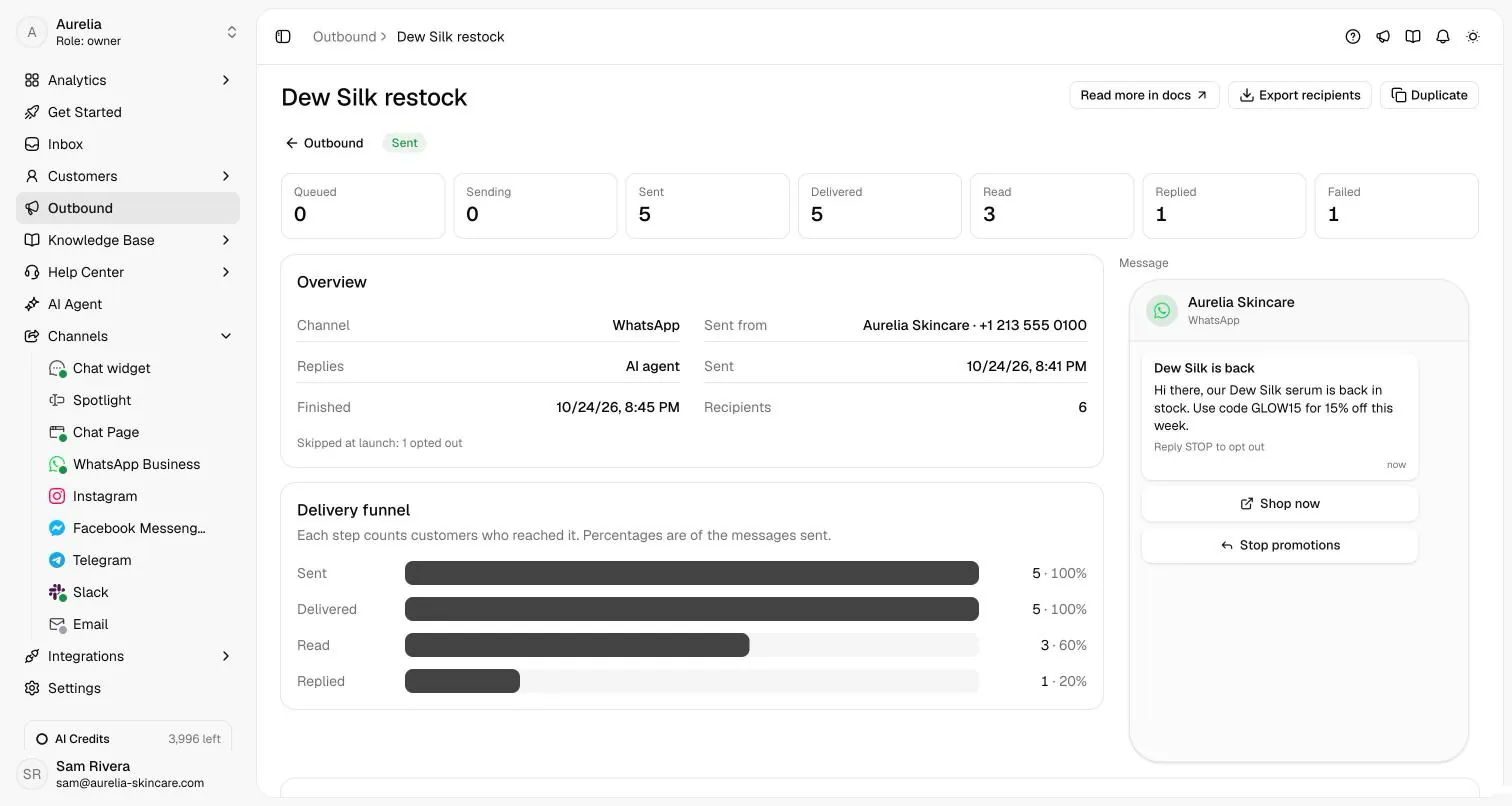
A restock campaign sent from the store's WhatsApp number, with replies set to the AI agent. On the right, the real campaign page: what was sent, delivered, read and replied.
what the agent did · documented behaviour
How it works
How WhatsApp broadcast campaigns work in Asks
Campaigns live under Outbound. You need a connected WhatsApp number and at least one approved Marketing or Utility template; owners and admins create and send, and every teammate can see the results.
- Step 01
Get a template approved by Meta
Create the message on your number's Templates tab under Channels → WhatsApp: a body with variables like
Templates docs{{1}}, an optional header, footer and buttons. Asks submits it with sample values and Meta reviews it. The category you pick decides the price: Marketing for promotions, Utility for order and account updates. Authentication templates can't be sent as campaigns.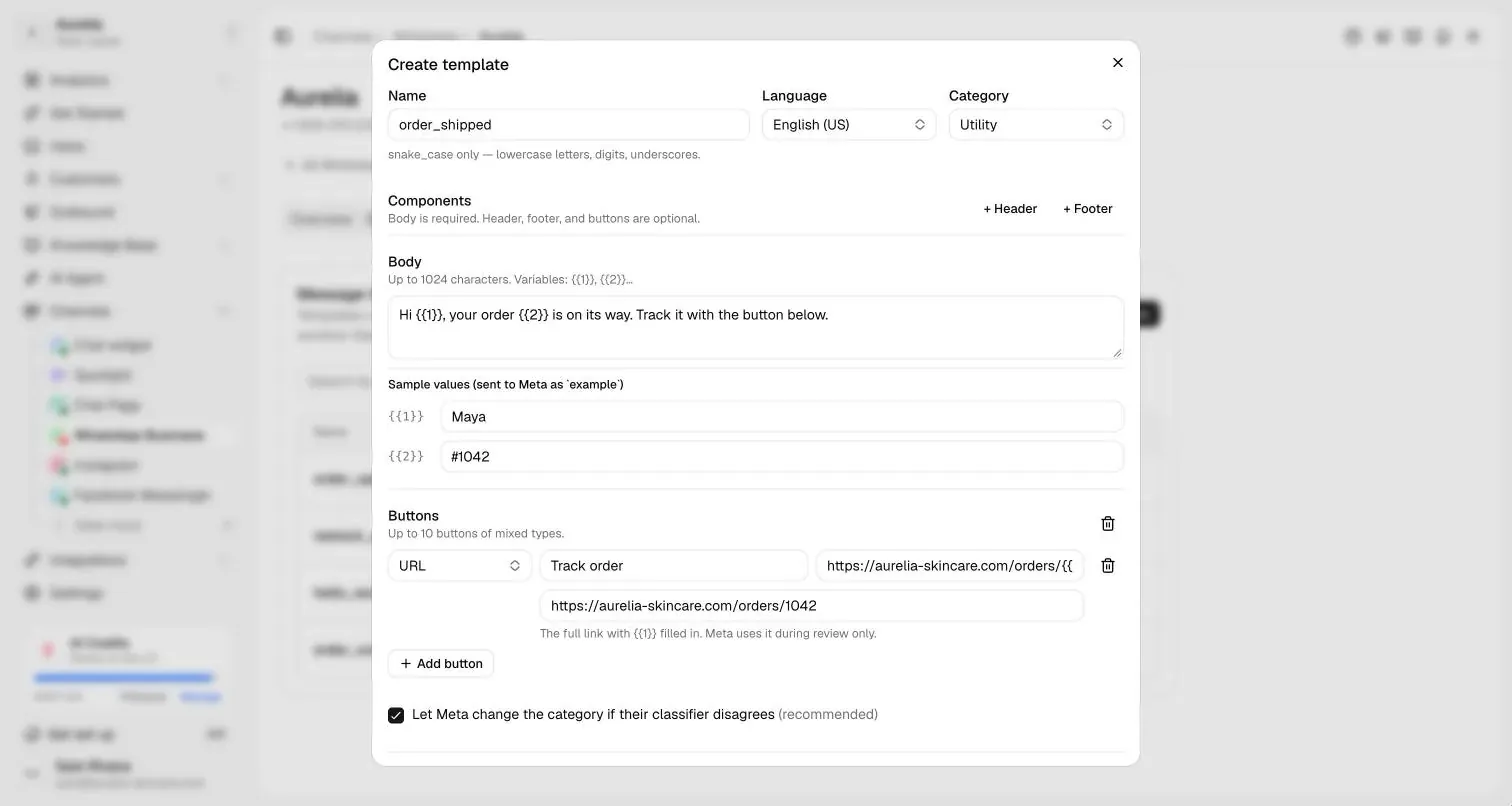
The template editor: sample values for Meta's review, buttons, and the category that sets the rate. - Step 02
Set up the campaign
Choose the number to send from and who answers replies: AI agent replies or Your team replies. Pick the template and fill each variable from the customer's details (first name, email, a detail the AI collected) or fixed text. Add a fallback; without one, customers with an empty value are skipped instead of getting a blank.
Campaign docs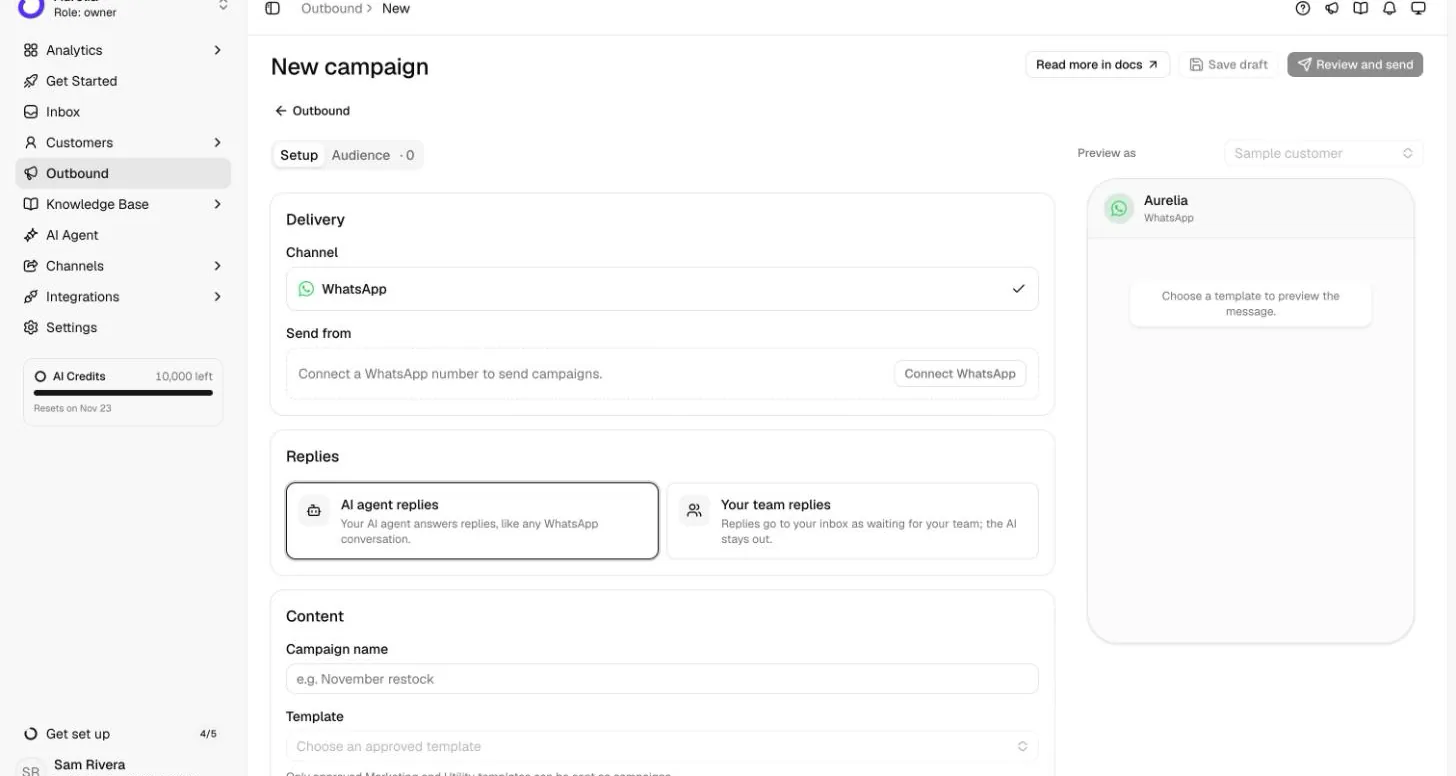
Setup: the sending number, who answers replies, and the template. The preview shows the message as it will look in WhatsApp. - Step 03
Choose who receives it
Tick customers one by one, or switch to Everyone who matches and filter by tags, a collected detail, last contact or "Only customers who've messaged you on WhatsApp". Import CSV brings in a list from elsewhere (up to 5,000 rows). Opted-out numbers, duplicates and invalid phones are skipped and counted, so each number gets the campaign once.
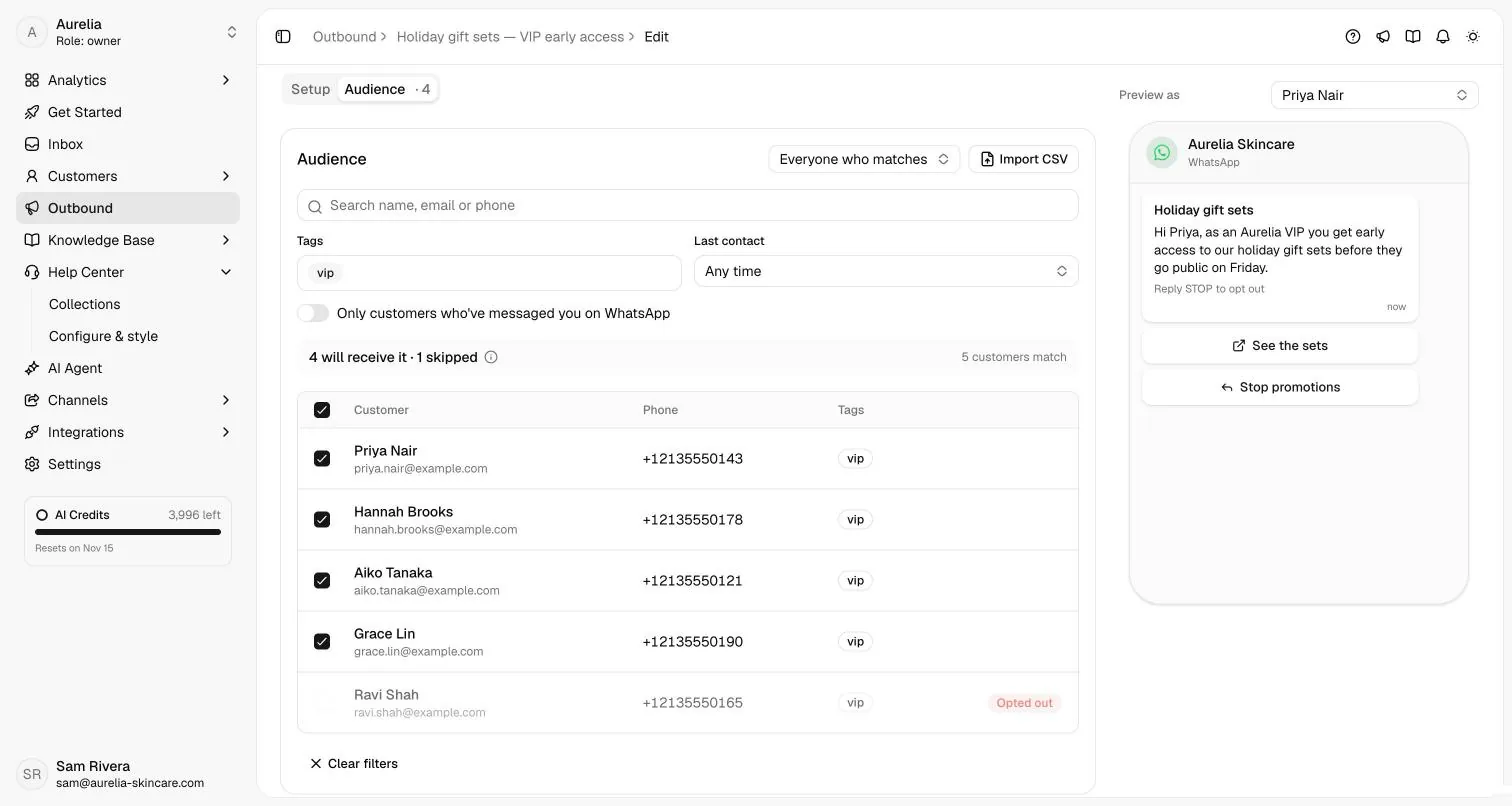
Audience: filter by tag or import a CSV. Opted-out customers are skipped automatically; Preview as shows each person's version. - Step 04
Confirm consent, then send or schedule
Review and send shows the summary. Choose Send now or Schedule for later, and confirm that these customers agreed to receive WhatsApp messages: Asks asks every time. A campaign that reaches Meta's daily limit waits and continues on its own; one that hits a payment, template or quality problem pauses with the reason, and Resume picks it up.
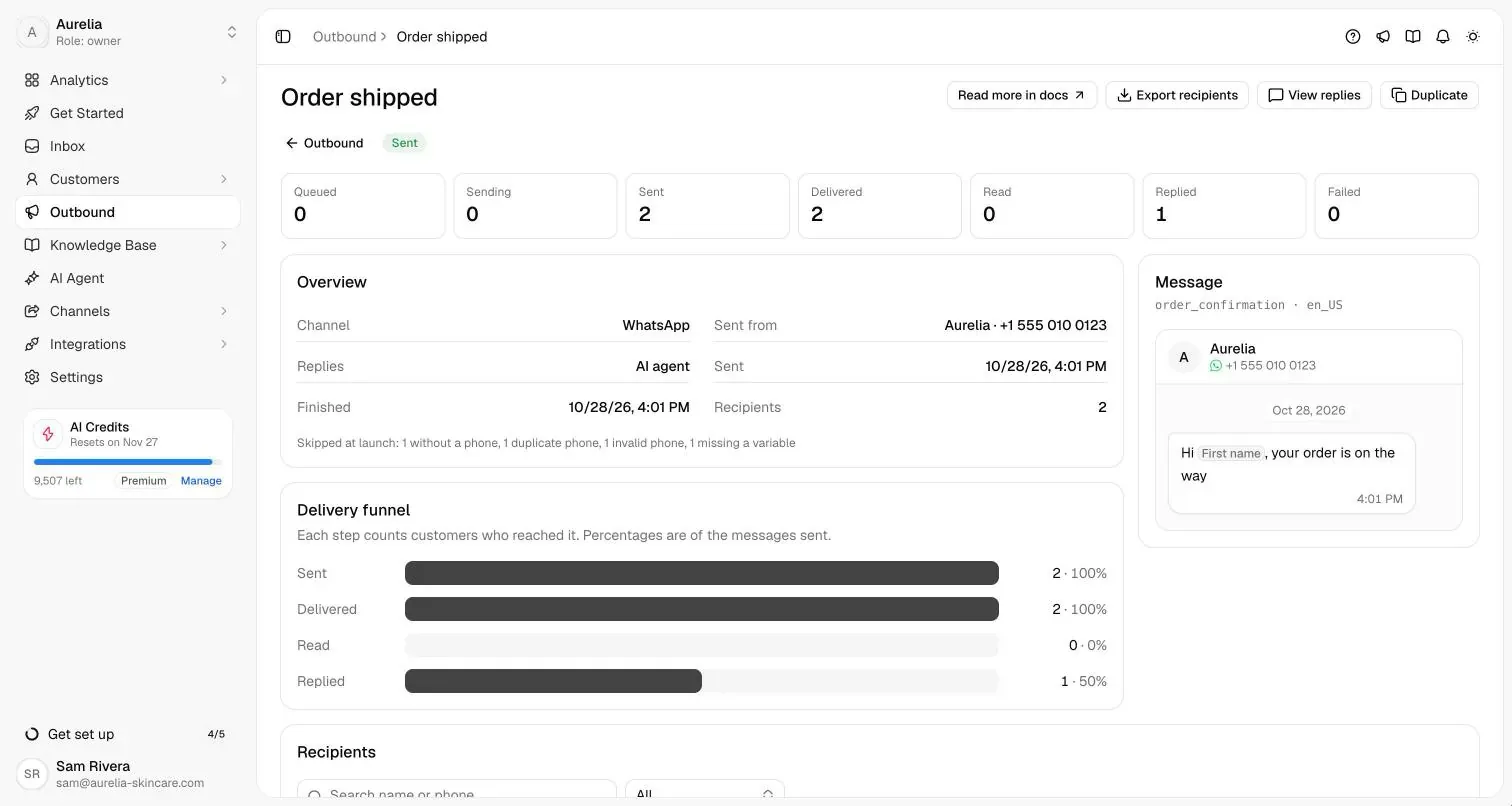
After sending: skipped customers are listed with the reason, Export recipients downloads the list, and View replies opens the replies in the inbox. - Step 05
Replies go to your AI agent or your team
A send never fills your inbox by itself. When a customer replies to the campaign message, or writes within 7 days, the campaign message is added to their conversation so whoever answers sees what they're replying to. Replies the AI handles collect under Inbox → Campaigns; anything it hands over, or a campaign set to Your team replies, lands in the main inbox. STOP opts a customer out of future campaigns; START opts them back in.
Handoff docs
Capabilities and limits
What it does, and what it won't.
What it does
- Sends one approved Marketing or Utility template to up to 10,000 customers per campaign, from the WhatsApp number you choose.
- Personalizes every message from the customer record, with fallbacks, and skips anyone whose value would be blank.
- Tracks each recipient from queued to sent, delivered, read and replied, with Meta's reason for every failure. Export the list as CSV.
- Handles opt-outs: STOP and Meta's Stop promotions button opt a customer out of future campaigns automatically.
- Routes replies to the AI agent, which sees the campaign message, or straight to your team.
- Never sends a message twice: a failed message is never re-sent.
What it won't do
- Message people who haven't opted in. You confirm consent before every send, and Meta lowers your number's quality and limits when people block or report you.
- Send free-form text as a broadcast: campaigns use approved templates only, and not Authentication templates.
- Run multi-step drip sequences. Each campaign is one template send; Duplicate sends it again.
- Broadcast on Instagram, Messenger, Telegram or email. Campaigns send on WhatsApp.
- Pay Meta's fees. Meta bills each delivered template to your WhatsApp Business account.
Plans, channels and setup
Where it runs and what it costs.
Campaigns are part of every plan. Meta bills each delivered template to your WhatsApp Business account at its category's rate for the customer's country: in the US and Canada, $0.025 per marketing and $0.0034 per utility template; in the UK, $0.0635 and $0.022 (rates effective October 1, 2026). AI replies to campaigns use AI credits like any other reply. Estimate Meta's fees for your list.
| Plan | Starter | Business | Premium |
|---|---|---|---|
| Price, billed yearly | $29/mo ($39/mo monthly) | $119/mo ($149/mo monthly) | $279/mo ($349/mo monthly) |
| AI credits per month | 500 | 4,000 | 10,000 |
| Outbound WhatsApp campaigns | Included | Included | Included |
| Customers per campaign | 10,000 | 10,000 | 10,000 |
| Teammates in the inbox | 10 | 25 | 50 |
| API and webhooks (messages carry their campaign) | Not included | Included | Included |
Enterprise adds custom limits and SAML SSO: talk to sales. Every self-serve plan starts with a 7-day free trial, card required, cancel anytime. Compare plans.
- Sends on
- WhatsApp, from any of your connected WhatsApp Business numbers
- Replies answered by
- Your AI agent or your team, chosen per campaign
- Setup
- A few minutes per campaign once a template is approved. Owners and admins create and send; every teammate sees results.WhatsApp campaigns docsWhatsApp docsCustomers docs
FAQ
WhatsApp broadcast questions
01What is a WhatsApp broadcast?
One message sent to many people, each of whom receives it as a private chat. In the WhatsApp Business app, a broadcast list holds up to 256 contacts and only reaches people who saved your number. Through the WhatsApp Business Platform, businesses send approved template messages to customers who opted in, which is how Asks campaigns work.
02How much does a WhatsApp broadcast cost?
Meta charges per delivered template, by category and the customer's country: $0.025 per marketing template in the US and Canada and $0.0635 in the UK (rates effective October 1, 2026). A campaign of 2,000 marketing messages to US customers costs Meta $50.00. Campaigns are included in every Asks plan; Asks adds no per-message fee. Price your own list with the WhatsApp API cost calculator.
03Do customers need to save my number?
Not for campaigns sent through the WhatsApp Business Platform, which is what Asks uses. They do need to have opted in to hear from you on WhatsApp; Asks asks you to confirm that before every send. The saved-number rule applies to the WhatsApp Business app's broadcast lists.
04How many people can I broadcast to?
Up to 10,000 customers per campaign in Asks. Meta also caps how many different customers your business can reach outside a customer service window in a rolling 24 hours: 250 for a new business portfolio, 2,000 after business verification or another of Meta's scaling paths, then higher as message quality stays high (Meta messaging limits, checked Nov 2026). A campaign that reaches the cap waits and continues on its own.
05What happens when a customer replies to a broadcast?
The reply opens a normal conversation with the campaign message shown above it. Choose per campaign whether your AI agent answers (those replies collect under Inbox → Campaigns until it hands one over) or your team does (they go straight to the inbox as Needs human).
06Can I use broadcast lists in the WhatsApp Business app and Asks together?
Not on the same number. When a WhatsApp Business app number connects to Asks in coexistence mode, Meta turns off the app's broadcast lists; send campaigns from Asks instead. Everything else in the app keeps working.
Guides
Read more before you set it up.
Related
Keep exploring Asks.
How we made this page. Drafted with AI assistance from the Asks docs and source code; product facts verified against Asks on . Screenshots are real captures from the Aurelia demo workspace (a fictional store). Conversations marked “Illustrative example” show documented behaviour, not a customer transcript. Asks publishes this page about its own product. Editorial policy.

Broadcast once, answer every reply.
Connect your WhatsApp number, get a template approved, and send your first campaign to yourself before your customers.
7-day free trial · card required · cancel anytime
