MCP server
A help desk MCP server for Claude, ChatGPT and Cursor.
Asks is a remote MCP server for customer support at https://api.asks.app/v1/mcp. Add it to Claude, ChatGPT, Codex or Cursor, sign in with OAuth, and the assistant can chat with your AI agent, update its knowledge, work the inbox, tickets and customers, and read analytics. Included on Business and up.
7-day free trial · card required · cancel anytime
Updated By Ray, founder of AsksProduct facts checked against Asks on
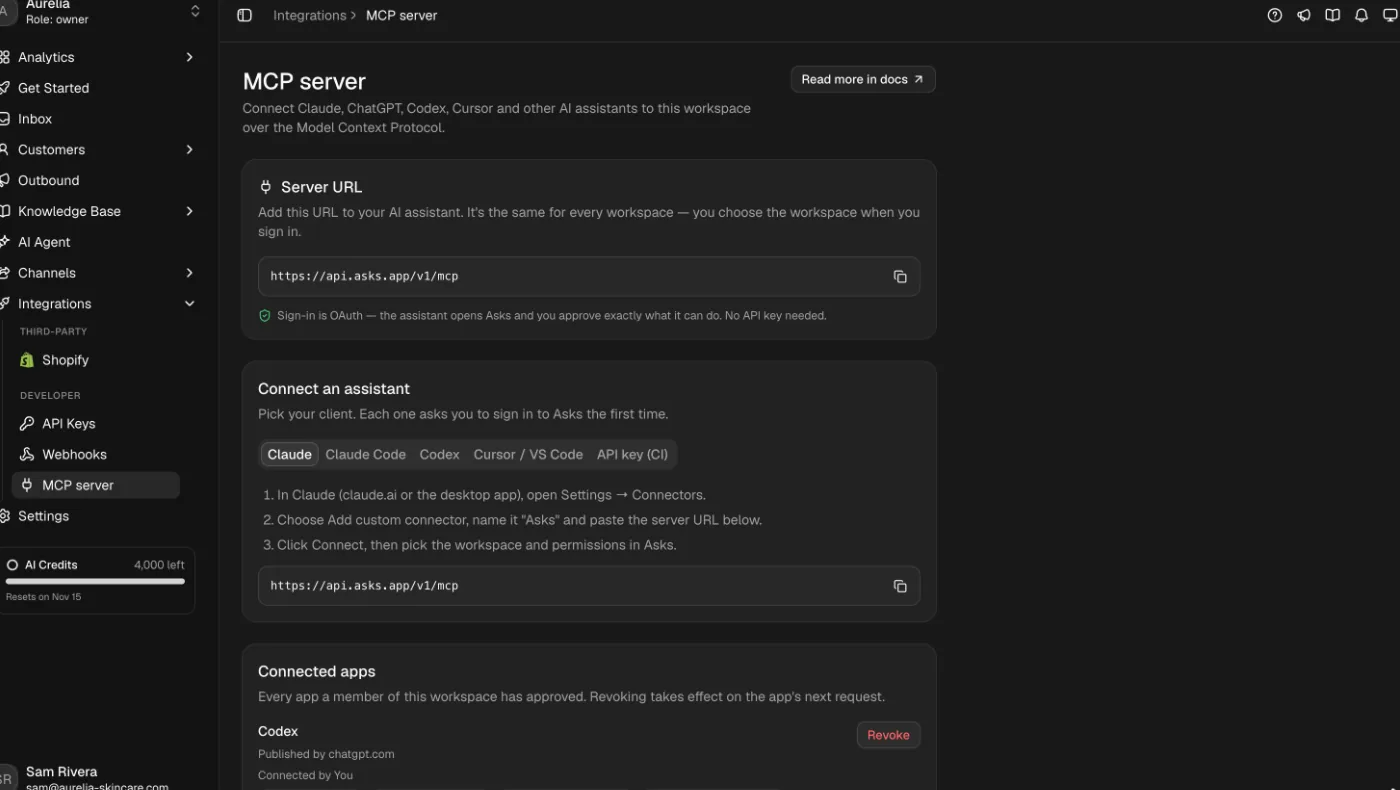
Connect
One URL, nothing to host.
The endpoint isn’t a page to open in a browser: add it to an MCP client and the client opens the Asks sign-in for you.
- 1
Claude (claude.ai or the desktop app)
Settings → Connectors → Add custom connector, name it Asks and pastehttps://api.asks.app/v1/mcp. - 2
Claude Code
Runclaude mcp add --transport http asks https://api.asks.app/v1/mcp, then/mcp→ asks → Authenticate. - 3
Codex
Runcodex mcp add asks --url https://api.asks.app/v1/mcp, thencodex mcp login asks. - 4
Cursor, ChatGPT and other clients
Add a remote MCP server with the same URL (in Cursor: Settings → MCP → Add new MCP server). Don’t add an Authorization header: the client negotiates OAuth itself.
Sign-in and permissions
You approve exactly what it can do.
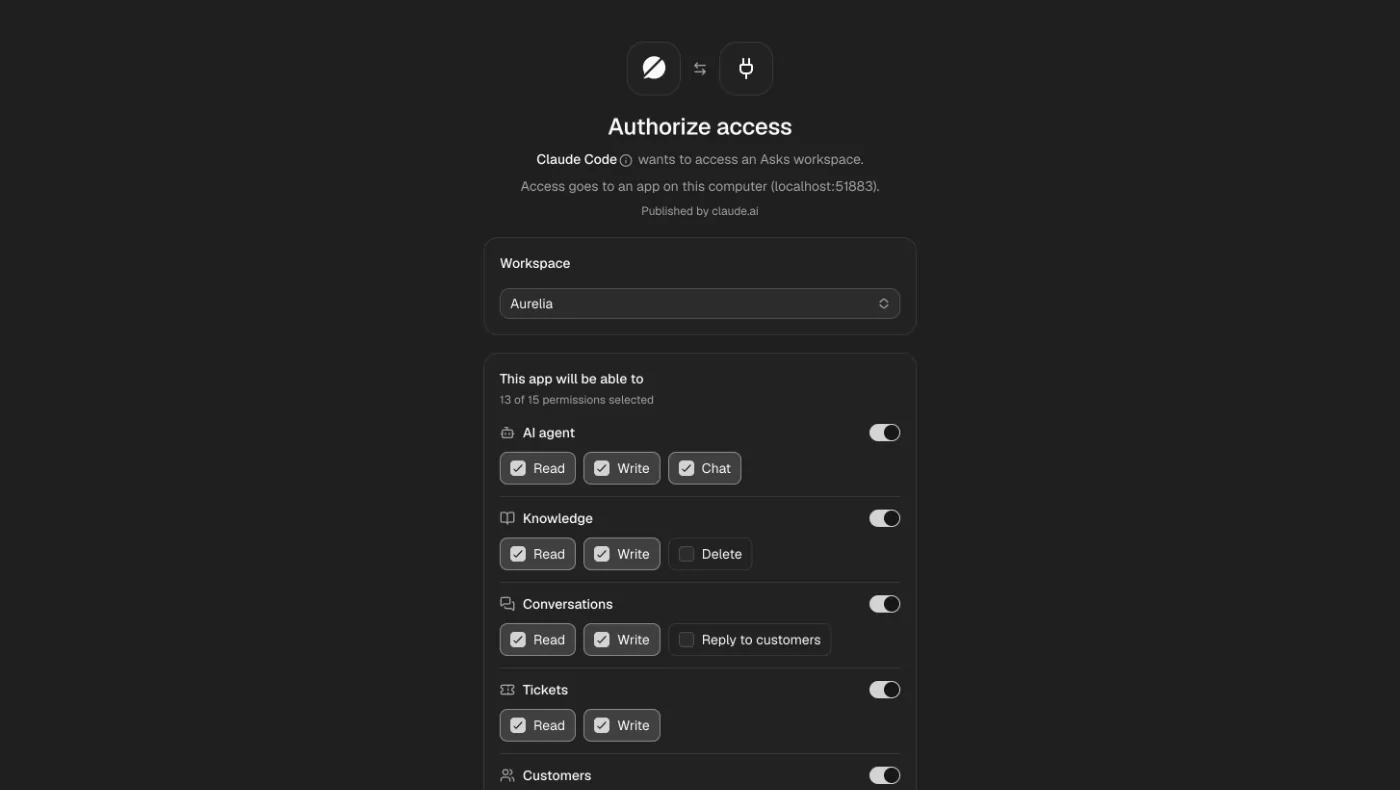
- Access goes to one app, for one workspace, limited to what you approved and never more than your own role allows.
- Opt-in permissions (deleting knowledge, replying to customers) are shown but not selected by default.
- Access tokens expire after an hour and refresh silently; an approval lasts 90 days, then the app asks again.
- If a teammate’s role changes or they leave the workspace, their apps change with them on the next request.
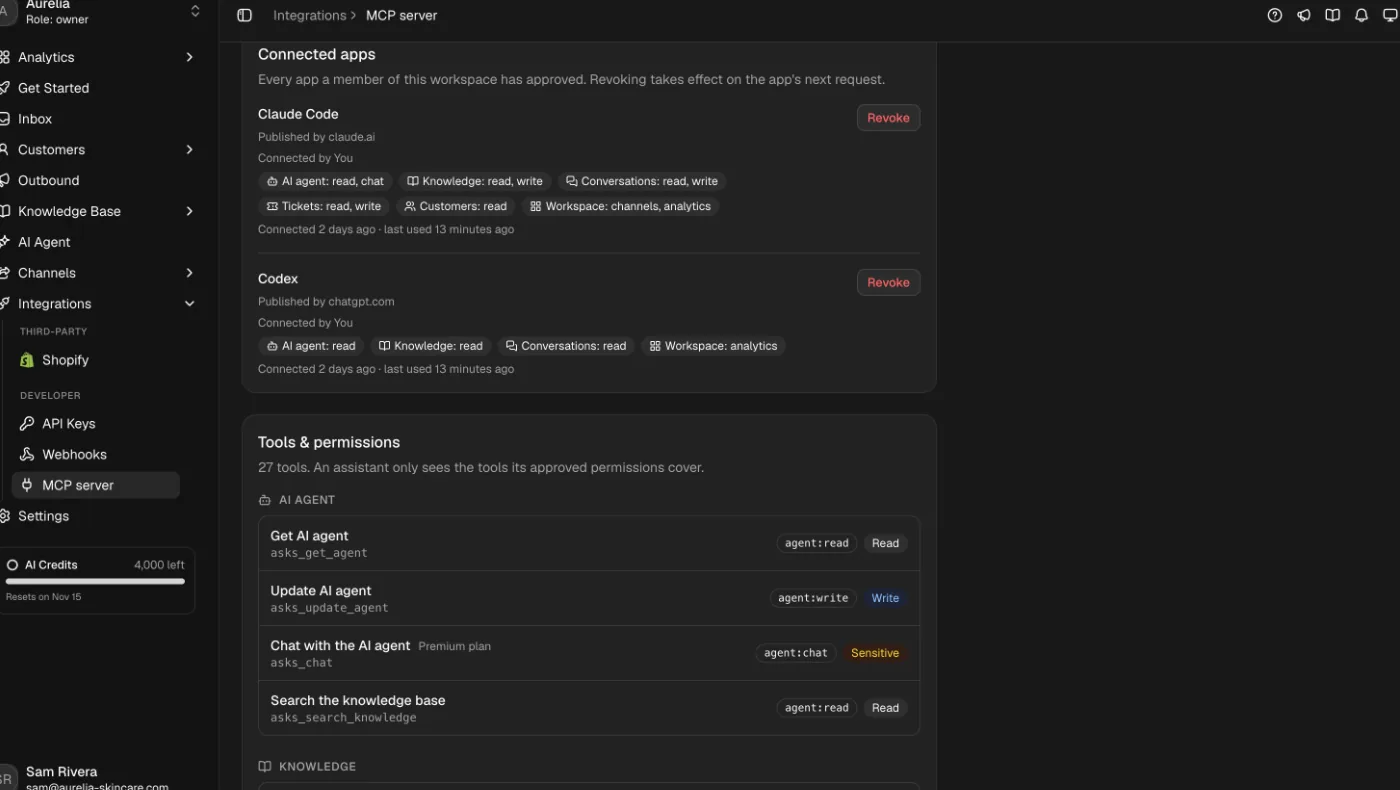
Tools
27 tools, each one a public API call.
Every tool runs a single public API operation with the same validation, side effects and errors. An assistant only sees the tools its permissions cover.
AI agent
Read and update the agent’s settings, search the knowledge it retrieves from, and chat with it.
asks_get_agent · asks_update_agent · asks_chat · asks_search_knowledge
Knowledge
Add, edit, re-crawl and remove text, Q&A and website sources. Every change trains immediately.
asks_list_sources · asks_get_source · asks_get_sources_summary · asks_create_source · asks_update_source · asks_delete_source · asks_sync_source
Inbox
Search conversations on every channel, read them, close, assign or hand back to the AI, add internal notes and reply to the customer.
asks_search_conversations · asks_get_conversation · asks_update_conversation · asks_add_note · asks_send_reply · asks_list_tags
Tickets, customers and workspace
Work tickets and teams, look up and update customers, check channels and pull analytics.
asks_list_tickets · asks_get_ticket · asks_update_ticket · asks_list_teams · asks_search_customers · asks_get_customer · asks_update_customer · asks_list_channels · asks_get_analytics · asks_whoami
- Sensitive tools need confirmation.
asks_send_replyandasks_delete_sourcerun only when the assistant passes an explicit confirmation; otherwise the server answersCONFIRMATION_REQUIREDand does nothing. - Plans. Every tool needs the Business plan or higher;
asks_chatneeds Premium and the API channel turned on. Requests share the public API’s rate limits.
The other direction
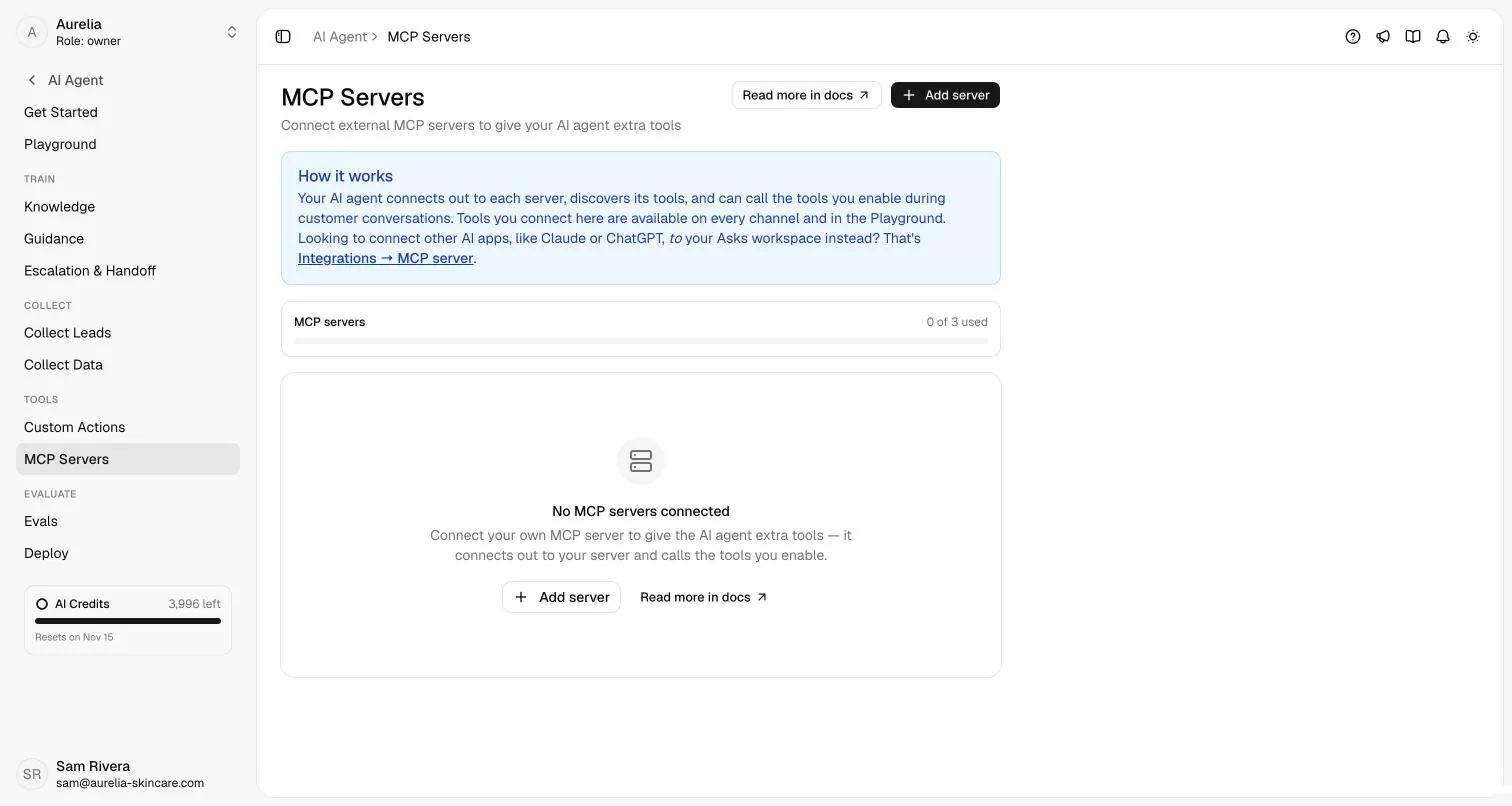
Your agent can call your MCP servers, too.
Under AI Agent → MCP Servers, the Asks agent connects out to servers you run, discovers their tools, and calls the ones you enable during customer conversations on every channel. Plans include 1 (Starter), 3 (Business) or 10 (Premium) servers. For one-off HTTP calls, custom actions are simpler; see all options on the integrations page.
Honest comparison
Other help desks with MCP servers.
Asks publishes this page. If you already run one of these help desks, use its own server: nobody should switch help desks for an MCP endpoint.
| Help desk | Status | Sign-in | What the assistant can do |
|---|---|---|---|
| Asks | Generally available (Business plan and up) | OAuth, or an API key for headless jobs | 27 tools: agent settings and chat, knowledge, inbox, tickets, customers, analytics; customer replies with confirmation |
| Fin (formerly Intercom) | Hosted server for US and EU workspaces (AU not yet) | OAuth (recommended) or a bearer token | 16 tools, mostly read-only: search conversations, contacts, companies and articles; create and update articles; add internal notes. Its docs say it cannot send customer-visible replies. OAuth connections also get Fin Operator tools. |
| Zendesk | Zendesk Bridge, in an early access program since November 10, 2026 (by enrollment, free during early access) | Through the Bridge MCP endpoint | A catalog of more than 400 Zendesk tools, capped at 150 for a pre-built integration |
When theirs is the better choice
- Your team already lives in Fin or Zendesk: their server reaches your existing tickets, contacts and articles; ours can only see an Asks workspace.
- You need Fin Operator’s configuration proposals or Zendesk’s breadth of admin tools.
- Choose Asks when you want one AI agent on your website, WhatsApp, Instagram, Messenger, Telegram, Slack and email, run from your assistant. Compare the products in Asks vs Intercom and Asks vs Zendesk.
Sources
- Intercom developer docs: Model Context Protocol (MCP) (checked Nov 2026)
- Zendesk Help Center: Zendesk Bridge FAQ (EAP) (checked Nov 2026)
- Asks docs: MCP server reference (checked Nov 2026)
For the design behind the server (why every tool is one API call, and how confirmation works), read MCP server for customer support: how Asks does it. Day to day, the assistant works the same shared inbox and AI help desk your team uses.
FAQ
Questions, answered.
01What is a help desk MCP server?
An MCP (Model Context Protocol) server exposes your help desk as tools an AI assistant can call. With the Asks server, Claude, ChatGPT, Codex or Cursor can search your inbox, update the agent’s knowledge or close a ticket from a chat, within the permissions you approve.
02Which plan includes the Asks MCP server?
The Business plan and up. The asks_chat tool, which holds a real conversation with your agent, needs Premium. On other plans only asks_whoami answers; every other tool returns PLAN_REQUIRED.
03Do I need an API key?
No. Assistants sign in with OAuth: Asks shows a consent screen where you pick the workspace and permissions. API keys are only for headless jobs such as CI, where no browser can open.
04Can the assistant reply to my customers?
Only if you approve the Reply to customers permission, which is never preselected. Even then, asks_send_reply runs only with an explicit confirmation in the call; without it the server answers CONFIRMATION_REQUIRED and sends nothing.
05How do I cut off an assistant?
Revoke it under Integrations → MCP server → Connected apps. It takes effect on the app’s next request, even if its token hasn’t expired. Removing the connector inside the assistant only makes it forget the token.
06Is this the same as connecting MCP servers to my AI agent?
No, that is the opposite direction. The Asks MCP server lets an assistant work inside Asks. Under AI Agent → MCP Servers, your Asks agent connects out to servers you run and calls their tools while it talks to customers.

Connect your assistant in a minute.
Start a trial, pick a plan with the MCP server, paste one URL into Claude, ChatGPT or Cursor, and approve what it may do.
7-day free trial · card required · cancel anytime
