Shopify integration
A Shopify AI chatbot that knows your live store.
Asks answers shoppers from your live Shopify store: it searches the catalog, quotes your real policies, builds a cart and shares the checkout link, and tracks orders once the customer verifies their email. Install it from the Shopify App Store; the chat widget goes on from your theme editor.
7-day free trial · card required · cancel anytime
Updated By Ray, founder of AsksProduct facts checked against Asks on
What it does
Five store skills, read live at answer time.
Products and policies are read from Shopify when the customer asks, so a price change shows up in the next answer.
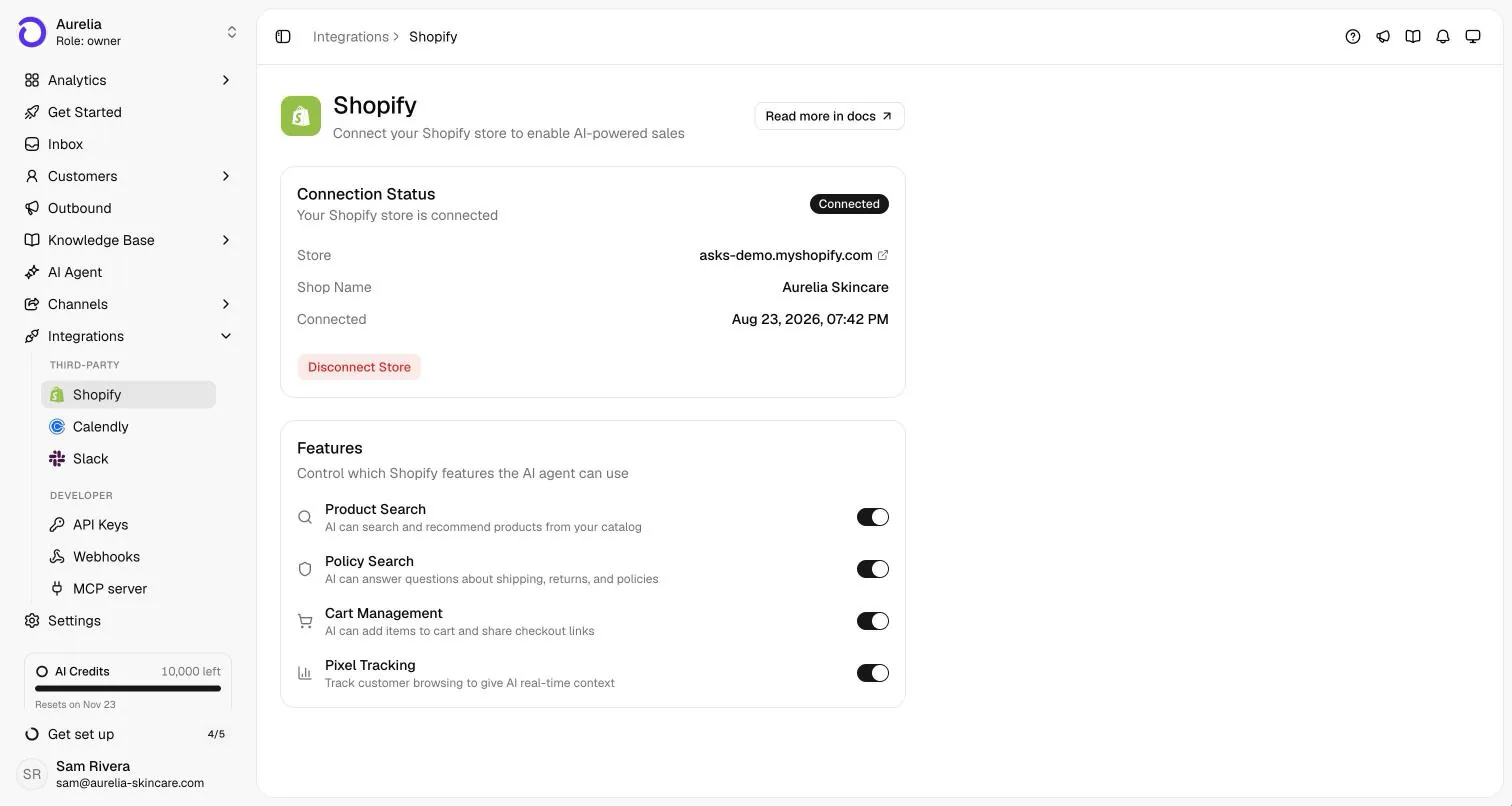
- Product Search
- Searches your live catalog and answers with product names, prices, links, images and per-variant availability.
- Policy Search
- Answers shipping, returns, refunds, privacy and terms questions from your store’s actual policies and FAQs.
- Cart Management
- Builds a cart in the conversation (add, update, remove) and shares the checkout link. The customer places the order.
- Pixel Tracking
- Gives the agent context on what the shopper is browsing: products viewed, searches, cart activity. It only collects from visitors who allow analytics under your store’s privacy settings.
- Order status
- Answers “where is my order?” with payment and fulfillment status, items and tracking links for up to three recent orders, after the customer verifies their identity.
In the product
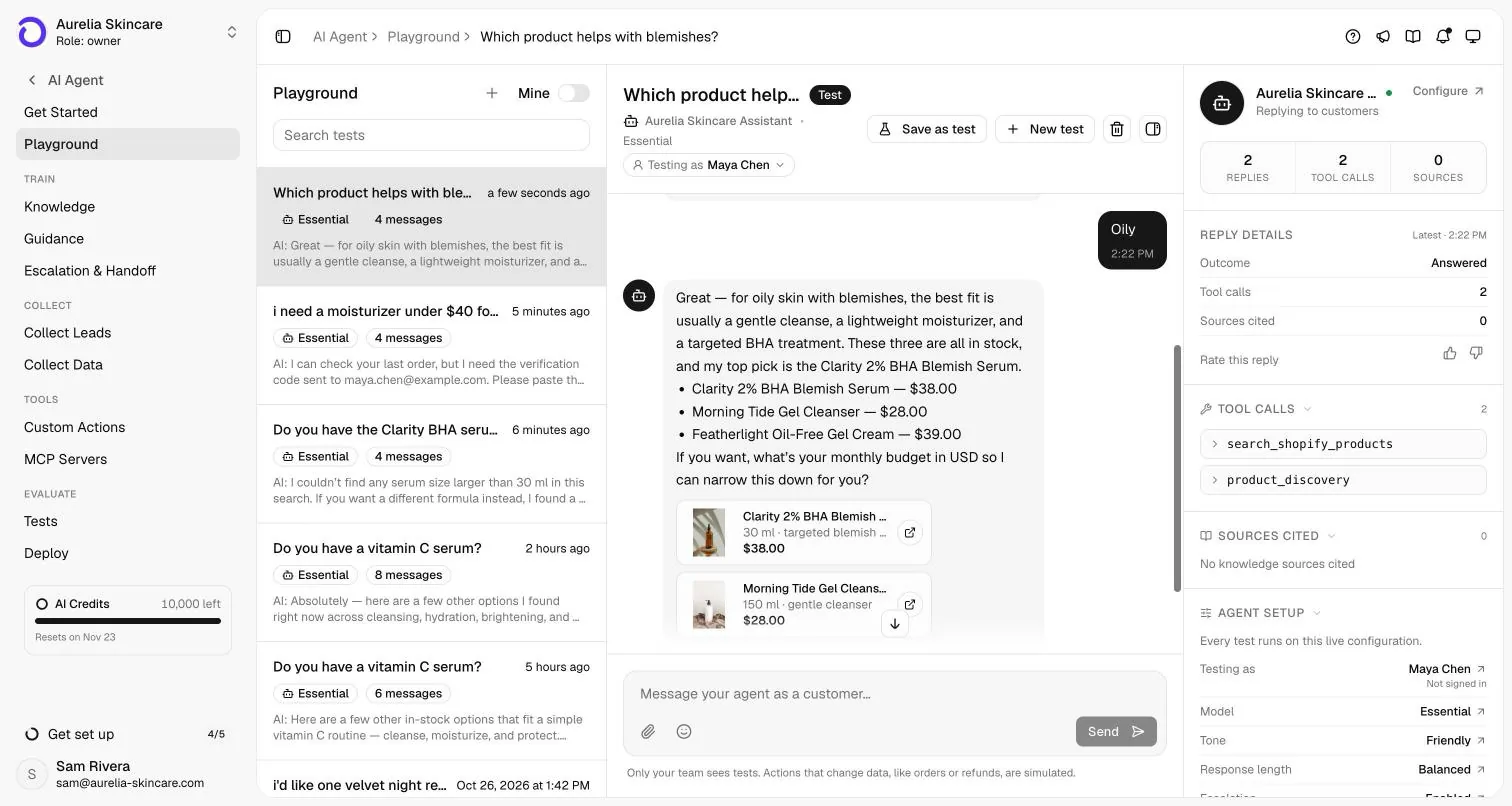
A real answer from a real catalog.
This is our demo store (Aurelia Skincare, a fictional brand on a real Shopify development store), tested in the Asks Playground.
Order tracking
“Where is my order?”, answered without a ticket.
- The agent shares payment status, fulfillment status, items and tracking links for up to three recent orders.
- An order number alone is never enough. The customer gives the email on the order and enters a six-digit code sent to it. The email stays verified for 30 minutes in that conversation.
- On WhatsApp, the customer’s own number verifies orders placed with it.
- Order status needs the installed app; storefront detection alone can’t see orders. More on the job itself in the order tracking chatbot and our guide to WISMO.
Set up
Live in three steps, no code.
- 1
Install the app
Install Asks from the Shopify App Store and approve the permissions Shopify asks for. - 2
Land in Asks, signed in
Shopify opens Asks in a new tab and signs you in with your Shopify identity. A new store starts onboarding with its details filled in, and the agent learns your catalog, policies and pages. - 3
Turn on the widget
Select Add to my store (or Add to theme on the widget’s Deploy tab). Your theme editor opens with the Asks Widget embed on; select Save.
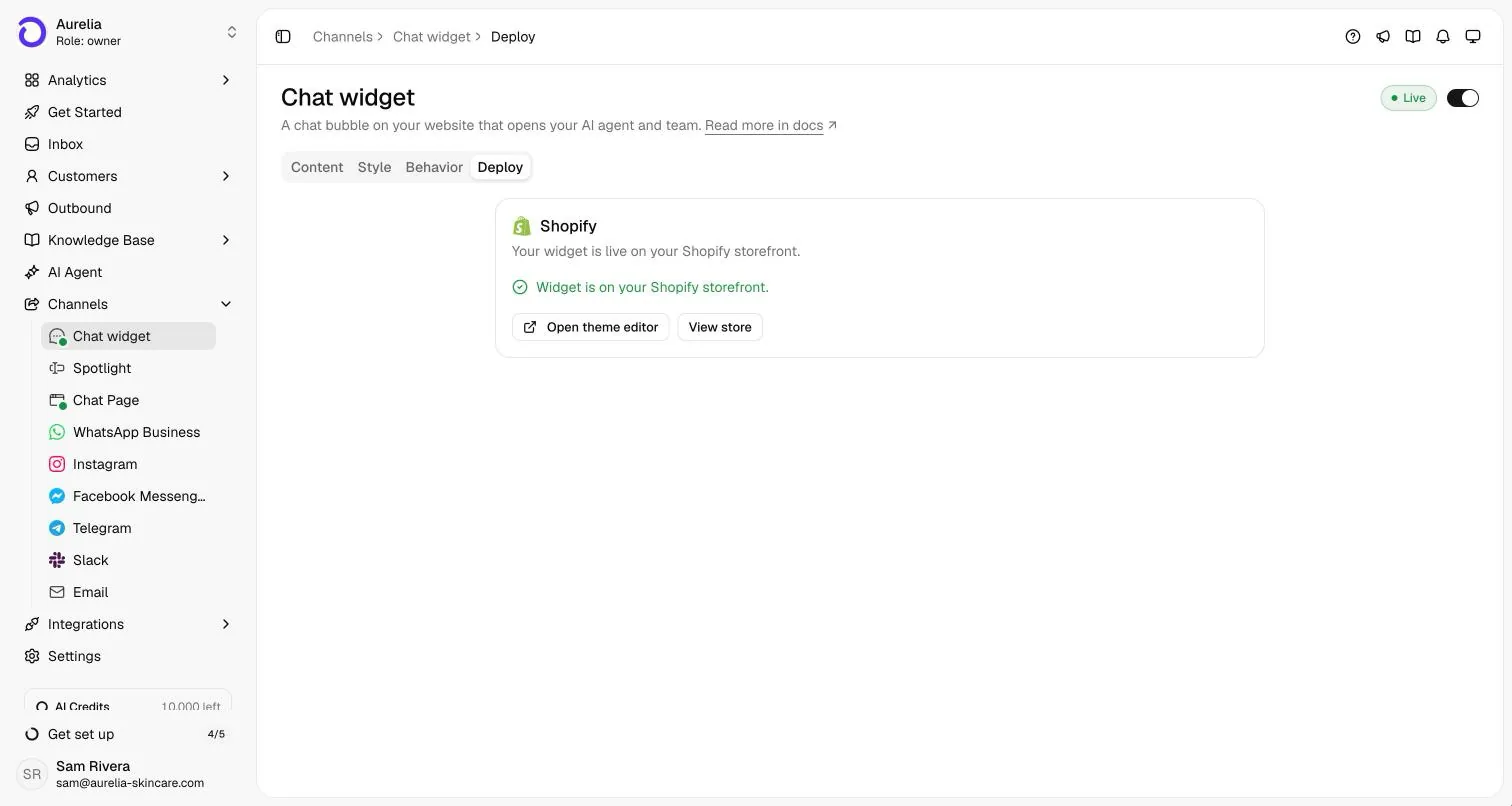
The Shopify app is a connector: you work in the Asks dashboard, not inside your Shopify admin. The full walkthrough, including reinstalls and moving a store between workspaces, is in the Shopify setup guide. For a step-by-step with testing tips, read how to add an AI chatbot to your Shopify store.
Honest comparison
Asks or Shopify Inbox’s own AI agent?
Asks publishes this page, so weigh it accordingly. Shopify facts below come from Shopify’s own App Store listing and help center.
| Shopify Inbox (checked Nov 2026) | Asks | |
|---|---|---|
| Price | Free | From $29/mo billed yearly ($39 month-to-month), billed through Shopify while a store is connected. 7-day free trial · card required · cancel anytime. |
| AI agent | An “AI sales associate for your online store” that answers from product details, store policies, pages and its own knowledge base. You can run Inbox with or without it. | Answers from the live catalog and policies plus your website, documents and help center; carts and checkout links; Calendly bookings; custom HTTP actions. |
| Channels | Online store chat (the listing says it works with Shopify Admin and Online Store) | Website chat widget, Spotlight, Chat Page, WhatsApp, Instagram, Facebook Messenger, Telegram, Slack, and Email |
| When the AI can’t help | Hands off to staff in Inbox, or points the customer to your store’s email when handoff isn’t available | Hands off to your team in a shared inbox with assignment, internal notes and tickets |
| App Store reviews | 4.5 stars from 5,818 reviews | No reviews yet |
When Shopify Inbox is the better choice
- You only need chat on your online store, and free matters more than anything else.
- You want Shopify’s own app, with thousands of merchant reviews behind it.
- Your shoppers are signed in with Shop, and you want replies personalized from their Shop preferences and purchase history.
When Asks fits better
- Customers also message you on WhatsApp, Instagram, Messenger or email, and you want one agent and one inbox for all of it.
- You need order tracking with identity verification on every channel.
- You want to test the agent before customers see it (AI Tests) and connect booking or your own APIs.
Sources
- Shopify Inbox on the Shopify App Store (checked Nov 2026)
- Shopify Help Center: Managing customer conversations (Inbox agent and handoff) (checked Nov 2026)
Comparing more Shopify apps? See our roundup of the best AI chatbots for Shopify, which covers Gorgias, Tidio and others.
Read the full roundup: best AI chatbot for Shopify, or the head-to-head Asks vs Gorgias.
Limits
What it won’t do.
- It never places an order: the customer completes checkout from the link.
- It doesn’t create, modify, cancel or refund orders, edit inventory or generate discount codes.
- Enterprise plans, one-time credit top-ups and auto-recharge aren’t available while you are billed through Shopify.
- Website crawls skip product, collection, cart, checkout, account and policy pages, because the agent reads those live from Shopify instead.
Running a store? The e-commerce playbook shows how the agent sells and supports across channels, and pricing lists what each plan includes.
FAQ
Questions, answered.
01Is there a free Shopify AI chatbot?
Shopify Inbox, Shopify’s own app, is free and includes an AI agent for your online store chat. Asks is a paid app: every plan starts with a 7-day free trial (card required, cancel anytime), and it adds other channels, a team inbox and order tracking with verification.
02Does Asks work with my Shopify theme?
Yes. The widget is a theme app embed, so it works with all Shopify themes. You turn it on from the theme editor and select Save; there is no code to paste.
03Can the agent answer Shopify questions on WhatsApp and Instagram too?
Yes. Connecting Shopify makes the agent store-aware on every channel: Website chat widget, Spotlight, Chat Page, WhatsApp, Instagram, Facebook Messenger, Telegram, Slack, and Email. On WhatsApp, the customer’s own number verifies orders placed with it.
04How does Asks protect order details?
An order number alone is never enough. The customer gives the email on the order and enters a six-digit code that Asks sends to that address; the email then stays verified in that conversation for 30 minutes.
05Can the agent refund, cancel or discount orders?
No. The agent’s Shopify access is read-and-assist only: it doesn’t create, modify, cancel or refund orders, edit inventory or generate discount codes. Refunds and exceptions go to your team in the shared inbox.
06Do I need the app, or can I just paste my store URL?
Pasting your store URL during onboarding is enough for product, policy and cart answers: Asks detects Shopify storefronts, including on custom domains. The app adds the one-click widget install, order status and billing through Shopify.

Put it on your store tonight.
Install the app, let the agent learn your catalog and policies, and answer your first shoppers in minutes.
7-day free trial · card required · cancel anytime
