A lead generation chatbot that answers first.
A lead generation chatbot answers a visitor's question, then asks for their contact details at the moment you define and sends each lead to your team. In Asks, Collect Leads does this on your website with a short form and on WhatsApp, Instagram and other channels in conversation.
Most lead forms ask before they help. Asks flips the order: in your website chat and messaging channels, the agent answers from your own content first, so the request for an email lands when the visitor already has a reason to give it. Leads appear in your shared inbox with the conversation attached, and when the next step is a call, the appointment booking chatbot can book it in the same conversation.
7-day free trial · card required · cancel anytime
By Ray, founder of Asks (pen name) · Updated
In a conversation
Answer, then ask.
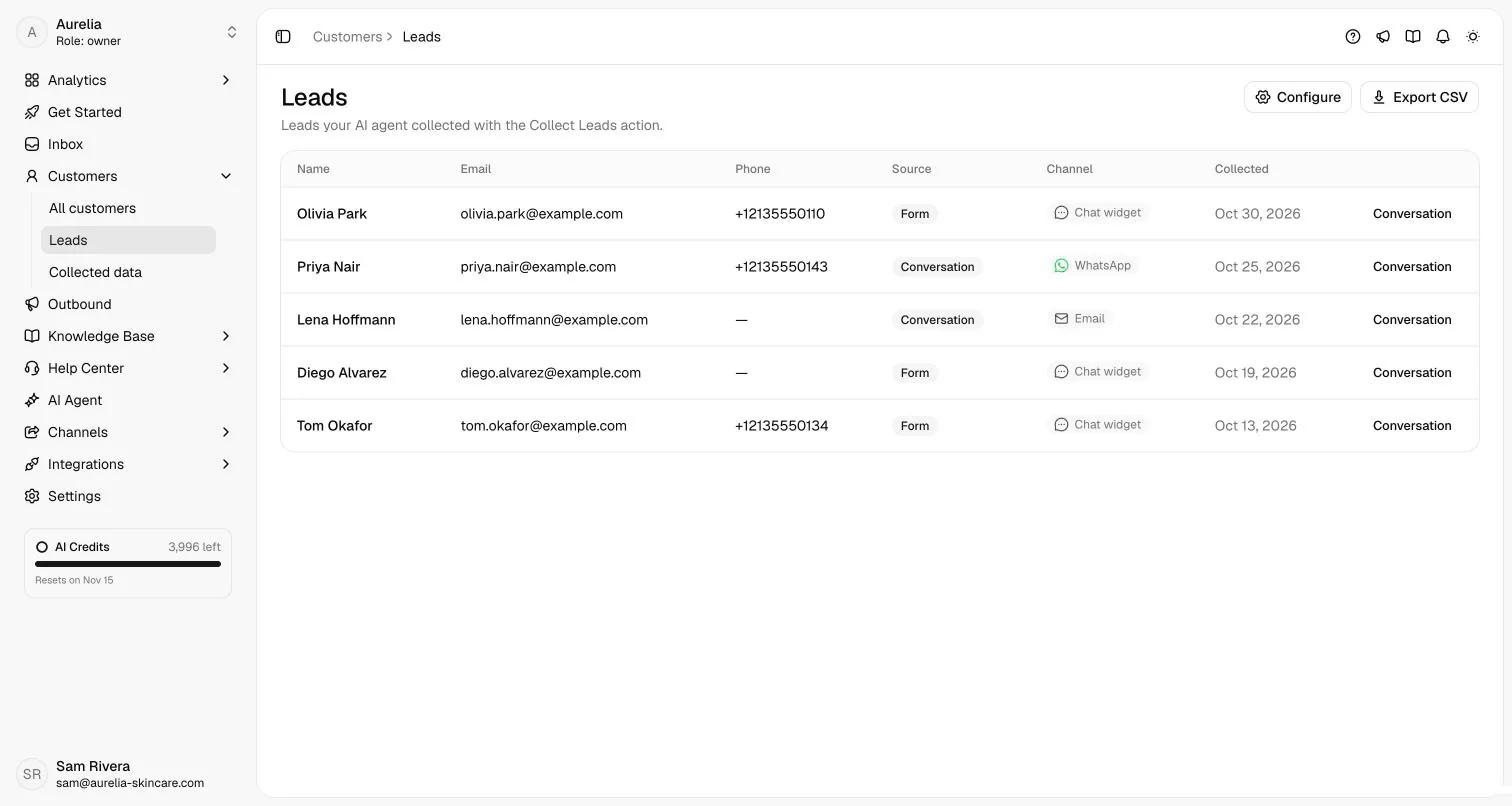
A wholesale enquiry on the website widget, in form mode. The real Leads list on the right is where a submission like this lands.
what the agent did · documented behaviour
How it works
How the lead generation chatbot works in Asks
Collect Leads is a setting on your AI agent, not a separate bot to build. You describe the moment, pick the fields and choose where leads go.
- Step 01
Turn on Collect Leads and describe the moment
In AI Agent → Collect Leads, switch it on and write when to ask in When to use, for example "when the visitor asks about pricing or wants a demo". Left empty, the agent asks only after it has helped and the visitor shows interest.
Collect Leads docs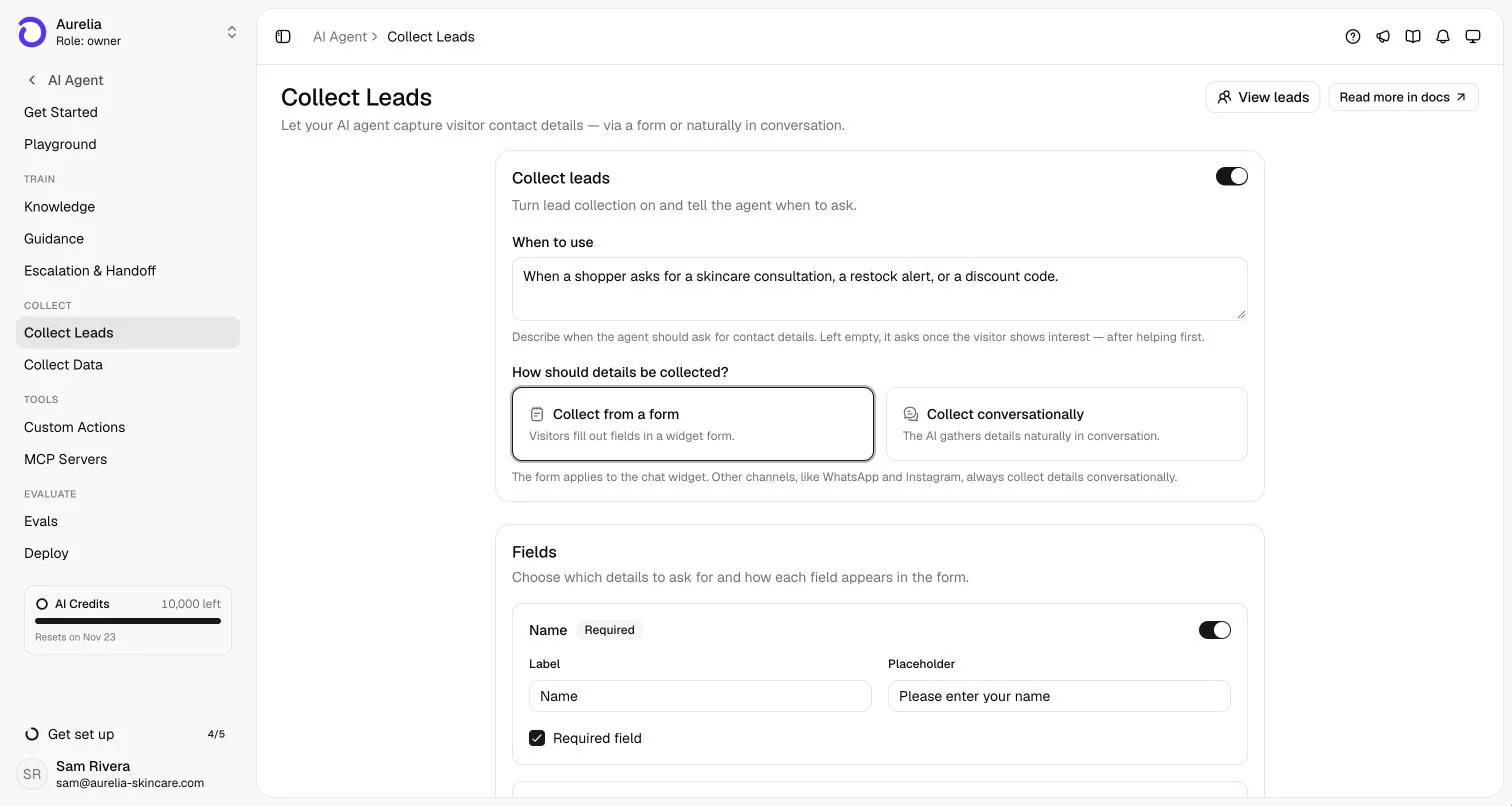
Say when to ask, then choose a form or a conversation. The form shows in website chat; messaging channels always ask in conversation. - Step 02
Pick a form or a conversation, and the fields
Collect from a form shows a short form under the agent's reply in website chat. Collect conversationally asks in plain messages, one detail at a time. Switch Name, Email and Phone on or off; email or phone must be required, so every lead is reachable.
- Step 03
Qualify with your own questions (optional)
For details beyond contact info, such as company size, budget or timeline, add a Collect Data action. Each action has its own trigger and up to 20 fields, and the agent gathers them in conversation while it helps.
Collect Data docs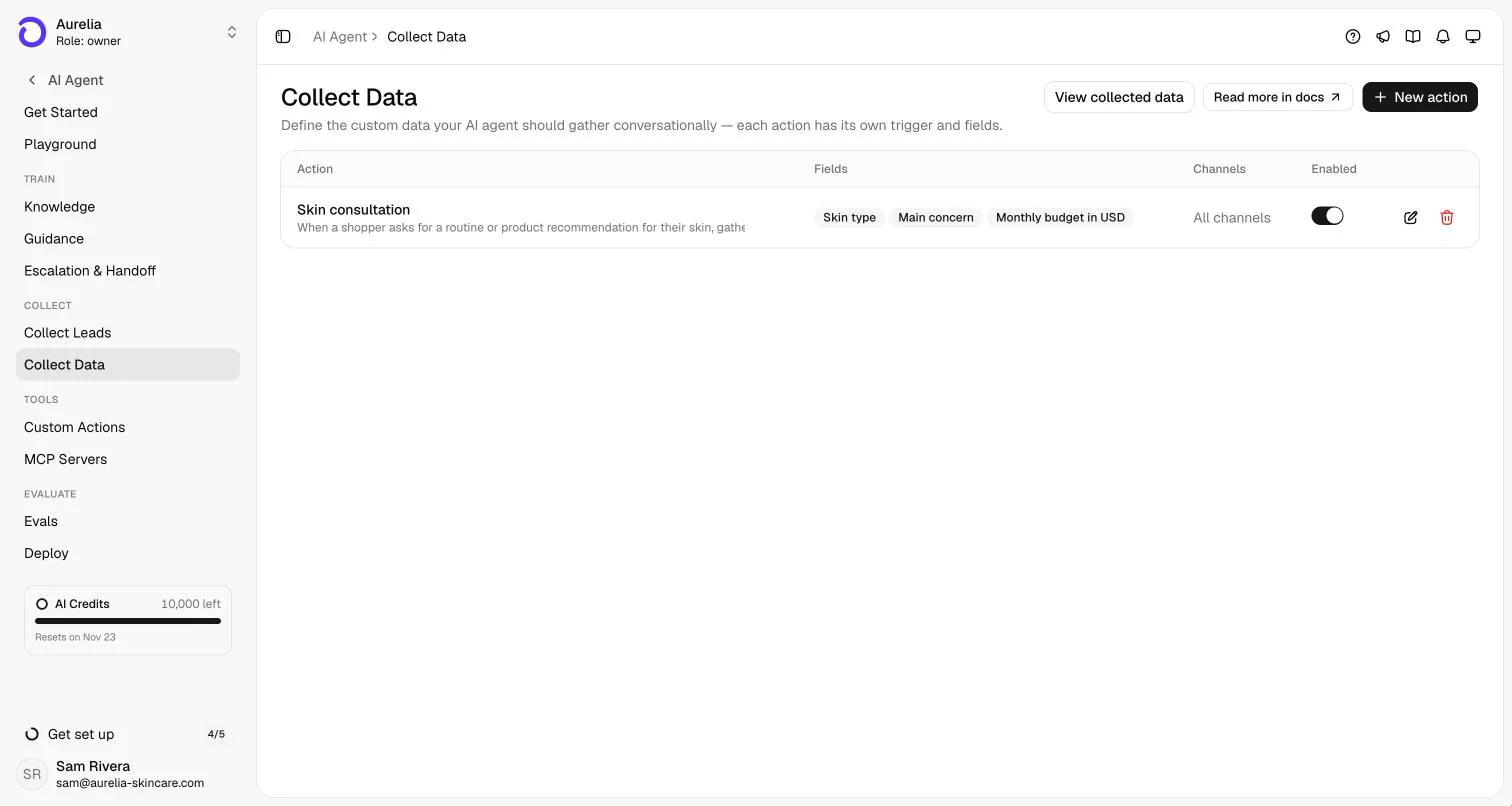
Collect Data: one action per request type, with the fields your team needs to follow up. - Step 04
Send leads where your team works
Every lead lands on the customer record and in Customers → Leads. Add up to 10 email addresses to notify, and on Business and Premium subscribe a webhook to
Webhooks docslead.capturedto push leads into your CRM.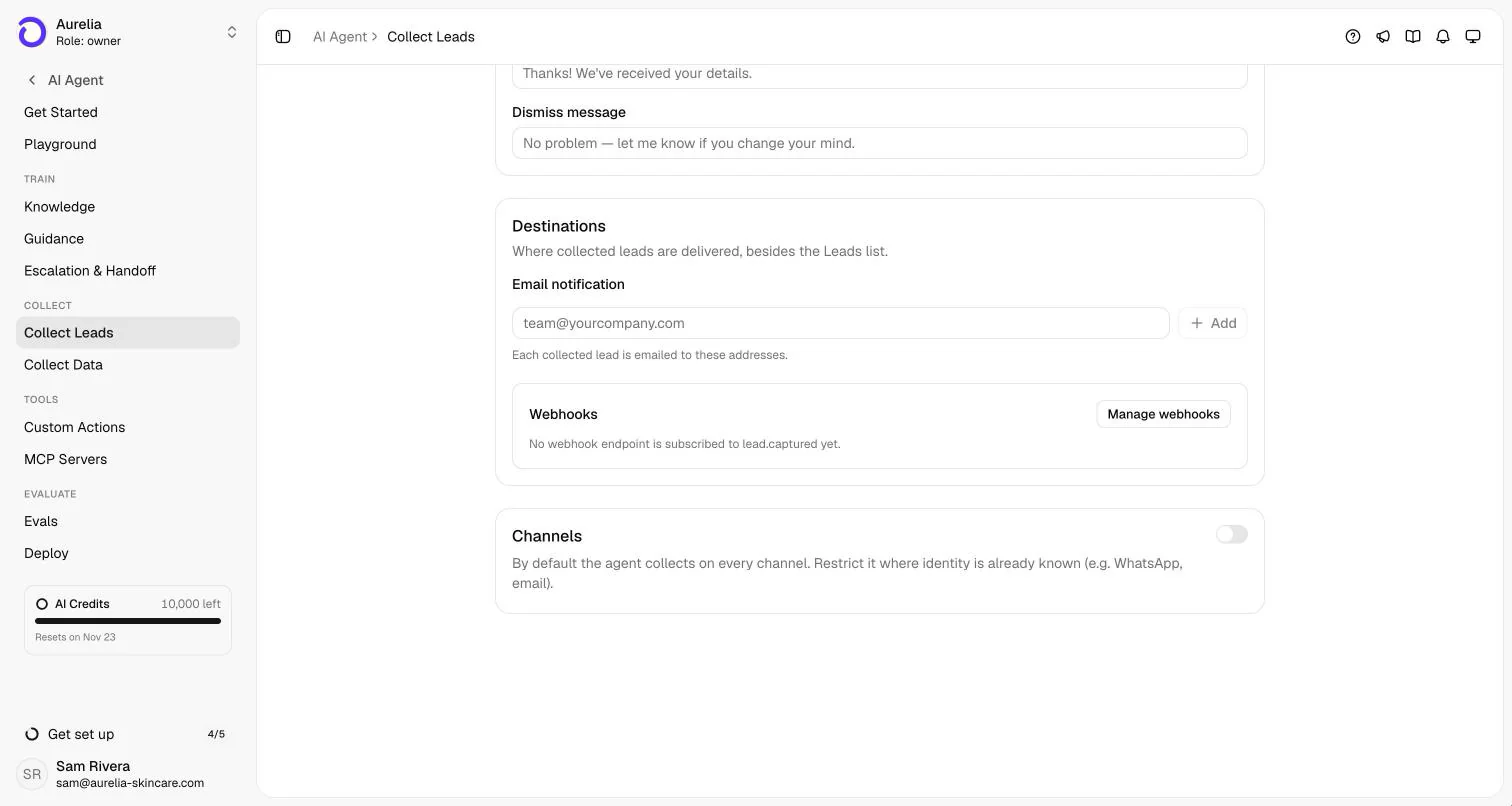
Destinations: email notifications and lead.captured webhooks. Channels lets you skip collection where you already know the customer. - Step 05
Test it before customers see it
Play the visitor in the Playground: ask the question that should trigger the form and check the timing. Leads saved in the Playground are simulated, so your list stays clean.
Capabilities and limits
What it does, and what it won't.
What it does
- Answers the question first, then asks for contact details at the moment you describe.
- Shows the form at most once per conversation and never asks again for details the customer already gave or that are on their record.
- Treats "have someone contact me" as a lead, not a handoff. If it does escalate while contact details are missing, it shows the form in the same turn.
- Collects on every live channel: a form in website chat, plain messages everywhere else.
- Saves leads to the customer record and the Leads list, with source, channel and the conversation. CSV export included.
What it won't do
- Ask for passwords, card numbers or government IDs, or keep pushing after a customer declines.
- Score leads or assign them to sales reps. It captures and delivers them; scoring and routing stay in your CRM.
- Sync with a CRM natively. Use the lead.captured webhook (Business and up), email notifications or the CSV export.
- Show a form on WhatsApp, Instagram or other messaging channels. There it always asks in conversation.
Plans, channels and setup
Where it runs and what it costs.
Collect Leads is part of every plan. Each AI reply uses AI credits from the plan's monthly allowance; capturing the lead itself costs nothing extra. Full plan details are on the pricing page.
| Plan | Starter | Business | Premium |
|---|---|---|---|
| Price, billed yearly | $29/mo ($39/mo monthly) | $119/mo ($149/mo monthly) | $279/mo ($349/mo monthly) |
| AI credits per month | 500 | 4,000 | 10,000 |
| Collect Leads (form + conversation) | Included | Included | Included |
| Collect Data qualification fields | Included | Included | Included |
| lead.captured webhook to your CRM | Not included | Included | Included |
| Teammates in the inbox | 10 | 25 | 50 |
Enterprise adds custom limits and SAML SSO: talk to sales. Every self-serve plan starts with a 7-day free trial, card required, cancel anytime. Compare plans.
- Form in the chat
- Website chat widget, Spotlight, and Chat Page
- In conversation
- WhatsApp, Instagram, Facebook Messenger, Telegram, Slack, and Email
- Setup
- A few minutes in AI Agent → Collect Leads, no code. Workspaces created with the onboarding wizard usually start with it on, in form mode.Collect Leads docsCollect Data docsWebhooks docs
FAQ
Lead generation chatbot questions
01What is a lead generation chatbot?
A chatbot that captures contact details from website visitors and messaging contacts so your team can follow up. A good one helps first: it answers the visitor's question from your content, then asks for an email or phone number when the visitor has shown interest.
02Does it ask for an email before answering?
No. By default the agent helps first and asks only once the visitor shows interest. You can describe a specific moment instead, such as a pricing question or a demo request.
03Can it send leads to my CRM?
Yes, through a webhook: on Business and Premium, subscribe an endpoint to lead.captured and forward it to your CRM or an automation tool. On every plan you also get email notifications and a CSV export of the Leads list. There is no built-in CRM connector.
04Does it work on WhatsApp and Instagram?
Yes. On WhatsApp, Instagram and the other messaging channels the agent asks in conversation, one detail at a time. The form is for website chat only.
05How is this different from a pop-up form?
A pop-up asks before the visitor gets anything. The chatbot answers their question first, asks in context, asks once, and never repeats a question the customer already answered, so fewer visitors close it out of habit.
Guides
Read more before you set it up.
How we made this page. Drafted with AI assistance from the Asks docs and source code; product facts verified against Asks on . Screenshots are real captures from the Aurelia demo workspace (a fictional store). Conversations marked “Illustrative example” show documented behaviour, not a customer transcript. Asks publishes this page about its own product. Editorial policy.

Turn questions into follow-ups.
Connect your site, switch on Collect Leads, and see your first lead arrive with the conversation that earned it.
7-day free trial · card required · cancel anytime
