An order tracking chatbot that checks who's asking.
An order tracking chatbot answers "where is my order?" with live status from your store. With the Asks Shopify app, the agent verifies the customer with a six-digit code sent to the order's email, then shares payment and fulfillment status, items and tracking links for up to three recent orders.
Order status questions are the biggest ticket category for many online stores, and the easiest to get wrong: an order number alone is guessable, and a chatbot that shares addresses on request is a privacy incident. Asks verifies first and answers from live Shopify data. For the wider playbook on cutting these tickets, read the WISMO guide; this page covers how the feature works in Asks for ecommerce stores.
7-day free trial · card required · cancel anytime
By Ray, founder of Asks (pen name) · Updated
In a conversation
Verified, then answered.
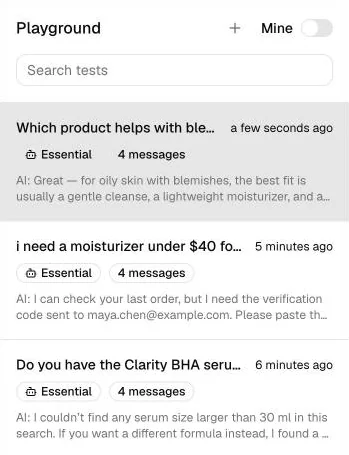
An order question on the website widget of a connected Shopify store. On the right, a real Playground test where the agent stops to ask for the verification code before sharing anything.
what the agent did · documented behaviour
How it works
How the order tracking chatbot works in Asks
Order status comes from the installed Asks Shopify app. Stores on other platforms can connect their own order API with a custom action.
- Step 01
Install the Asks app on your Shopify store
Install Asks from the Shopify App Store and approve the permissions (step-by-step guide). Order status needs the installed app: pasting a store URL into onboarding is enough for product and policy answers, but it can't see orders.
Shopify docs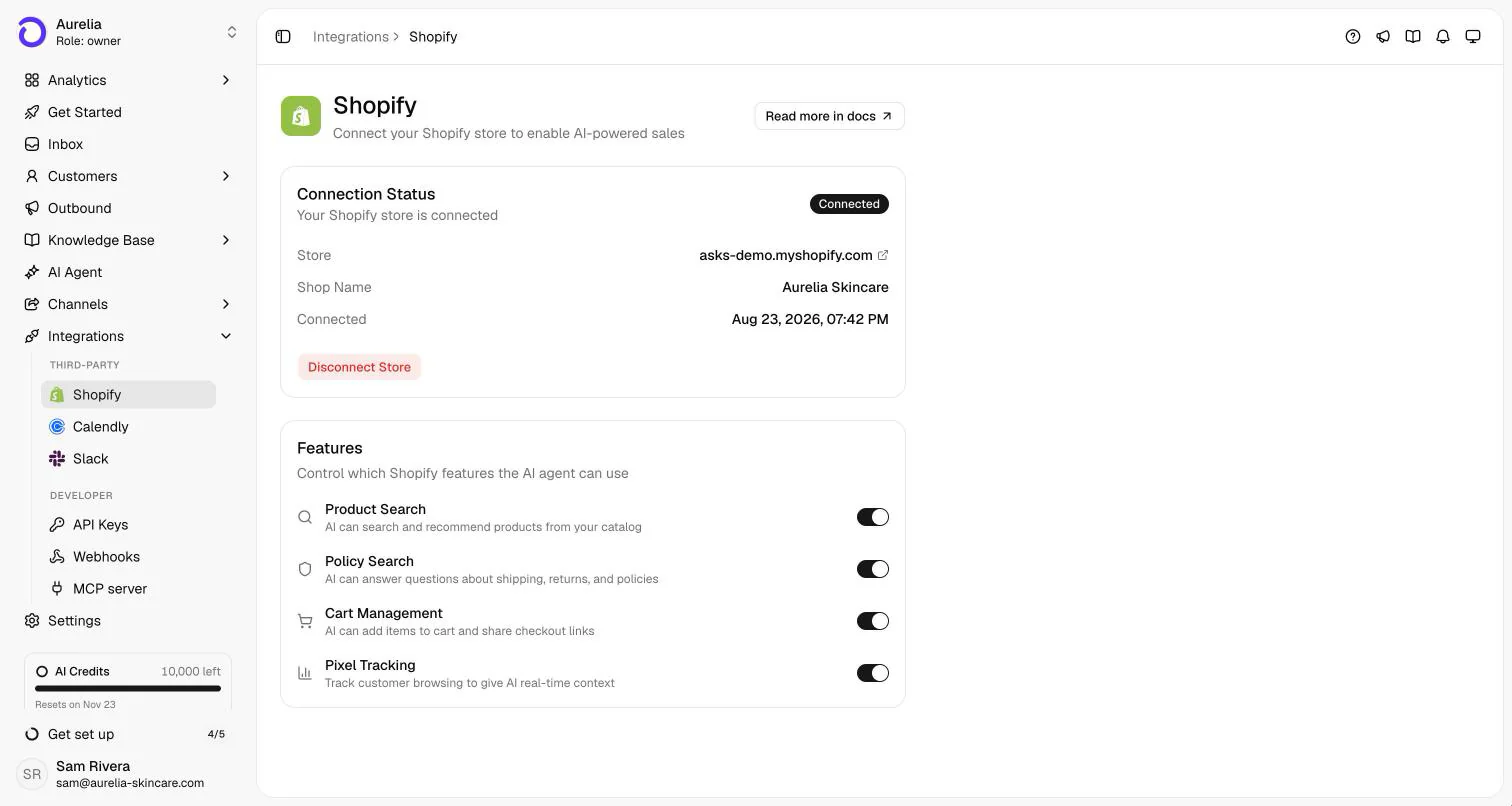
The connected store and the features the agent may use. Order status works once the app is installed. - Step 02
The customer proves the order is theirs
An order number alone is never enough. The customer gives the email on the order and enters the six-digit code Asks emails to that address; the email then stays verified in that conversation for 30 minutes. On WhatsApp, the customer's own number verifies orders placed with it.
- Step 03
The agent answers from live store data
Once verified, the agent shares payment status, fulfillment status, items and tracking links for up to three recent orders, in the customer's language. It never makes up a delivery date: when Shopify has none, it points to the tracking link. A lost parcel or a refund request goes to your team's help desk through your escalation rules.
- Step 04
Not on Shopify? Connect your order API
Add a custom action that calls your order system's API with the order number, and use response filters so the model sees only status, carrier and tracking. With a custom action, checking that the customer owns the order is up to your API.
Custom actions docs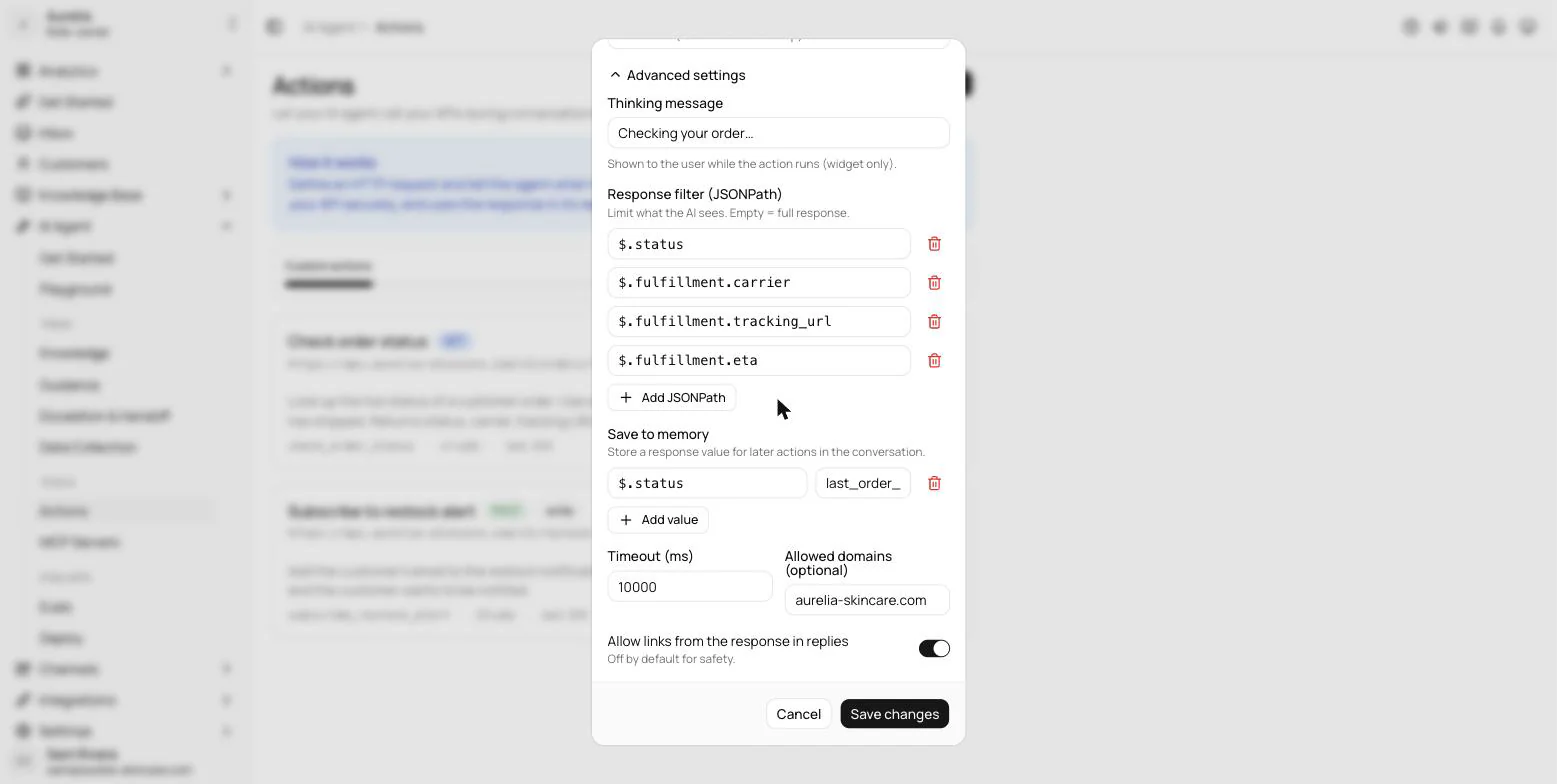
A custom order-lookup action: a thinking message for website chat, and JSONPath filters that limit what the model sees. - Step 05
Test as a real customer before launch
In the Playground, choose Test as and pick a customer to chat as them. The agent sees them the way it would in a live chat, and nothing is saved to their record.
Testing docs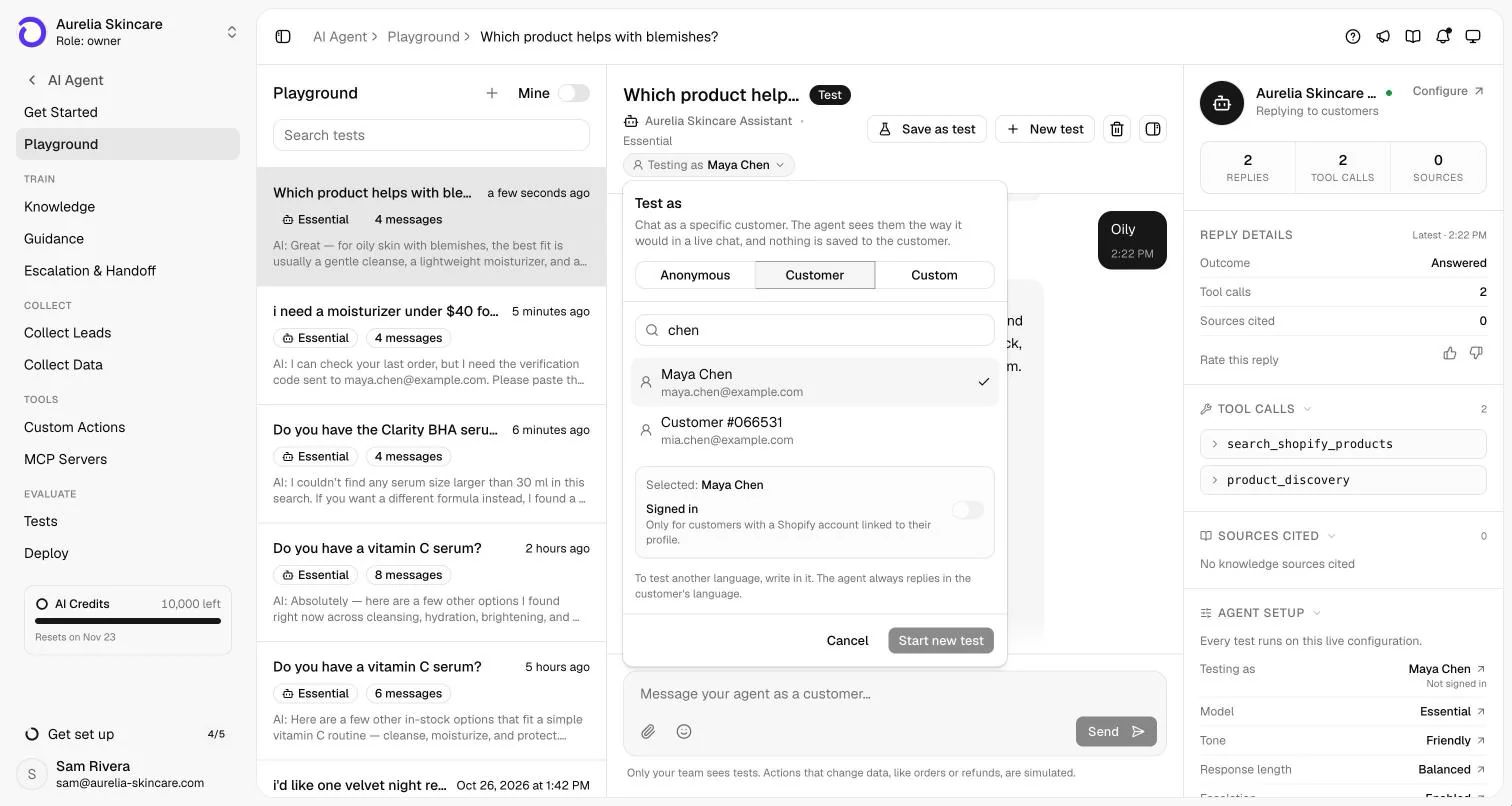
Test as: chat as a specific customer to check the verification flow end to end.
Capabilities and limits
What it does, and what it won't.
What it does
- Verifies before sharing anything: the order's email plus a six-digit code, or the customer's own WhatsApp number for orders placed with it.
- Answers from live Shopify data: payment status, fulfillment status, items and tracking links for up to three recent orders.
- Answers in the customer's language, around the clock, on every live channel.
- Answers shipping and returns questions from your store's actual policies.
- Hands exceptions to your team with the conversation attached.
What it won't do
- Share order details on an order number alone, or on a typed email without the code.
- Create, change, cancel or refund orders, edit inventory or make discount codes. Its Shopify access is read-and-assist only.
- Invent a delivery date. It reports what your store knows and links the carrier's tracking page.
- Track parcels with carriers itself. Tracking comes from your Shopify fulfillments.
- List older orders beyond the three most recent.
Plans, channels and setup
Where it runs and what it costs.
Order status is part of every plan once the Shopify app is installed. While a store is connected, your Asks subscription is billed through Shopify at the same prices.
| Plan | Starter | Business | Premium |
|---|---|---|---|
| Price, billed yearly | $29/mo ($39/mo monthly) | $119/mo ($149/mo monthly) | $279/mo ($349/mo monthly) |
| AI credits per month | 500 | 4,000 | 10,000 |
| Shopify order status with verification | Included | Included | Included |
| Custom actions for other order APIs | 5 | 15 | 50 |
| AI summary on handoff | Not included | Included | Included |
| Teammates in the inbox | 10 | 25 | 50 |
Enterprise adds custom limits and SAML SSO: talk to sales. Every self-serve plan starts with a 7-day free trial, card required, cancel anytime. Compare plans.
- Answers on
- Website chat widget, Spotlight, Chat Page, WhatsApp, Instagram, Facebook Messenger, Telegram, Slack, and Email
- Verification
- A six-digit code sent to the order's email; on WhatsApp, the customer's own number
- Setup
- Install the Shopify app; no code. Other platforms need an order-status API endpoint for a custom action.Shopify docsCustom actions docsEscalation docs
FAQ
Order tracking chatbot questions
01What is an order tracking chatbot?
A chatbot that answers "where is my order?" by looking up the order in your store and replying with its status and tracking link. A safe one verifies that the person asking owns the order before it shares anything.
02How does the chatbot verify the customer?
The customer gives the email on the order and enters a six-digit code that Asks emails to that address. The email stays verified in that conversation for 30 minutes. On WhatsApp, the customer's own number verifies orders placed with it.
03Can it track orders outside Shopify?
Yes, with a custom action that calls your order system's API, such as a WooCommerce or in-house endpoint. In that setup your API decides what proves ownership, so build the check into the endpoint.
04Will the chatbot cancel or change orders?
No. Its Shopify access is read-and-assist only: it looks up orders, builds carts and shares checkout links, but never creates, changes, cancels or refunds an order.
05How is this different from WISMO automation?
WISMO ("where is my order?") is the ticket category; an order tracking chatbot is one way to automate it. Our WISMO guide covers the whole playbook, including shipping notifications, tracking pages and when a human should step in.
Guides
Read more before you set it up.
How we made this page. Drafted with AI assistance from the Asks docs and source code; product facts verified against Asks on . Screenshots are real captures from the Aurelia demo workspace (a fictional store). Conversations marked “Illustrative example” show documented behaviour, not a customer transcript. Asks publishes this page about its own product. Editorial policy.

Answer every "where's my order?"
Install the Shopify app, test the verification flow in the Playground, and let your team keep the exceptions.
7-day free trial · card required · cancel anytime
