WhatsApp auto-reply messages for business: 36 examples

A WhatsApp auto-reply is a message WhatsApp Business sends for you: a greeting when someone writes for the first time, or an away message when you're closed. Below are 36 examples (greeting, away, quick replies and follow-ups), plus how to set them up in the WhatsApp Business app and what changes on the API.

By , pen name of the Asks founderUpdated 36 templates

The WhatsApp Business app sends greeting and away messages exactly as you write them, so they can't include the customer's name. The {braces} in those two groups are things you fill in once, like your hours or a link. Quick replies are inserted by a person, so they can be personalized each time.

{ }What the placeholders mean (34)
{business_name}
your business name
{response_time}
your usual reply time
{business_hours}
your hours, e.g. Mon to Fri, 9 am to 6 pm
{menu_link}
your menu
{booking_link}
your booking page
{emergency_number}
an emergency phone number
{reopen_time}
when you're back
{tracking_link}
the tracking page
{return_link}
your returns page or label
{help_center_link}
your help center or FAQ page
{closed_from}
the first day you're closed
{closed_until}
the day you're back
{ship_date}
the ship date
{owner_name}
your first name
{delay}
the current wait, e.g. 2 hours
{urgent_examples}
what counts as urgent
{phone}
a phone number
{event_name}
the sale or launch
{season}
the period with changed hours
{address}
a street address
{map_link}
a map link
{parking_note}
where to park
{first_name}
the customer's first name
{return_window}
your return period, e.g. 30 days
{carrier}
the delivery company
{payment_methods}
the payment methods you accept
{price_list_link}
your current price list
{price_includes}
what prices include
{catalog_link}
your product catalog
{delivery_area}
where you deliver
{cutoff_time}
the daily order cutoff time
{delivery_time}
the usual delivery time
{agent_name}
the name of the person replying
{review_link}
where to leave a review

Greeting messages

9 templates

WhatsApp sends the greeting when someone messages you for the first time, and again when they write after 14 days of silence. Write it for both: new customers and returning ones.

WhenAny business that wants a friendly first reply.

Hi, thanks for messaging {business_name}! 👋 Tell us what you need and we'll reply within {response_time}. Our team is here {business_hours}.

Personalize: Put your real response time in. "We'll reply soon" at 11 pm is a promise customers measure you against.
WhenYou get a few types of request and want customers to say which one up front.

Hi, welcome to {business_name}! To help you faster, reply with a number: 1. Order status 2. Returns and exchanges 3. Product questions 4. Something else

Personalize: In the Business app, the numbers don't route anything; they just tell your team what the customer needs at a glance. Keep it to four options at most.

WhenE-commerce or retail stores.

Hi, thanks for messaging {business_name}! 🛍️ Ask us about sizes, stock or your order. If it's about an order, send your order number and we'll look it up.

Personalize: Asking for the order number in the greeting saves a full round trip on the most common question.

WhenRestaurants that take reservations or orders on WhatsApp.

Hello from {business_name}! 🍽️ For a table, send the date, time and number of guests. Today's menu: {menu_link} We're open {business_hours}.

Personalize: Ask for the three booking details in one line. Customers who send them together get confirmed in one reply.

WhenAppointment-based businesses.

Hi! Thanks for contacting {business_name}. 💇 You can book your next appointment here: {booking_link} For anything else, send us a message and we'll reply within {response_time}.

Personalize: Lead with the booking link. Most messages to appointment businesses are booking requests.

WhenHealthcare and wellness practices that handle appointments by message.

Hello, you've reached {business_name}. We can help with appointments, opening hours and directions. We can't give medical advice by message. In an emergency, call {emergency_number}.

Personalize: Keep the emergency line in the greeting, not only in the away message. People send urgent messages at any hour.

WhenAgencies that get property enquiries on WhatsApp.

Hi, thanks for contacting {business_name}! 🏡 Send us the link or address of the property you're interested in and when you'd like to view it, and an agent will get back to you.

Personalize: Ask for the property link. Without it, the first reply is always "which property?"

WhenB2B services, consultants and agencies.

Hello! You've reached {business_name}. Share a few lines about your project and a good time to talk, and we'll get back to you within {response_time}.

Personalize: Asking for a good time to talk turns a vague enquiry into a scheduled call.

WhenYour customers come back often, so many will see the greeting again.

Hi, and welcome (back) to {business_name}! 👋 If you're following up on an order, send the order number and we'll pick up where we left off.

Personalize: Because WhatsApp resends the greeting after 14 quiet days, avoid wording that only fits first-time customers.

Away messages

10 templates

An away message should answer two questions: when will a person reply, and is there anything the customer can do meanwhile.

WhenSchedule set to "Outside of business hours".

Thanks for your message! We're closed right now. Our hours are {business_hours}, and we'll reply as soon as we're back. 🙏

Personalize: Write your hours in the customer's terms ("Mon to Fri, 9 am to 6 pm") and include your timezone if you sell abroad.

WhenYou don't answer on Saturdays and Sundays.

Hi! We're away for the weekend and back on Monday at {reopen_time}. Your message is saved and we'll reply first thing.

Personalize: "Your message is saved" stops people from sending the same message three times.

WhenYou're closed for a public holiday or a seasonal break.

Happy holidays from {business_name}! 🎉 We're closed from {closed_from} to {closed_until}. Orders placed now ship on {ship_date}. We'll reply to every message when we're back.

Personalize: Use a custom schedule for the exact dates, and switch back afterwards. A holiday message in mid-January looks abandoned.

WhenYou're away for an hour or two during the day.

We're on a short break and back at {reopen_time}. Leave your message and we'll reply right after.

Personalize: Only use this if the break is regular. For one-off breaks, it's faster to reply to the few messages when you're back.

WhenYou run the business alone and you're away for several days.

Hi! {owner_name} here. I'm away until {closed_until} with limited access to messages, and orders are paused until then. Thanks for your patience; I'll reply as soon as I'm back.

Personalize: Say whether orders are paused. Customers mostly worry about whether their order will still arrive.

WhenA sale, launch or seasonal peak means replies are slow even during opening hours.

Thanks for your message! We're receiving more messages than usual, so replies may take up to {delay}. We answer in order, so there's no need to send your message again.

Personalize: Switch the away message to "Always send" for the peak, then turn it off. Leaving it on afterwards makes you look slower than you are.

WhenSome problems can't wait until morning.

We're closed right now and back at {reopen_time}. If your issue is urgent ({urgent_examples}), please call {phone}.

Personalize: Spell out what counts as urgent. Without examples, every message is urgent to the person sending it.

WhenA big promotion is live and messages are piling up.

Big day today! 🎈 Our {event_name} is live and we're getting lots of messages. Delivery times and returns are on {help_center_link}. For everything else, we'll reply within {response_time}.

Personalize: Answer the two questions everyone asks during a sale (delivery time and returns) in the message itself.

WhenYour hours change for a season or a period.

Heads-up: during {season}, our hours change to {business_hours}. Messages sent outside those hours are answered the next morning.

Personalize: Update your business profile hours too. The "Outside of business hours" schedule follows the profile, not this text.

Quick replies

13 templates

Quick replies aren't automatic: you insert them by typing / in a chat. That means you can personalize every one before sending.

WhenSomeone asks when you're open.

Shortcut/hours

We're open {business_hours}. 🕘 Messages sent outside those hours get a reply the next morning.

Personalize: The app can also generate default replies from your business profile, including your hours. Keep your profile complete and you may not need this one.

WhenSomeone asks where you are.

Shortcut/address

You'll find us at {address}. Here's the map: {map_link} Parking: {parking_note}

Personalize: Add the one detail people always get wrong: the entrance, the floor, or where to park.

WhenA customer asks where their order is.

Shortcut/track

Here's the tracking link for your order, {first_name}: {tracking_link} It updates every time the carrier scans the parcel.

Personalize: Paste the carrier's current estimate as well if the tracking page is hard to read.

WhenYou need the order number to help.

Shortcut/order

Could you send me your order number? It's in your confirmation email and starts with #.

Personalize: Say where to find it. Half of customers don't know what an order number looks like.

WhenA customer asks how to return something.

Shortcut/returns

Returns are easy: you have {return_window} from delivery. Start here: {return_link} Then drop the parcel at any {carrier} point.

Personalize: If returns cost the customer money, say how much here. It's the follow-up question every time.

WhenSomeone asks how they can pay.

Shortcut/pay

We accept {payment_methods}. For orders placed here on WhatsApp, we'll send you a secure payment link.

Personalize: Never ask customers to send card numbers in a chat. Always use a payment link or your checkout.

WhenSomeone asks how much something costs.

Shortcut/prices

Here's our current price list: {price_list_link} Prices include {price_includes}. Tell me what you're looking for and I'll help you choose.

Personalize: Keep one up-to-date price list link rather than pasting prices into the reply. Old prices in old chats cause disputes.

WhenA customer wants to browse products.

Shortcut/catalog

Here's our catalog: {catalog_link} Tell me which one you like and I'll check it's in stock in your size.

Personalize: Offer the stock check. It turns browsing into a conversation that ends in an order.

WhenA customer wants an appointment or a table.

Shortcut/book

You can book here: {booking_link} Pick any open slot and you'll get a confirmation straight away. Need a time that isn't listed? Tell me and I'll check.

Personalize: The last line catches the customers your booking page would otherwise lose.

WhenSomeone asks whether and how fast you deliver.

Shortcut/delivery

We deliver to {delivery_area}. Orders placed before {cutoff_time} usually arrive {delivery_time}.

Personalize: Say "usually" unless you guarantee it. A promise in writing becomes a complaint when the carrier is late.

WhenYou need a minute to find the answer.

Shortcut/checking

Thanks, {first_name}! Let me check that for you. I'll be back in a few minutes.

Personalize: Only send this if you'll really reply within minutes. Otherwise, give a time.

WhenSomeone else on your team should answer.

Shortcut/handover

I'm passing you to {agent_name}, who can help with this. They'll reply here within {response_time}.

Personalize: Tell the colleague what the customer already said before you send this, so they don't ask again.

WhenA customer just ordered through the chat.

Shortcut/thanks

Thank you for your order, {first_name}! 🙌 We'll message you here when it ships.

Personalize: Only promise a shipping message if someone will really send it. On the API, a message sent more than 24 hours after the customer's last one needs an approved template.

Follow-ups and closing

4 templates

Inside 24 hours of the customer's last message, these work everywhere. Later than that, the API only lets you send an approved template.

WhenYou answered and the customer went quiet.

Hi {first_name}, just checking in: did that solve it? If you need anything else, reply here.

Personalize: Send it within the 24-hour window if you're on the API. After that, it needs to be a template.

WhenThe question is answered.

Glad we could help! 😊 Message us here anytime.

Personalize: Keep the closing line short. On WhatsApp, a long sign-off reads like a newsletter.

WhenAfter a delivery or appointment went well.

Thanks again for choosing {business_name}, {first_name}! If you have a minute, a quick review helps us a lot: {review_link}

Personalize: On the API this is usually sent later as a template, so check which category Meta assigns it before you build a flow around it.

WhenAn order is ready to collect in store.

Hi {first_name}, your order is ready for pickup at {address}. We're open {business_hours}. Just show this message at the counter.

Personalize: On the API, a pickup notice sent outside the 24-hour window is a utility template, which Meta bills.

WhatsApp Business app or API: where your auto-replies come from

There are two ways to run WhatsApp for a business, and auto-replies work differently in each. The WhatsApp Business app is the phone app with built-in greeting messages, away messages and quick replies. The WhatsApp Business Platform (the API) has no built-in auto-reply switches: the inbox, chatbot or AI agent connected to your number sends those messages for you.

Auto-replies in the WhatsApp Business app vs the WhatsApp Business Platform (API), checked November 2026
WhatsApp Business appWhatsApp Business Platform (API)
Greeting messageBuilt in. Sent when a customer messages you for the first time, or after 14 days without messagesSent by the software connected to your number
Away messageBuilt in. Always, on a custom schedule, or outside the business hours in your profileSent by your software, based on its own schedule or business hours
Quick repliesUp to 50 saved replies, inserted by typing / in a chatSaved replies in your inbox software
PersonalizationFixed text, the same for everyoneCan use the customer's name and order details, depending on your software
When you can replyAny timeFree-form messages only within 24 hours of the customer's last message; after that, an approved template
Meta's per-message feesGreeting, away and quick-reply messages are part of the app and aren't billed per messageSince October 1, 2026, each number gets 1,000 delivered service messages a month at no charge; Meta bills every one after that, and every template, by category and country

That last row matters for automation on the API: every auto-reply is a delivered service message, so it counts toward the monthly allowance. Meta's pricing page has the current rates.

How to set up auto-replies in the WhatsApp Business app

  1. 1Greeting message: open the Tools tab, tap Greeting message and turn on Send greeting message. Tap the message to edit it, choose Recipients (everyone, everyone not in your address book, everyone except selected contacts, or only selected contacts) and tap Save.
  2. 2Away message: in Tools, tap Away message and turn on Send away message. Edit the text, then set the Schedule: Always send, Custom schedule, or Outside of business hours. The last option only appears once business hours are set in your business profile. Choose recipients and tap Save.
  3. 3Quick replies: in Tools, tap Quick replies, then the add button. Write the message, set a shortcut and save. In any chat, type / to see them all. You can store up to 50.

Two things that catch people out: away messages are sent from your phone, so it needs an internet connection; and if you turn on Meta's own AI agent in the app, WhatsApp says it may stop your greeting and away messages from working. Steps follow WhatsApp's Help Center (greeting, away, quick replies); menu names vary slightly between Android and iPhone.

Rules for WhatsApp auto-replies customers don't mind

  • Keep it to a phone screen. If customers have to scroll, the important line is the one they miss.
  • Say when a person will reply. A time beats "soon", and "tomorrow at 9" beats "during business hours".
  • Offer one useful thing. A tracking link, a booking link or a menu. Not five.
  • Use emojis like punctuation. One or two help the message feel like WhatsApp. A row of them looks like spam.
  • Test from another phone. Send yourself a message after you save, so you see exactly what customers see.

Beyond templates

When to stop copy-pasting: let an AI agent answer on WhatsApp

An away message tells customers when you'll answer. It doesn't answer them. If most of your after-hours messages ask the same things (stock, delivery times, opening hours, order status), those customers still wait until morning, and some of them buy somewhere else.

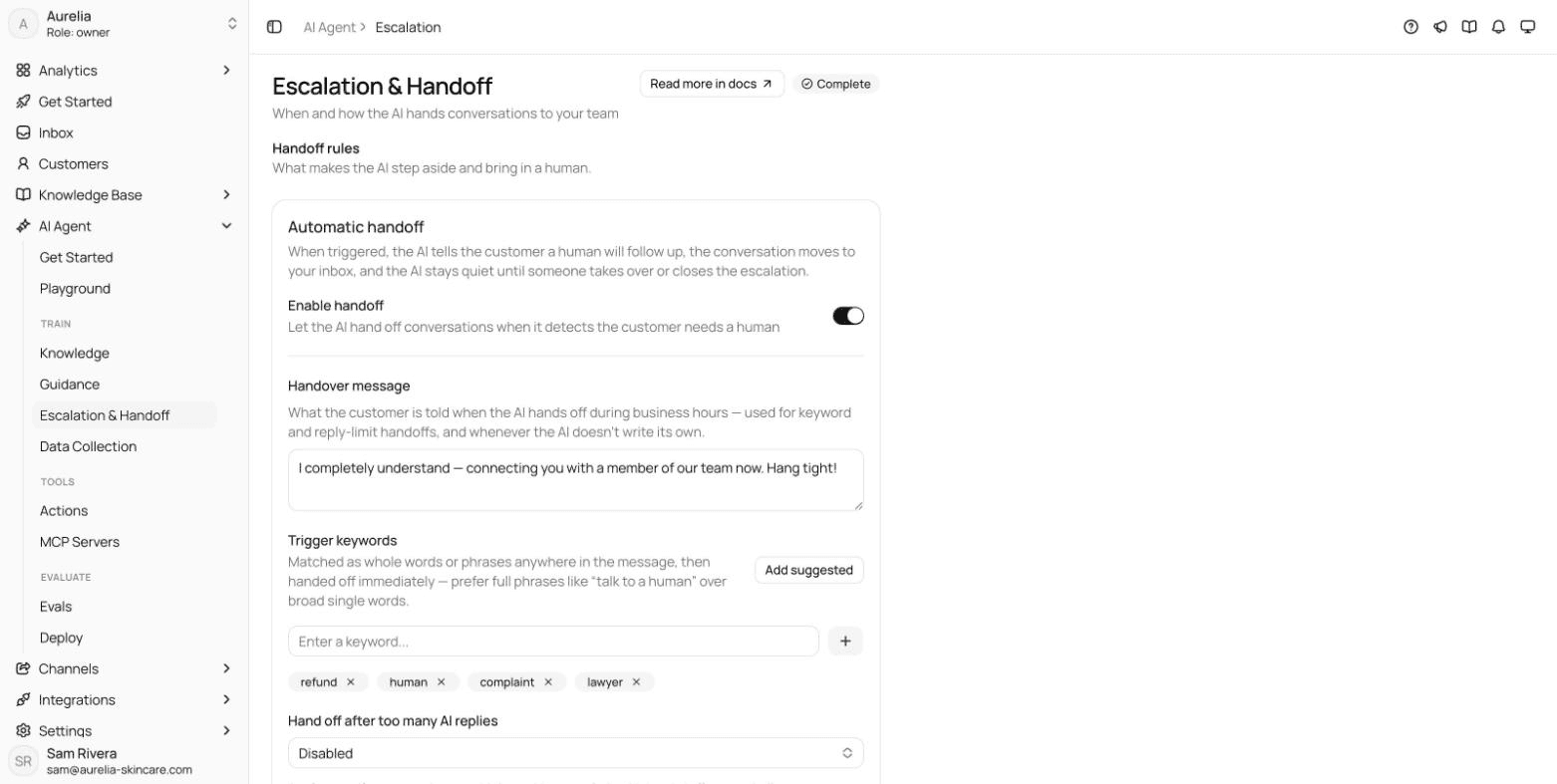
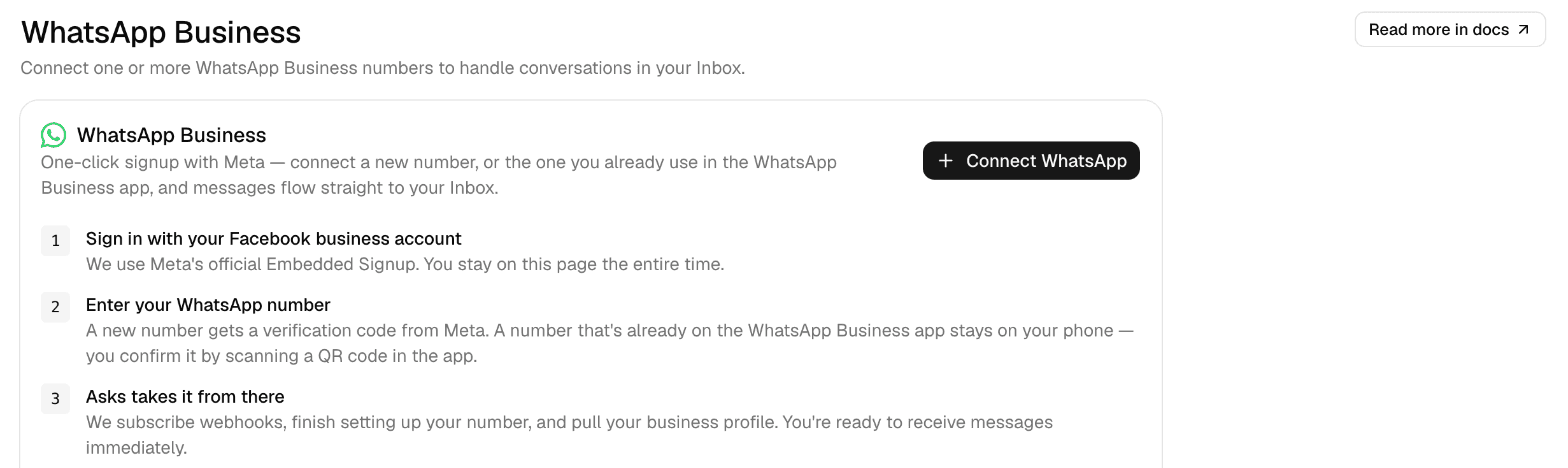
An AI agent connected to your WhatsApp number answers those questions in the chat at any hour, from your website, catalog and policies, and hands the rest to your team in a shared inbox. With Asks, you connect the number through Meta's Embedded Signup; a number already on the WhatsApp Business app can stay on your phone in coexistence mode. Outside your business hours the agent keeps answering, and when a conversation needs a person it can send your off-hours message saying when the team is back.

Whatever answers, Meta bills WhatsApp messages separately. An AI agent's replies are service messages, so they count toward each number's 1,000 a month at no charge, and Meta charges for every one after that at the rate for the customer's country.

7-day free trial · card required · cancel anytime

Illustrative exampleWhatsApp

A question at 11:40 pm, answered instead of queued

Customer: Hi, do you deliver to Rotterdam? How long does it take?
AI agent: Yes, we deliver across the Netherlands. Orders placed before 2 pm ship the same day and usually arrive in 1 to 2 business days. Would you like me to check stock on something?
Illustrative example. The delivery details come from the business's own shipping page; the agent answers from whatever your content says.
Asks WhatsApp Business channel page with a Connect WhatsApp button and three steps: sign in with a Facebook business account, enter your WhatsApp number (a number on the WhatsApp Business app stays on your phone and is confirmed with a QR code), and Asks finishes the setup
Connecting a WhatsApp number in Asks, including one already on the WhatsApp Business app.
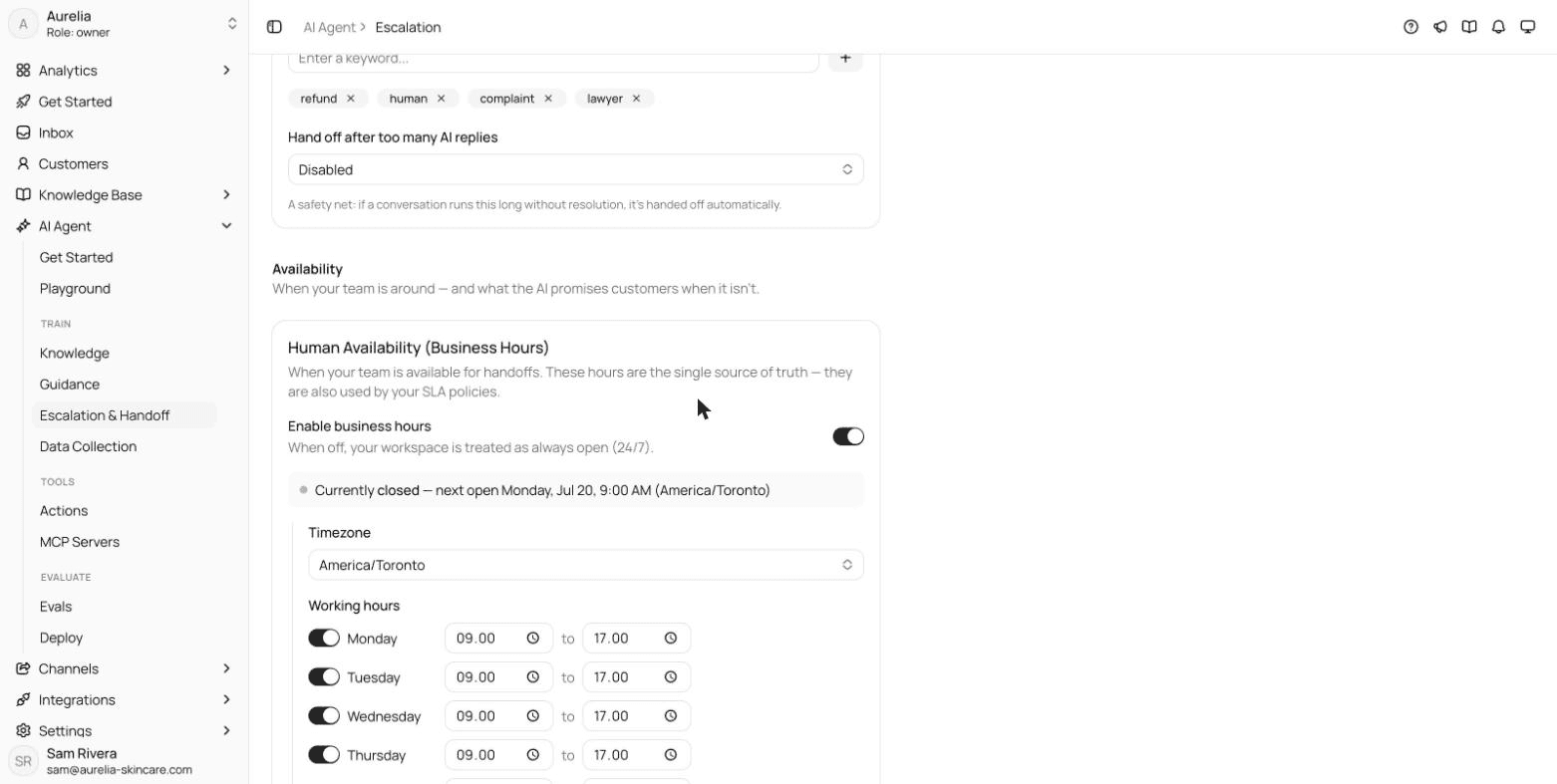
Asks Escalation settings with the Human Availability card: business hours enabled, the America/Toronto timezone, weekday working hours from 9:00 to 17:00 and a status line saying the team is currently closed and when it next opens
Business hours decide when the agent promises a live handoff and when it sends your off-hours message. Aurelia demo workspace.
Asks Escalation and Handoff settings with automatic handoff enabled, a handover message telling the customer a team member is joining, and trigger keywords such as refund, human, complaint and lawyer
The handover message and keywords that send a conversation straight to your team.

FAQ

WhatsApp auto-reply messages, answered.

01What is a WhatsApp auto-reply message?

It's a message WhatsApp Business sends for you without anyone typing it. In the WhatsApp Business app there are two: the greeting message, sent when someone messages you for the first time or after 14 days without messages, and the away message, sent when you've marked yourself unavailable.

02How do I set an away message on WhatsApp Business?

In the WhatsApp Business app, open the Tools tab, tap Away message and turn on Send away message. Edit the text, choose a schedule (Always send, Custom schedule or Outside of business hours) and the recipients, then tap Save.

03What's the difference between a greeting message and an away message?

The greeting message welcomes customers when they first write to you, or write again after 14 days of inactivity. The away message tells customers you're unavailable, based on the schedule you choose. Both can be on at the same time.

04Why isn't my WhatsApp away message working?

Check four things: the schedule (Outside of business hours only works once business hours are set in your business profile), the recipients setting, whether your phone has an internet connection, and whether Meta's AI agent is turned on in the app, which WhatsApp says may stop greeting and away messages.

05Can I use auto-replies with the WhatsApp Business API?

Yes, but the API has no built-in greeting or away switch. The inbox, chatbot or AI agent connected to your number sends them, as normal messages inside the 24-hour customer service window. Each one is a delivered service message and counts toward the number's monthly allowance of 1,000.

06Do WhatsApp auto-replies cost anything?

In the WhatsApp Business app, greeting and away messages aren't billed per message. On the API, Meta has billed service messages since October 1, 2026 once a number passes 1,000 delivered in a month, and every auto-reply counts as one. Templates are billed separately, by category and country.

07Can a WhatsApp auto-reply include the customer's name?

Not in the WhatsApp Business app: greeting and away messages are fixed text. Quick replies are inserted by a person, so you can add the name before sending. On the API, it depends on the software sending the message.

How we made this page

Written for asks.app and published under Ray's byline. Every message is original: drafted with AI assistance and reviewed for accuracy and tone before publishing, not copied from other template lists. WhatsApp features and Meta's pricing were checked against WhatsApp's Help Center and Meta's developer documentation on November 16, 2026; Asks details against the product and its documentation the same day. How we write and correct pages is in our editorial policy.

Answer the repeat questions before anyone copies a template.

Asks learns your website and help center, answers customers on chat, email and messaging apps, and hands the rest to your team in one inbox.

7-day free trial · card required · cancel anytime

Chat on WhatsApp