Chatbot welcome messages: 26 examples by industry

A good chatbot welcome message says who is answering, what it can help with, and offers three to five clickable questions. Here are 26 examples for website chat, organized by industry and by page (pricing, checkout, after hours), each with suggested conversation starters and a note on why it works.

By , pen name of the Asks founderUpdated 26 templates

Replace everything in {braces}. The starters under each message are the click-to-send buttons most chat tools show below the first message; pick the questions your visitors ask most, in their words. For messaging apps, see the WhatsApp auto-reply messages.

{ }What the placeholders mean (10)
{business_name}
your business name
{competitor}
a product visitors compare you with
{integration}
a tool visitors use
{first_name}
the customer's first name
{feature}
a feature name
{service}
a service you offer
{emergency_number}
an emergency phone number
{date}
a date
{area}
a neighborhood or city
{reopen_time}
when you're back

E-commerce and retail

4 templates

Shoppers open the chat for three reasons: an order, a product question, or a policy. Offer all three as starters.

AI support for e-commerce

WhenA store that sells a range of products.

Hi! I'm {business_name}'s assistant. I can track your order, help you find the right product, or explain shipping and returns.

Conversation starters

  • Where is my order?
  • Help me choose a gift
  • What's your return policy?
  • Do you ship to my country?

Personalize: Put "Where is my order?" first. It's the question a store's chat gets most, and answering it fast earns trust for everything else.
WhenClothing and shoe stores, where sizing drives returns.

Hi there! Not sure about the fit? I can help you find your size, check stock, or answer questions about an order.

Conversation starters

  • Which size should I get?
  • Is this in stock in my size?
  • How do exchanges work?
  • Where is my order?

Personalize: Leading with fit is a conversion move: sizing doubts are why shoppers leave a product page without buying.

WhenSkincare, cosmetics and wellness products.

Hi! I can help you build a routine, find products for your skin type, or check on an order. What are you looking for today?

Conversation starters

  • Help me build a routine
  • What's good for sensitive skin?
  • Is this product fragrance-free?
  • Where is my order?

Personalize: Ingredient and skin-type questions are where a knowledgeable answer sells. Make sure your product pages list ingredients so the answers can be specific.

WhenStores where compatibility questions come before the purchase.

Hi! Ask me about compatibility, specs or warranty before you buy, or about an order you've already placed.

Conversation starters

  • Will this work with my device?
  • What's the difference between these two models?
  • How does the warranty work?
  • Where is my order?

Personalize: Compatibility questions are the most common pre-purchase blocker in electronics. Name them in the message so visitors know they can ask.

SaaS and software

4 templates

Visitors to a software site are evaluating, buying or stuck. Match the message to which of those the page suggests.

WhenFirst-time visitors exploring what the product does.

Hi! I'm the {business_name} assistant. Ask me anything about what {business_name} does, how it works, or whether it fits your team.

Conversation starters

  • What does {business_name} do?
  • How is it different from {competitor}?
  • Does it integrate with {integration}?
  • How much does it cost?

Personalize: Include the comparison question. Visitors are comparing you anyway, and a straight answer is better than leaving them to search.

WhenSales-led products where a call is the next step.

Hi! I can answer questions about {business_name} right here, or help you book a demo with our team if you'd like to see it on your own data.

Conversation starters

  • Book a demo
  • Is there a trial?
  • Who is {business_name} for?
  • Talk to sales

Personalize: Offer answers first and the demo second. Many visitors want one question answered before they'll give you a meeting.

WhenThe chat inside your product, for existing customers.

Hi {first_name}! Stuck on something? Ask me how to do anything in {business_name}, or tell me what went wrong and I'll help or bring in our support team.

Conversation starters

  • How do I invite my team?
  • How do I export my data?
  • Something isn't working
  • Talk to support

Personalize: Use the user's name only if your chat tool knows who is signed in. A generic "Hi!" is better than a broken placeholder.

WhenOn documentation pages, where visitors already searched once.

Can't find it in the docs? Ask me in your own words and I'll point you to the right page, with the steps.

Conversation starters

  • How do I get started?
  • How do I set up {feature}?
  • Where are the API docs?
  • Talk to support

Personalize: "In your own words" is the point of chat on a docs page: people who search with the wrong keyword can still get the answer.

Agencies and professional services

3 templates

Service businesses sell a conversation. The welcome message should make starting one feel low-effort.

WhenAgencies that qualify leads before a call.

Hi! Tell me a bit about your project and I can explain how we'd approach it, share relevant work, or set up a call with the team.

Conversation starters

  • What services do you offer?
  • Can I see similar projects?
  • What does a project usually cost?
  • Book a call

Personalize: Answer the cost question honestly, even with a range. Visitors who get no answer on cost often leave without asking anything else.

WhenFirms where visitors want to know if you handle their situation.

Hello! I can tell you which services we offer, who we work with, and what we'll need from you to get started. For advice on your own situation, I'll connect you with an accountant.

Conversation starters

  • Do you work with small businesses?
  • What do you need from me to start?
  • How do your fees work?
  • Talk to an accountant

Personalize: Separate general information from advice in the message itself. It sets the right expectation and keeps the assistant on safe ground.

WhenProviders with both prospects and existing clients on the site.

Hi! Are you a current client with an issue, or looking for IT support for your business? Pick one below and I'll take it from there.

Conversation starters

  • I'm a client and need help
  • What services do you offer?
  • Do you cover my area?
  • Get a quote

Personalize: When two very different audiences use the same chat, ask which one they are in the first message, and route them accordingly.

Restaurants, salons, clinics and studios

4 templates

Local businesses get the same questions every day: hours, location, prices, booking. Make those one click away.

AI support by industry

WhenRestaurants that take reservations or answer menu questions online.

Hi, welcome to {business_name}! I can help you book a table, check today's opening hours, or answer questions about the menu and allergens.

Conversation starters

  • Book a table
  • Are you open today?
  • Do you have vegan options?
  • Can I bring a group?

Personalize: Mention allergens. It's a question people hesitate to ask in person, and a good answer brings in diners who would otherwise stay away.

WhenAppointment-based beauty businesses.

Hi! I can help you book an appointment, find the right treatment, or answer questions about prices and preparation.

Conversation starters

  • Book an appointment
  • Which treatment is right for me?
  • How much is a {service}?
  • Can I reschedule?

Personalize: Include rescheduling as a starter. Letting clients move a booking themselves cuts no-shows.

WhenHealthcare practices handling appointments and practical questions.

Hello, welcome to {business_name}. I can help with appointments, opening hours, directions and insurance questions. I can't give medical advice; for an emergency, call {emergency_number}.

Conversation starters

  • Book an appointment
  • Do you accept my insurance?
  • What are your opening hours?
  • How do I get there?

Personalize: State the limit and the emergency number in the welcome message itself, not in a disclaimer link. People skim.

WhenStudios selling classes and memberships.

Hey! Want to try a class? I can show you the schedule, explain memberships, or book your first session.

Conversation starters

  • Book a trial class
  • What's on the schedule today?
  • How do memberships work?
  • I'm a beginner. Where do I start?

Personalize: Speak to beginners directly. They're the visitors most likely to leave without asking.

Hotels and travel

2 templates

Travelers ask detailed questions late at night and in many languages. Make it obvious that they can.

AI support for hotels and travel

WhenAccommodation with direct bookings on its website.

Welcome to {business_name}! Ask me about rooms, availability, check-in times, parking or anything about your stay, in any language.

Conversation starters

  • Do you have rooms on my dates?
  • What time is check-in?
  • Is breakfast included?
  • Is there parking?

Personalize: Only say "in any language" if your assistant really answers in the visitor's language. If it does, saying so wins international guests.

WhenBusinesses selling tours, trips or experiences.

Hi! Planning a trip? I can help you pick the right tour, check dates and group sizes, or explain what's included.

Conversation starters

  • Which tour is best for families?
  • Is there space on {date}?
  • What's included in the price?
  • What's your cancellation policy?

Personalize: Cancellation policy is the last question before a booking. Having it as a starter removes the final hesitation.

Real estate

2 templates

Property visitors are either looking or already living there. Ask which, and route them.

WhenAgencies with listings on their website.

Hi! Looking for a place? Tell me the area, budget and size you have in mind, and I'll help you find listings or book a viewing.

Conversation starters

  • Show me homes in {area}
  • Book a viewing
  • What will I need to apply?
  • Talk to an agent

Personalize: Asking for area, budget and size in the first message gives the conversation a direction and qualifies the lead at the same time.

WhenManagers whose site serves current tenants.

Hello! Are you a current tenant or looking to rent? Tenants can report a repair or ask about rent and payments here.

Conversation starters

  • Report a repair
  • How do I pay rent?
  • I'm looking to rent
  • Emergency maintenance

Personalize: Make emergency maintenance its own starter, and have it show a phone number straight away.

Education

2 templates

Prospective students compare options carefully. Make it easy to ask the questions they'd feel awkward emailing.

AI support for education

WhenCourse creators and online academies.

Hi! Not sure which course is right for you? Tell me what you'd like to learn and your current level, and I'll suggest where to start.

Conversation starters

  • Which course should I start with?
  • How long does it take?
  • Do I get a certificate?
  • Is there a refund policy?

Personalize: Asking for the visitor's level turns a catalog question into a recommendation, which is what they actually want.

WhenAdmissions pages with deadline and requirement questions.

Hello! I can help with programs, entry requirements, application deadlines and fees. Ask me anything about applying.

Conversation starters

  • What are the entry requirements?
  • When is the application deadline?
  • How much are the fees?
  • Talk to admissions

Personalize: Deadlines change every year. Update the source pages your assistant answers from before each intake.

By page and moment

5 templates

The same visitor needs a different opener on the pricing page than on the homepage. Use these where your chat tool lets you vary the message.

WhenVisitors comparing plans.

Comparing plans? Tell me about your team and I'll tell you which plan fits, and what's included.

Conversation starters

  • Which plan is right for me?
  • Is there a trial?
  • What happens if I go over my limit?
  • Can I change plans later?

Personalize: "What happens if I go over my limit?" is the question people are afraid to ask. Answering it removes a reason to wait.

WhenShoppers about to buy.

Any questions before you check out? I can help with delivery dates, payment options or a discount code that isn't working.

Conversation starters

  • When will it arrive?
  • Which payment methods do you accept?
  • My discount code isn't working
  • Can I change my order later?

Personalize: Keep it short and practical. At checkout, a long welcome message is a distraction from the buy button.

WhenSomeone who has chatted or bought before.

Welcome back! Picking up where you left off, or is there something new I can help with?

Conversation starters

  • Check my order
  • I have a new question
  • Talk to someone

Personalize: Only use "welcome back" if your chat tool really recognizes returning visitors. Otherwise it reads as a mistake.

WhenYour team is offline but the assistant keeps answering.

Our team is offline right now, but I can still answer most questions. If you need a person, leave your message and they'll reply when they're back at {reopen_time}.

Conversation starters

  • Where is my order?
  • What's your return policy?
  • Leave a message for the team

Personalize: Be honest that the team is away and that the assistant isn't. It sets the right expectations for both kinds of question.

WhenSites with visitors from several countries.

Hi! 👋 Ask me anything about {business_name}, in English or in your own language.

Conversation starters

  • Do you ship internationally?
  • ¿Hablan español?
  • Quelles sont vos options de livraison ?

Personalize: Add one starter in each of your main visitors' languages. It shows people they can write in theirs.

What makes a chatbot welcome message work

  • Say who is answering. "I'm {business_name}'s assistant" tells people they can ask freely and sets fair expectations.
  • Name what it can help with. Two or three concrete jobs ("track your order, find your size") beat "How can I help you?", which makes the visitor do the work.
  • Keep it short. One or two sentences. The message appears in a small chat bubble; anything longer gets skipped.
  • Offer three to five starters. Clickable questions get conversations going faster than an empty text box, and they show what kind of questions are welcome.
  • Show the way to a person. A "Talk to someone" starter costs nothing and makes visitors more willing to try the assistant first.
  • Don't ask for an email first. Asking for contact details before answering anything is the fastest way to an empty chat. Answer, then ask.

Where these go in Asks

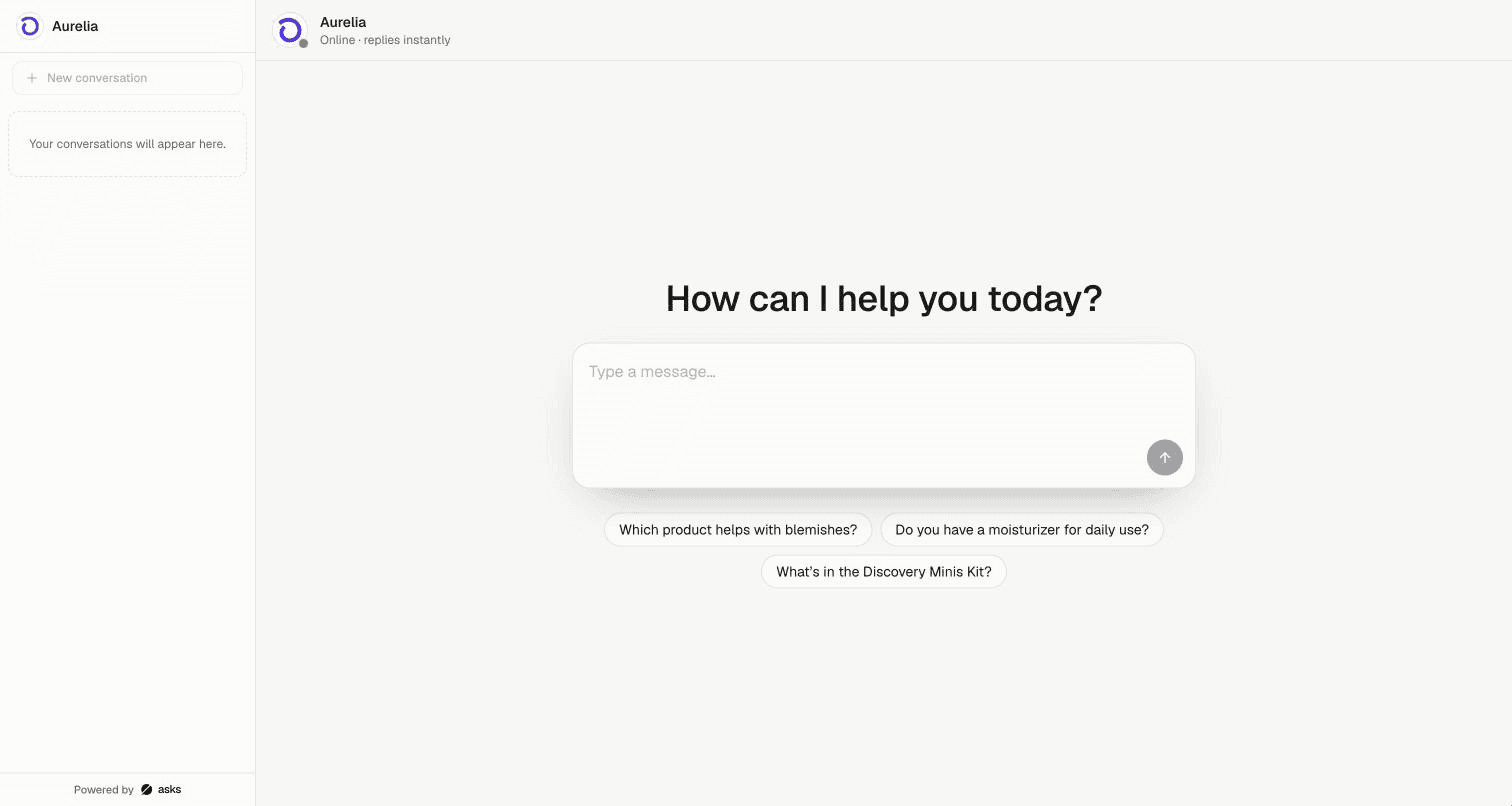
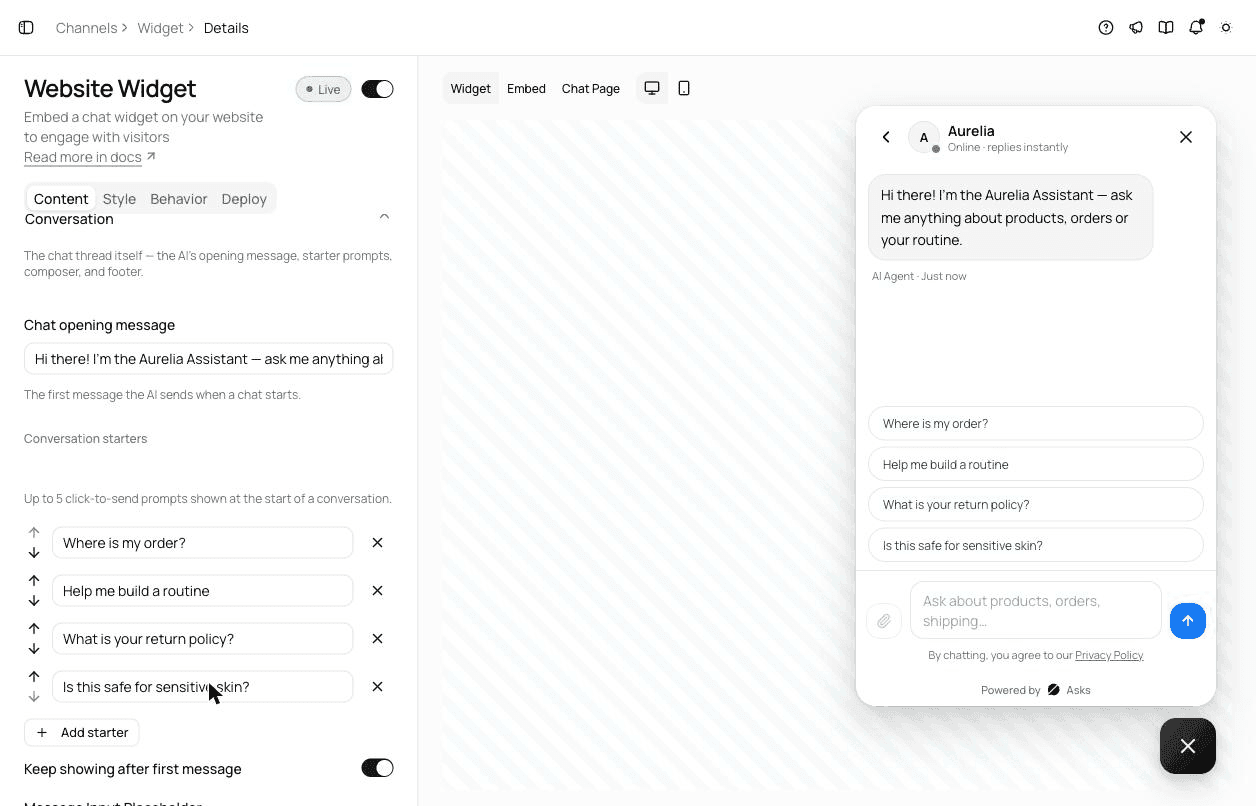
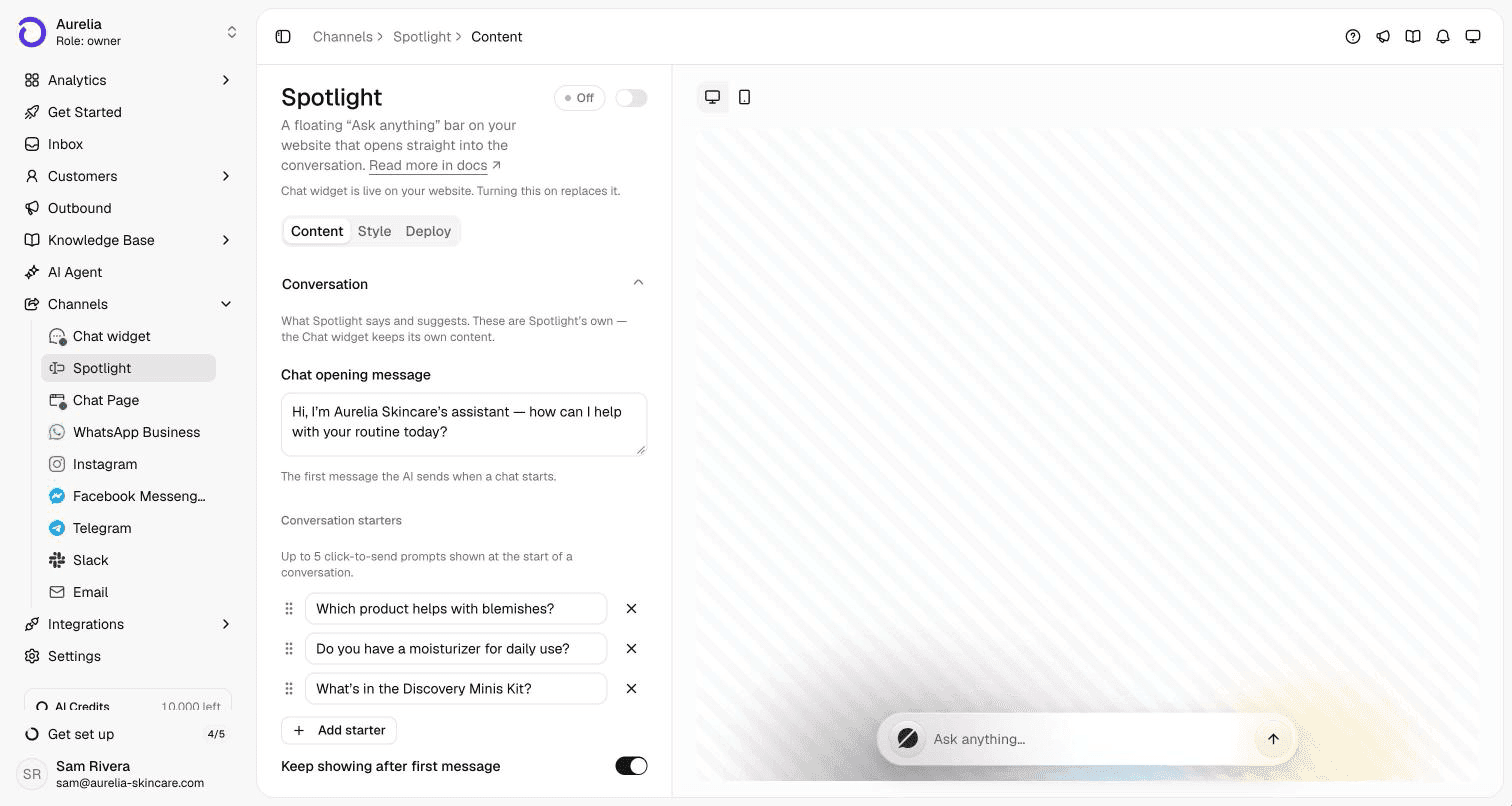
In Asks, the website chat widget's first message is the Chat opening message, and the clickable questions are Conversation starters: up to five, which you can drag to reorder and keep showing after the first message. Spotlight, the ask-anything bar, has its own opening message and starters, and the hosted Chat Page uses a welcome heading above its message box. Your opening message and starters are never machine-translated. The widget customization guide has every field.

Beyond templates

When to stop copy-pasting: let an AI agent answer what the welcome message invites

A welcome message is a promise: ask me anything. A scripted chatbot can only keep it for the questions someone wrote a flow for, and every other question ends in a dead end or a "leave your email" form.

An AI agent keeps the promise by answering from your own website, help center and product data, in the visitor's own words, and hands the conversation to your team when it can't support an answer from your content. The welcome message and starters stay exactly as you write them; what changes is what happens after the first click.

7-day free trial · card required · cancel anytime

Asks website widget settings, Content tab: the Chat opening message field, four conversation starters with reorder arrows, and a live preview of the widget showing the opening message and the starters as buttons
The Chat opening message and conversation starters, with the live preview. Aurelia demo workspace.
Asks Spotlight settings with its own Chat opening message and three conversation starters, and a preview of the floating Ask anything bar
Spotlight, the ask-anything bar, has its own opening message and starters.
A public Asks Chat Page with the welcome heading How can I help you today?, a large message box and three starter questions below it
The hosted Chat Page: a welcome heading, a message box and starter questions.

FAQ

Chatbot welcome messages, answered.

01What is a chatbot welcome message?

It's the first message a website chat shows when a visitor opens it. A good one says who is answering, what it can help with, and offers a few clickable questions so the visitor doesn't have to start from a blank box.

02How long should a chatbot welcome message be?

One or two short sentences. It appears in a small chat bubble, and visitors decide in a second whether to engage. Put the detail in the conversation starters, not in the message.

03Should a chatbot say that it's a bot?

Yes. Saying "I'm the assistant" up front sets fair expectations, and pairing it with an easy way to reach a person makes visitors more willing to try the assistant first.

04What are conversation starters?

They're suggested questions shown as buttons under the welcome message; clicking one sends it as the visitor's first message. In Asks, each website channel can have up to five.

05Should the welcome message ask for the visitor's email?

Not first. Asking for contact details before answering anything drives visitors away. Answer the question, then ask for an email if there's a reason to follow up, such as a quote or a callback.

06What's the difference between a welcome message and a proactive message?

A welcome message appears when the visitor opens the chat. A proactive message pops up on its own, for example after some time on a page. Proactive messages get more attention but also interrupt, so use them sparingly and on high-intent pages.

How we made this page

Written for asks.app and published under Ray's byline. Every message is original: drafted with AI assistance and reviewed for accuracy and tone before publishing, not copied from other template lists. Details about Asks were checked against the product and its documentation on November 16, 2026. How we write and correct pages is in our editorial policy.

Sources

Answer the repeat questions before anyone copies a template.

Asks learns your website and help center, answers customers on chat, email and messaging apps, and hands the rest to your team in one inbox.

7-day free trial · card required · cancel anytime

Chat on WhatsApp