Canned responses: 76 examples for customer service

Canned responses are pre-written replies a support team saves and inserts with a shortcut. Here are 76 examples for chat and email, grouped by situation: order status, shipping delays, refunds, billing, account access, bugs, apologies, escalations and closing. Each one says when to send it and how to make it sound like you.

By , pen name of the Asks founderUpdated 76 templates

Replace everything in {braces} before you send. Most help desks call these saved replies, macros or snippets; the idea is the same. The best ones answer the question completely, sound like a person, and leave room for one line that only applies to this customer.

{ }What the placeholders mean (66)
{first_name}
the customer's first name
{agent_name}
the name of the person replying
{team}
a team name, e.g. billing
{response_time}
your usual reply time
{issue}
the problem, in a few words
{eta}
when the next update comes
{update}
the latest status
{business_hours}
your hours, e.g. Mon to Fri, 9 am to 6 pm
{tracking_link}
the tracking page
{order_number}
the order number
{ship_date}
the ship date
{carrier}
the delivery company
{delivery_date}
the delivery date
{date}
a date
{address}
a street address
{link}
a relevant link
{refund_amount}
the refund amount
{payment_method}
e.g. Visa ending 4242
{days}
a number of days
{item}
the product
{new_date}
the new date
{reason}
the reason, in plain words
{return_link}
your returns page or label
{country}
the destination country
{duties_policy}
who pays import duties to that country
{return_window}
your return period, e.g. 30 days
{refund_reference}
the payment reference
{alternative}
what you can offer instead
{replacement_item}
the replacement product
{policy_link}
your policy page
{credit_amount}
the store credit amount
{amount}
an amount with currency
{plan}
the plan name
{billing_link}
the page where customers manage billing
{invoice_link}
a link to the invoice
{renewal_date}
the renewal date
{charge_date}
the date of the charge
{last4}
the last four digits of the card
{explanation}
a plain explanation
{proration_note}
what is charged or credited today
{email}
an email address
{minutes}
a number of minutes
{verification_detail}
the detail that proves it's them
{reset_link}
the password reset page
{what_is_deleted}
what gets deleted
{ticket_number}
the ticket or reference number
{workaround}
the workaround
{status_link}
your status page
{platform}
what you tested on
{troubleshooting_step}
the step to try
{feature}
a feature name
{domain}
your website's domain
{mistake}
what went wrong
{fix}
what you did to fix it
{prevention}
what changes so it doesn't happen again
{gesture}
the goodwill gesture
{next_step}
the next concrete step
{manager_name}
the support lead's name
{what_was_tried}
what has been tried
{desired_outcome}
what the customer wants
{mood}
how the customer is feeling
{company}
your company name
{review_link}
where to leave a review
{feedback_summary}
their point, in your words
{survey_link}
your rating survey
{topic}
what the conversation is about

First response and acknowledgment

7 templates

The first reply sets the tone. Show you read the message, say what happens next, and give a time.

WhenA new chat or ticket you can start on right away.

Shortcut/hi

Hi {first_name}, thanks for reaching out. I'm {agent_name} and I'll help you with this. Give me a moment to pull up your details.

Personalize: Swap "pull up your details" for the thing you're actually checking (your order, your account, the error you mentioned) so the customer knows you read the message.
WhenYou need to check another system or ask a colleague before you can answer.

Shortcut/checking

Thanks for waiting, {first_name}. I'm checking this with our {team} team now and will be back within {response_time} with an answer.

Personalize: Give a real time ("10 minutes", "by 3 pm") instead of "shortly". If you're going to miss it, send an update before the deadline, not after.

WhenThe message is missing something you need before you can act.

Shortcut/details

Happy to help, {first_name}. To find this quickly, could you send me: 1. Your order number 2. The email address you used at checkout Once I have those, I can sort it out.

Personalize: Ask for everything you need in one message. A second "one more thing" request feels like a runaround.

WhenThe issue is complicated and you want to check you've got it right before you start.

Thanks, {first_name}. Just to make sure I've got it right: {issue}. I'm on it now and will update you by {eta}.

Personalize: Restate the problem in one sentence, in your own words. If you misread it, the customer corrects you now instead of after a wrong fix.

WhenThe customer waited much longer than your usual response time.

Hi {first_name}, I'm sorry it took us this long to get back to you. That's not the wait we aim for. Here's where things stand: {update}

Personalize: Apologize once, then get straight to the answer. Two paragraphs of apology before the substance reads as stalling.

WhenThe question belongs to another team, such as billing or technical support.

Good question, {first_name}. Our {team} team handles this, so I've passed your message to them with everything you've shared. You won't need to repeat yourself, and you'll hear from them within {response_time}.

Personalize: Only promise "you won't need to repeat yourself" if the handoff really carries the conversation over. If it doesn't, give the customer a reference number instead.

WhenA message arrives after your team has gone home.

Thanks for your message, {first_name}. Our team is offline right now and back {business_hours}. Your message is in the queue and the first person in will pick it up. If it's about an order, you can follow it live here: {tracking_link}

Personalize: Point to the one self-serve link that answers most after-hours questions for your business: order tracking, the returns portal or the booking page.

Order status and tracking

8 templates

"Where is my order?" is the most common question in e-commerce support. Lead with the facts the customer can verify: the date, the carrier and the link.

AI support for e-commerce

WhenThe order has shipped and tracking is live.

Shortcut/track

Good news, {first_name}: order {order_number} shipped on {ship_date} with {carrier}. You can follow it here: {tracking_link} The current delivery estimate is {delivery_date}.

Personalize: Paste the carrier's estimate, not your standard shipping time. Customers open the tracking page and notice when the two disagree.

WhenThe order is paid but still being prepared.

Hi {first_name}, order {order_number} is being packed now and should leave our warehouse by {ship_date}. You'll get an email with tracking as soon as it ships.

Personalize: If you know why it's taking longer (a pre-order item, engraving, a busy week), say so. A reason makes a wait feel planned.

WhenThe carrier page shows no new scan for several days.

I checked order {order_number} and you're right, the tracking hasn't updated since {date}. Parcels sometimes travel between hubs without a scan, but I don't want to guess. I've asked {carrier} for a status check and will update you by {eta}.

Personalize: Tell the customer what you did, not only what usually happens. "I've asked the carrier" is the line that calms people down.

WhenTracking says delivered and the customer says it isn't there.

I'm sorry, {first_name}, that's stressful. Could you check around the delivery spot, with neighbors and with your building's mail room? Carriers sometimes mark a parcel delivered a day early. If it still hasn't turned up by {date}, reply here and I'll open a claim with {carrier} and send a replacement or a refund, whichever you prefer.

Personalize: Give a specific date to come back and say now what you'll do then. It saves a second round of back-and-forth.

WhenThe customer wants a different shipping address and the order hasn't left yet.

Done, {first_name}. Order {order_number} hadn't shipped yet, so I've changed the delivery address to: {address} Your shipping confirmation will show the new address.

Personalize: Paste the full new address back in the reply. Customers catch their own typos when they see the address written out.

WhenThe order already left and you can't change the address yourself.

Order {order_number} has already left our warehouse, so I can't change the address on our side. The quickest fix is to request a redirect with {carrier} here: {link} If that isn't possible, reply and we'll work out the next step together.

Personalize: Check that your carrier offers redirects before you suggest it. Sending someone to a dead end costs more trust than the delay itself.

WhenA customer asks to cancel and the order hasn't shipped.

Done, {first_name}. Order {order_number} is cancelled and a refund of {refund_amount} is on its way to your {payment_method}. Most banks show it within {days} business days.

Personalize: Put the amount and the payment method in the message. "Your refund is processed" makes people log in to check; the number doesn't.

WhenThe order includes an item that isn't in stock yet.

Hi {first_name}, the {item} in your order is on pre-order and we expect it on {date}. We'll ship the full order as soon as it arrives. If you'd rather have the in-stock items now, just say so and I'll split the shipment.

Personalize: Only offer a split shipment if you're willing to pay for the second parcel. Decide that before the template goes live, not in the chat.

Shipping delays and delivery problems

7 templates

Late, lost, damaged or wrong. Own the problem, say what you've already done, and don't make the customer prove it twice.

WhenYou know an order will be late before the customer asks.

Hi {first_name}, a heads-up on order {order_number}: it's running late, and the new delivery estimate is {new_date}. {reason} I'm sorry for the wait. If that date doesn't work for you, reply here and I'll see what I can do.

Personalize: Send it before the original date passes. The same news feels like good service when you send it first and like an excuse when the customer has to ask.

WhenThe carrier is held up by weather, strikes or peak volume.

I've checked with {carrier}: deliveries in your area are delayed because of {reason}. Your parcel is safe in transit and the new estimate is {new_date}. I'm keeping an eye on it, and if it hasn't moved by {date} I'll step in.

Personalize: Don't make the carrier sound like someone else's problem. You chose the carrier; the customer chose you.

WhenThe carrier confirms the parcel is lost, or it's well past the latest delivery date.

I'm sorry, {first_name}. {carrier} has confirmed your parcel is lost, so I've sent a replacement today with faster shipping. New tracking: {tracking_link} You don't need to do anything else.

Personalize: Decide in advance what happens if the original parcel turns up later, and add that sentence to the template so every agent says the same thing.

WhenThe customer reports a broken or damaged item.

That's not how it should have arrived, {first_name}, and I'm sorry. Could you send a photo of the item and the box? As soon as I have them, I'll send a replacement, or a refund if you prefer. You don't need to send the damaged one back.

Personalize: Only ask for photos if you or the carrier really need them for a claim. If you don't, skip straight to the fix.

WhenThe customer received something they didn't order.

That's our mistake, {first_name}, sorry about that. The {item} you ordered is on its way today, and here's a prepaid label for the one we sent by mistake: {return_link} There's no rush to send it back.

Personalize: Ship the right item before the wrong one comes back. Making the customer wait for your return scan punishes them for your mistake.

WhenPart of the order wasn't in the box.

Thanks for letting me know. I checked the packing record for order {order_number} and the {item} wasn't included. It's on its way now: {tracking_link}

Personalize: Check the packing record before you send this. If it shows the item was packed, ask whether it may have shipped in a separate parcel first.

WhenAn international customer asks about duties or a fee to receive the parcel.

Good question, {first_name}. For orders to {country}, {duties_policy} If a courier asks you to pay something we said was included, send me a photo of the notice and I'll sort it out.

Personalize: Write the {duties_policy} sentence once per destination country and keep it exact. Vague answers about customs turn into chargebacks.

Returns and refunds

9 templates

Refund replies are read twice and screenshotted. Put the amount, the method and the timeline in writing, and pair every "no" with something you can do.

WhenA customer asks how to send something back.

Shortcut/return

Of course, {first_name}. You can return anything within {return_window} of delivery. Start here: {return_link} Print the label, drop the parcel at any {carrier} point, and we'll refund you as soon as it reaches us.

Personalize: If your returns portal handles everything, the link is the answer. Keep the steps to three lines; the portal has the details.

WhenYou've just processed a refund.

Your refund of {refund_amount} for order {order_number} went out today to your {payment_method}. Depending on your bank, it shows up within {days} business days. Reference, in case your bank asks: {refund_reference}

Personalize: Include the payment reference. It's the first thing a bank asks for if the money doesn't appear.

WhenThe customer says the refund hasn't arrived.

I checked, and we sent your refund of {refund_amount} on {date}. Banks can take up to {days} business days to show it. If it isn't there by {new_date}, send me a screenshot of your statement and I'll trace it with our payment provider.

Personalize: Give the exact date you sent it. "It's been processed" sounds like a brush-off; "we sent it on Tuesday" sounds like a fact.

WhenThe customer asks to return something after the return period ended.

Thanks for asking, {first_name}. Order {order_number} arrived on {delivery_date}, which puts it outside our {return_window} return window, so I can't refund it. What I can do is {alternative}. Would that help?

Personalize: Agree a short menu of alternatives in advance (store credit, a repair, a discount on a replacement) so every agent offers the same one.

WhenThe customer wants a different variant of the same product.

Happy to swap it. I've reserved a {replacement_item} for you. Send the original back with this label: {return_link} We'll ship the new one as soon as the carrier scans your parcel.

Personalize: Reserving stock is the detail that matters. If your system can't hold an item, say "while stock lasts" instead of implying it's saved.

WhenThe returned parcel has arrived and passed inspection.

Your return for order {order_number} reached us today and everything checks out. Your refund of {refund_amount} is on its way to your {payment_method}.

Personalize: Send this the day the parcel arrives, even if the refund takes longer to process. Silence after a return is when customers start to worry.

WhenYou're refunding one item, not the whole order.

I've refunded {refund_amount} for the {item} to your {payment_method}. The rest of order {order_number} stays as it is. If anything else in the box isn't right, tell me.

Personalize: Name the item the refund covers. A partial amount with no explanation looks like a mistake.

WhenYour policy excludes opened or used items.

I understand, {first_name}, and I wish I had a better answer. Because the {item} has been opened, our returns policy doesn't cover a refund ({policy_link}). If something about the product didn't work for you, tell me what happened: a defect is covered, and I'll replace it.

Personalize: Link the policy instead of quoting it, and always leave the door open for a defect claim. It's often what the customer really means.

WhenStore credit is the agreed fix instead of a refund.

I've added {credit_amount} in store credit to your account, {first_name}. It applies automatically at checkout and doesn't expire.

Personalize: State the expiry rule either way. "Doesn't expire" is a selling point; a hidden expiry date is a future complaint.

Billing and payments

8 templates

Money questions need precision. Quote the amount, the date and the last four digits of the card, and never ask for full card details in chat.

WhenThe customer sees two charges for one purchase.

I'm sorry for the scare, {first_name}. I can see two charges of {amount} on {date}. One is a temporary authorization your bank releases within {days} business days; the other is the real payment. If both are still there after that, reply and I'll refund the duplicate straight away.

Personalize: Check first whether it's really a pending authorization. If it's a true duplicate, refund it now and say so; don't make the customer wait out a bank cycle for your error.

WhenA renewal or invoice payment didn't go through.

Hi {first_name}, your payment for the {plan} plan didn't go through on {date}, so I wanted to let you know before anything changes on your account. You can update your card here: {billing_link}

Personalize: Say how long the grace period lasts and what happens after it. "Before anything changes" only reassures people when they know when that is.

WhenA customer needs an invoice or receipt.

Shortcut/invoice

Here's your invoice for {date}: {invoice_link} If you need your company name, address or tax ID on it, send me the details and I'll reissue it.

Personalize: Offer the reissue up front. Finance teams almost always need a company name or tax number added.

WhenA customer asks to cancel.

Done, {first_name}. Your {plan} subscription is cancelled and won't renew. You keep access until {renewal_date}. If you have a moment, what made you cancel? One line helps us more than you'd think.

Personalize: Ask why once, after you've confirmed the cancellation. Never make the answer a condition for cancelling.

WhenThe customer forgot to cancel and asks for the renewal back.

I see your {plan} plan renewed on {charge_date}, and you hadn't meant it to. I've cancelled the renewal and refunded {refund_amount} to the card ending {last4}. It should appear within {days} business days.

Personalize: Agree how many days after a renewal you'll refund without questions, and give every agent the same rule.

WhenThe customer doesn't recognize an amount on an invoice.

Good question. The {amount} on your {date} invoice is {explanation}. You can see every line here: {invoice_link} If anything looks wrong, tell me which line and I'll check it.

Personalize: Explain in the customer's words, not your billing system's. "Two extra seats you added on March 3" beats "seat proration".

WhenYou've moved a customer to another plan.

You're on the {plan} plan as of today. {proration_note} Your next regular invoice is on {renewal_date}, and the details are in {billing_link}.

Personalize: Fill {proration_note} with exactly what is charged or credited today. Surprises on the next invoice cause more tickets than the change itself.

WhenThe customer says they'll dispute the charge with their bank.

I understand, {first_name}, and I'd like to fix this before you have to go through your bank, which can take weeks. Tell me what went wrong with order {order_number} and I can refund or replace it today.

Personalize: Don't threaten or lecture about chargebacks. A faster, better offer is the only thing that changes the customer's mind.

Account and access

6 templates

Security first, then speed. Verify before you change anything, and tell the customer exactly what you'll accept as proof.

WhenThe customer can't sign in.

Shortcut/reset

No problem. I've sent a password reset link to {email}. It works for {minutes} minutes. If it doesn't arrive, check your spam folder or reply here and I'll send another.

Personalize: Send the link to the address on the account, never to an address the customer gives you in chat.

WhenSomeone asks to change account details.

Before I change anything, I need to confirm it's you. Could you reply from the email address on the account, or tell me {verification_detail}? It's a small step that protects your account.

Personalize: Never ask for a password or a full card number. Name the exact detail you'll accept, so the customer doesn't guess and overshare.

WhenYou've updated the login email.

Done. Your account email is now {email}. We've also sent a notice to your previous address, so you'd know if anyone ever tried this without you.

Personalize: Only keep the second sentence if your system really notifies the old address. If it doesn't, it should.

WhenToo many failed sign-in attempts locked the account.

Your account was locked after several sign-in attempts, which is a security measure. It unlocks automatically after {minutes} minutes, or you can reset your password now: {reset_link}

Personalize: Explain that the lock protects them. People are calmer about a security measure than about a bug.

WhenA customer asks you to delete their account or data.

I can do that for you, {first_name}. Deleting your account removes {what_is_deleted} and can't be undone. Reply "confirm" and I'll complete it within {days} days. You'll get an email when it's done.

Personalize: Name what is deleted and what you're legally required to keep (invoices, for example). Make sure the wording matches your privacy policy.

WhenThe customer lost the phone or app they use for two-factor sign-in.

I'm sorry you're locked out. For your security I can't turn off two-factor sign-in from chat, but here's how to recover access: {link} If none of those options work, reply and I'll start a manual identity check, which takes {days} business days.

Personalize: Say why you can't do it in chat. "For your security" plus a clear path forward reads as care, not as a wall.

Bugs and technical issues

8 templates

Technical replies earn trust by being specific: what you tested, what you found, and when you'll be back.

WhenYou've reproduced the problem the customer reported.

Thanks for the detailed report, {first_name}. I reproduced it on our side, so it's not something on your end. I've logged it for our engineers as {ticket_number} and I'll update you when there's a fix.

Personalize: "I reproduced it" is worth more than any apology. Only say it when you did.

WhenYou can't investigate without more information.

Shortcut/bugdetails

Sorry about that. To track it down quickly, could you send: 1. What you clicked or typed just before it happened 2. Your browser or app version 3. A screenshot or short screen recording, if you can With those, I can usually reproduce it in a few minutes.

Personalize: Number the questions. Customers answer numbered lists completely and skip questions buried in a paragraph.

WhenA fix will take time but there's a way around the problem.

While our team works on a fix, here's a way around it: {workaround}. It's not ideal, I know, but it should keep you moving today. I'll let you know as soon as the proper fix is live.

Personalize: Test the workaround yourself before you send it. A workaround that fails doubles the frustration.

WhenThe fix for a reported issue has shipped.

Good news, {first_name}: the problem you reported with {issue} is fixed as of today. Could you try again and let me know it works for you? Thanks for reporting it; your details helped us find the cause.

Personalize: Close the loop with everyone who reported it, not only the last person. It's the cheapest loyalty you'll ever buy.

WhenA known incident is affecting customers.

Shortcut/outage

We know about the problem with {issue} and our team is working on it right now. Live updates are on our status page: {status_link} I'll reply here as soon as it's resolved. I'm sorry for the disruption.

Personalize: Don't promise a fix time unless engineering gave you one. Link the status page and let it carry the updates.

WhenEverything works when you test it.

I've tried this on {platform} and it works as expected on our side, which makes me think something specific to your setup is involved. Could we try {troubleshooting_step}? If that doesn't help, I'll set up a short screen share.

Personalize: Never write "it works for me". Say what you tested, so the customer knows you actually tried.

WhenThe behavior is by design, even if the customer expected something else.

Thanks for flagging this. What you're seeing is how {feature} works today: {explanation}. I understand it's not what you expected, so I've shared your feedback with our product team. In the meantime, {workaround}.

Personalize: Lead with the explanation, not with "this isn't a bug". Nobody likes being told their problem doesn't count.

WhenA stale page or session is the likely cause.

Could you try a quick fix? Sign out, clear your browser's cache for {domain} (or open a private window), then sign in again. An old version of the page causes this more often than you'd think. If it still happens, tell me and I'll dig deeper.

Personalize: Offer the private window as the easy option. Many people don't know how to clear a cache, and that's fine.

Apologies and service recovery

6 templates

A good apology names the mistake, fixes it and says what changes. "Sorry for any inconvenience" does none of the three.

WhenYour company got something wrong.

You're right, {first_name}, and I'm sorry. We {mistake}, and that's on us. Here's what I've done to fix it: {fix}. I've also {prevention} so it doesn't happen again.

Personalize: Name the mistake specifically. A vague apology sounds like you don't know what went wrong.

WhenThe customer went through real hassle and you want to make up for it.

I'm sorry this turned into such a hassle. As a thank-you for your patience, I've {gesture}. It's already applied; nothing to do on your side.

Personalize: Match the gesture to the hassle. A tiny discount after a ruined gift reads as an insult, and a full refund for a one-day delay sets a costly precedent.

WhenThe customer is upset and says so.

I can hear how frustrating this has been, {first_name}, and you shouldn't have had to chase us. I'm taking this on personally. Here's what happens next: {next_step}. I'll update you by {eta} either way.

Personalize: Don't match the tone or defend the company in the first message. Acknowledge, take ownership and commit to one concrete next step.

WhenA fix you made didn't hold.

I'm sorry this happened a second time, {first_name}. That tells me our first fix didn't reach the cause. I've escalated it to our {team} team with the full history so we solve it properly this time, and I'm staying on it with you.

Personalize: Admit the first fix failed. Pretending it's a new issue makes the customer explain everything again.

WhenYou said you'd reply by a time and didn't.

I told you you'd hear from us by {date}, and we didn't. I'm sorry. Here's the honest status: {update}. The next update comes by {eta}, and I'll make sure it does.

Personalize: Lead with the missed promise. Customers forgive a late update much faster when you say it before they do.

WhenSomeone posted about a bad experience and you're continuing in private.

Hi {first_name}, I saw your post and I'm sorry about your experience with {issue}. I'd like to make it right. Could you share your order number or account email here so I can look into it?

Personalize: Reply publicly once and briefly, then move to a private channel for the details. Never argue facts in public.

Escalations and handoffs

6 templates

The handoff is where customers decide whether your support works. Carry the context, name the person, give a time.

WhenThe question needs someone with deeper knowledge or permissions.

This one needs a specialist, so I'm passing you to {agent_name} from our {team} team. I've shared everything you've told me, so you won't need to start over. They'll reply here within {response_time}.

Personalize: Name the person and the team. "Someone will get back to you" sounds like a queue; a name sounds like a plan.

WhenThe customer asks to speak to someone more senior.

Of course. I've asked {manager_name}, who leads our support team, to review your case. They'll reply here by {eta}. In the meantime, is there anything I can do right now?

Personalize: Never refuse a manager request or make the customer justify it. Agree, and promise a real time.

WhenBefore you transfer, as a note only your team sees.

Customer: {first_name}, {email} Issue: {issue} Tried so far: {what_was_tried} Customer wants: {desired_outcome} Mood: {mood} Next step: {next_step}

Personalize: This note is what saves the customer from repeating the story. Keep it to these six lines and fill in every one.

WhenA teammate takes over a conversation an AI agent was handling.

Hi {first_name}, I'm {agent_name} from the {company} team, taking over from our AI assistant. I've read the conversation, so you don't need to repeat anything. Let's get this sorted.

Personalize: Read the transcript before you send this, then prove it by mentioning one detail, like the product or the order number.

WhenA case is with another team and there's nothing new yet.

A quick update, {first_name}: our {team} team is still working on your case ({ticket_number}). Nothing new to report yet, but you haven't been forgotten. Next update by {eta}.

Personalize: A no-news update is still an update. Silence is what turns a waiting customer into an angry one.

WhenThe customer mentions a lawyer, an injury, a safety issue or a formal complaint.

Thank you for telling me, {first_name}. I want to make sure this is handled properly, so I've passed it to {team}, who handle these cases. They'll contact you directly by {eta}.

Personalize: Don't speculate about fault or compensation in the first reply. Route it to the right people and confirm when they'll be in touch.

Feature requests and feedback

4 templates

Feedback replies are a promise about the future. Only promise what your team actually tracks.

WhenA customer asks for something your product doesn't do.

Thanks for the idea, {first_name}. I've added it to our product feedback along with how you'd use it, which is what our team looks at when deciding what to build. I can't promise if or when it ships, but I'll let you know if it does.

Personalize: Keep "I'll let you know" only if your team records who asked. Otherwise, drop the promise.

WhenA customer says something nice.

This made my day, {first_name}, thank you. I'll pass it on to the team. If you ever have a minute, a short review here would help other people find us: {review_link}

Personalize: Ask for the review only when the praise is about the product or service, not just about you.

WhenA customer tells you what you're doing badly.

Thank you for being straight with us. {feedback_summary} is a fair point, and I've shared it with the team responsible. If you're open to it, I'd like to follow up once we've made changes.

Personalize: Summarize their point in your own words. It proves you listened instead of pasting a thank-you.

WhenAt the end of a conversation that went well.

Glad we could help, {first_name}. Would you rate this conversation? It takes ten seconds: {survey_link}

Personalize: Ask after resolved conversations only, and only once. Repeated survey requests lower the response rate for everyone.

Closing and follow-up

7 templates

End the conversation on purpose: confirm it's solved, say how to come back, and follow up when silence might mean the fix didn't work.

WhenThe customer confirmed the problem is solved.

Shortcut/done

Glad that's sorted, {first_name}. I'll close this conversation now. If anything else comes up, just reply here and we'll pick it up.

Personalize: Make sure replying to a closed conversation really reaches your team before you promise it.

WhenYou've answered the question and want to make sure nothing is left.

Before I go: is everything clear on {topic}, or is there anything else I can help with?

Personalize: Ask once. If the customer says no or doesn't reply, close the conversation.

WhenYou sent a fix and haven't heard back.

Hi {first_name}, just checking in on {topic}. Did the steps above work for you? If I don't hear back in {days} days, I'll close this conversation. You can reply anytime to reopen it.

Personalize: Say when you'll close it. Customers don't mind a conversation closing when they were told.

WhenThe follow-up got no answer.

I haven't heard back, so I'm closing this conversation for now. If you still need help with {topic}, reply here and we'll pick it up where we left off.

Personalize: Keep it short and warm. This message is the last impression of the whole conversation.

WhenYou fixed something important and want to confirm it stayed fixed.

Hi {first_name}, it's {agent_name}. Last week we fixed {issue}. Is everything still working as it should?

Personalize: Use this sparingly, for problems that really hurt the customer. That's what makes it feel personal.

WhenYour shift ends before the conversation does.

My shift is ending, {first_name}, so I've passed your conversation to {agent_name}, who has the full history. They'll pick it up from here.

Personalize: Write the internal handoff note first (see above), then send this. The order matters.

WhenA difficult case is finally solved.

Thank you for sticking with us through this, {first_name}. I know it took longer than it should have. Everything is fixed on our side, and I've noted the details on your account in case it ever comes up again.

Personalize: Acknowledge the time it took. Ending as if it was a routine case erases the customer's experience.

How to write canned responses that don't sound canned

  • Answer completely. A canned response that needs a follow-up question wasn't finished. Include the link, the date or the amount the customer will ask for next.
  • Leave one line for this customer. Every template above has a placeholder for something specific. Fill it in, even when it's tempting to send as is.
  • Write the way your team talks. If nobody on your team says "we apologize for the inconvenience" out loud, it shouldn't be in a saved reply either.
  • One situation per response. "Refund issued" and "refund not showing yet" are different moments with different worries. Separate replies are easier to find and harder to misuse.
  • Review them every quarter. Policies, links and carriers change. A saved reply with an old returns window is worse than no saved reply.

Turn them into saved replies

  1. 1Pick the 20 to 30 situations your team answers most. Your help desk's reports or a week of tagged conversations will show you which ones.
  2. 2Give each one a short name and a shortcut you'll remember mid-chat, like /track or /refund.
  3. 3Replace the {braces} with your tool's variables, so the customer's name and order details fill in automatically.
  4. 4Decide which replies the whole team shares and which are personal.
  5. 5Check usage once a month: delete the ones nobody uses and rewrite the ones agents always edit heavily.

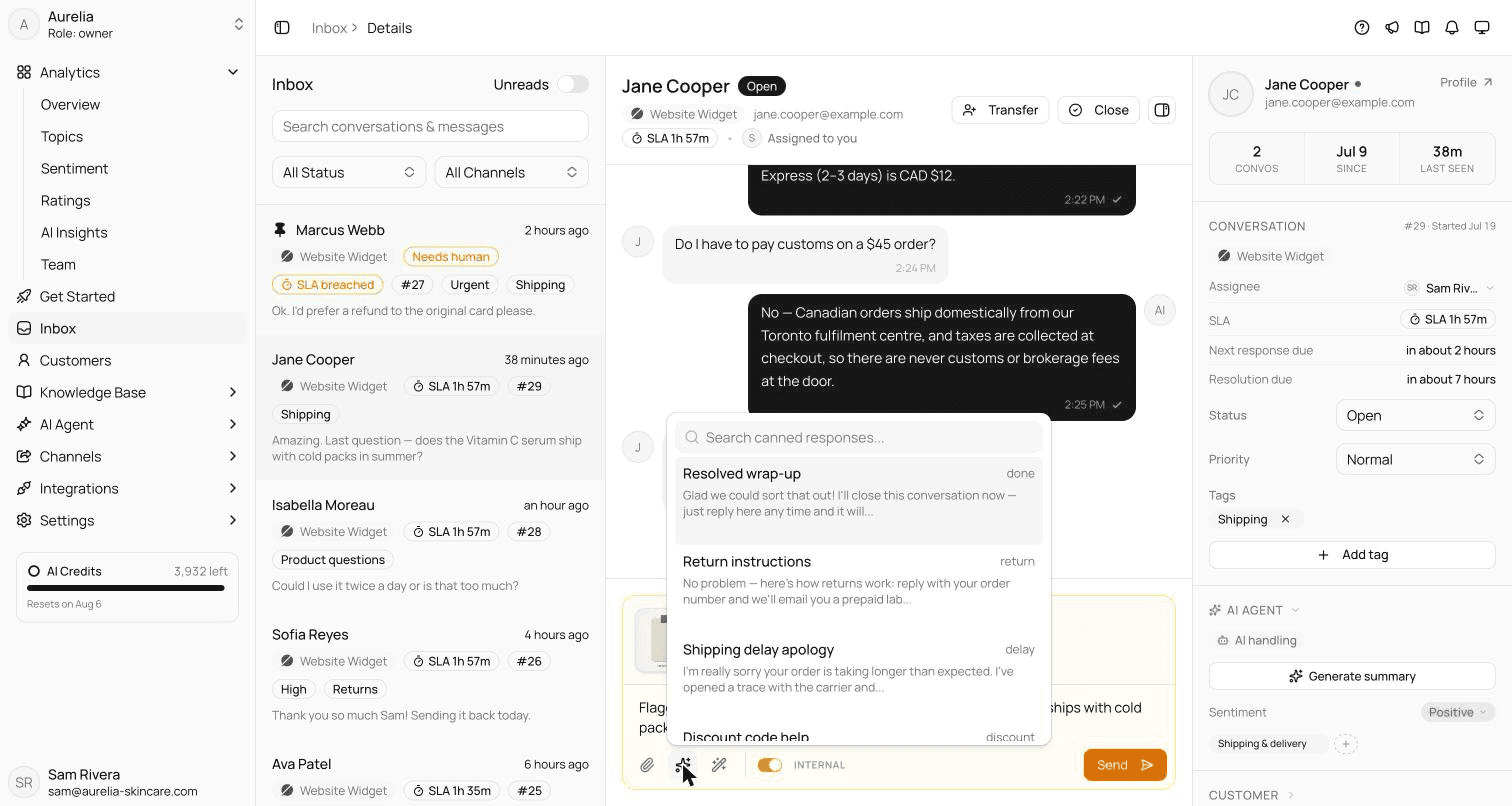
In Asks, canned responses live under Settings and open from the inbox composer when you type /. Their content can use variables such as {{customer.name}} or {{ticket.number}} that fill in when inserted, and a response can set the ticket's status, priority or tags when you send it. The canned responses guide lists every variable.

Beyond templates

When to stop copy-pasting: let an AI agent answer from your knowledge base

Canned responses make typing faster. They don't reduce the number of conversations. If the same handful of questions (where's my order, what's your return policy, do you ship to my country) make up most of your queue, a person pasting the same answer all day is the expensive part.

An AI agent answers those questions itself, from your own help center, policies and product pages, in your website chat, by email and on messaging apps. When it can't support an answer from your content, or the customer asks for a person, it hands the conversation to your team with the history attached. Your saved replies don't disappear: they become the source the agent learns from, and your team keeps them for everything else.

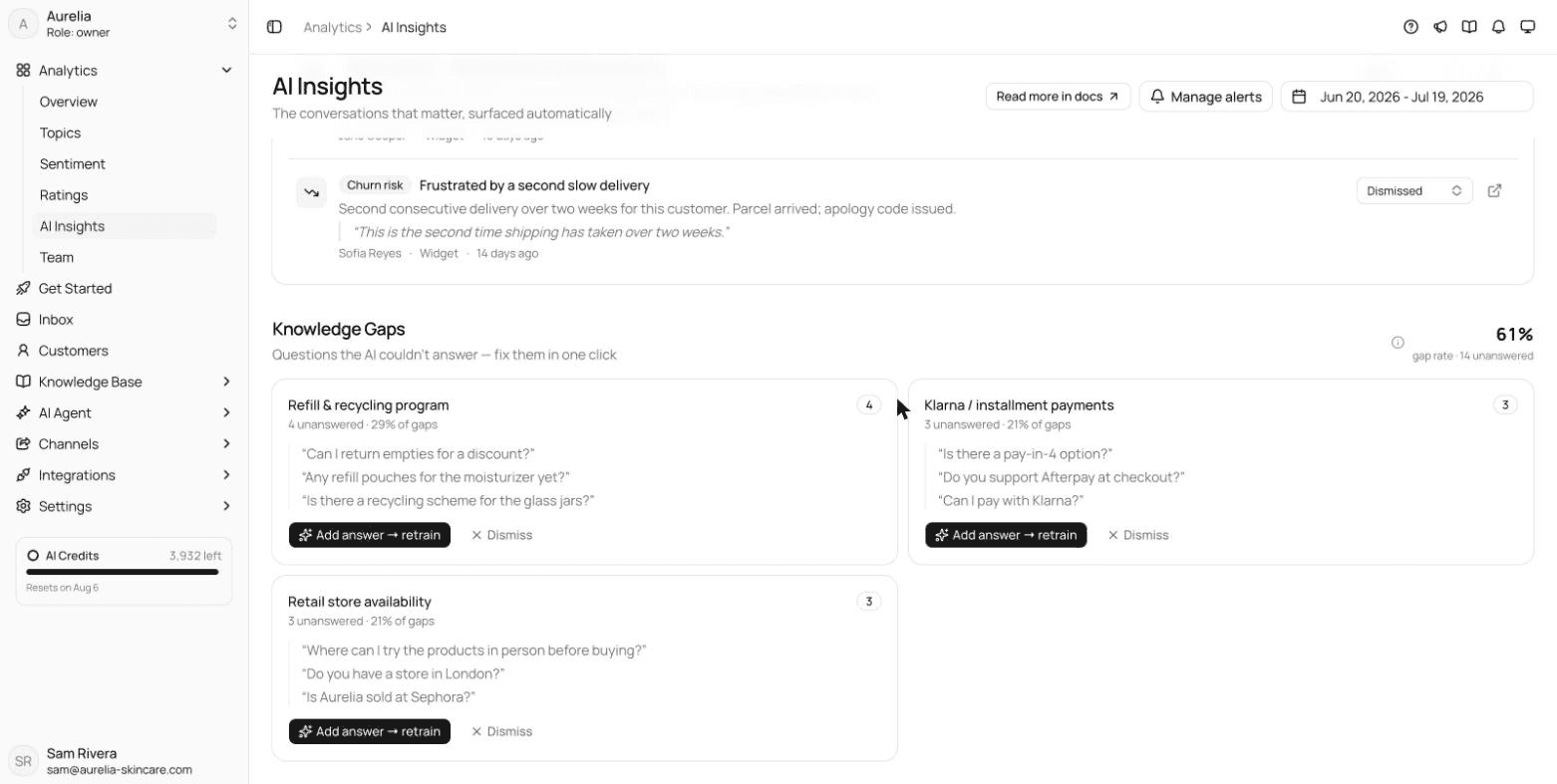
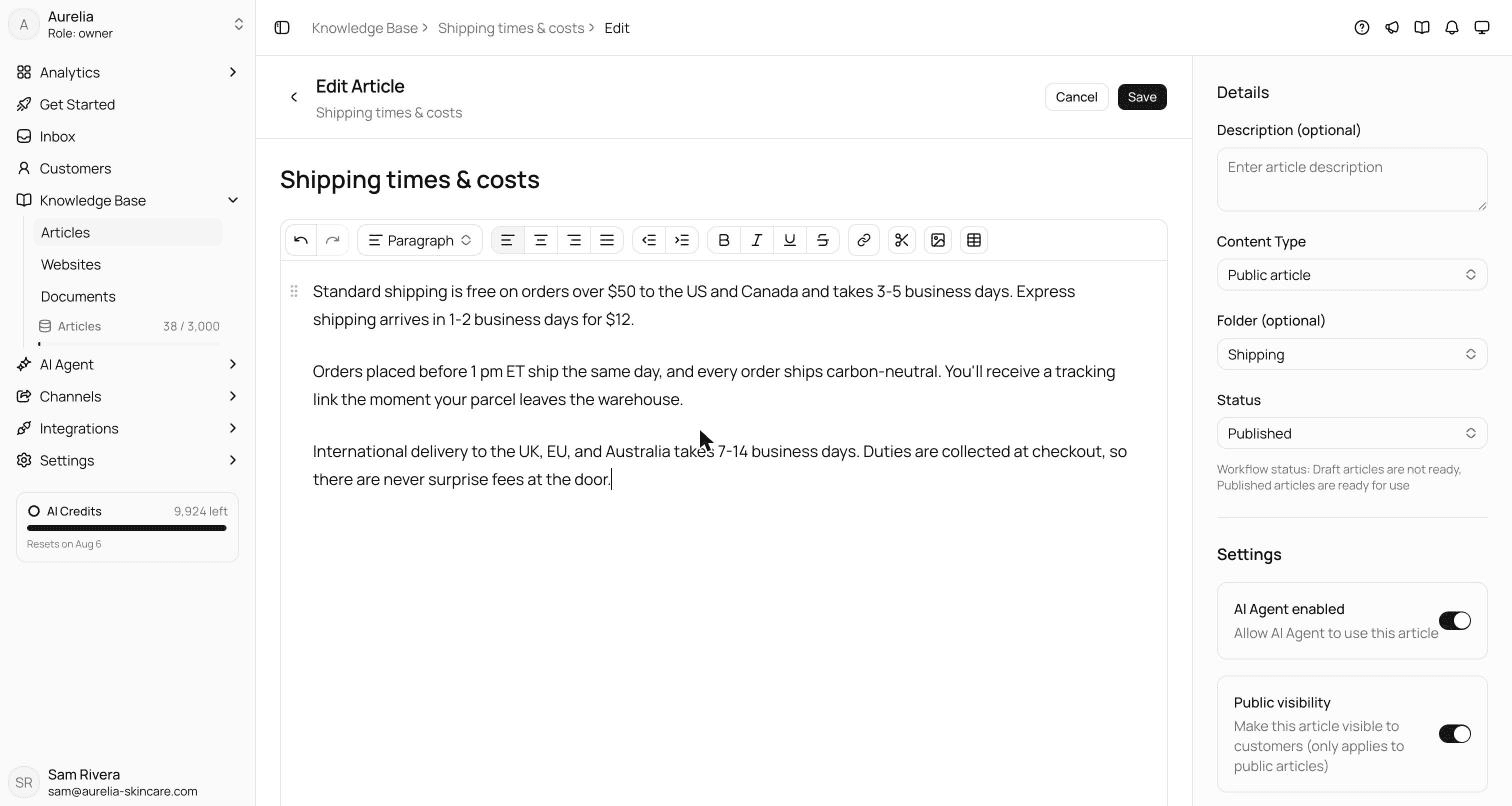
In Asks, you write a policy once as a knowledge-base article and the agent answers from it. AI Insights (on the Business plan and above) lists the questions it couldn't answer, so you know which answer to write next.

7-day free trial · card required · cancel anytime

Illustrative exampleWebsite chat

The same question, answered from your returns policy

Customer: Hi, I opened the face cream but it's not for me. Can I still return it?
AI agent: Sorry it didn't suit you. Opened skincare can't be returned for a refund under our returns policy, but if it caused a reaction or arrived damaged, that's covered and we'll replace it. Would you like me to connect you with the team to check?
Illustrative example. The reply quotes the store's own returns policy; a store with a different policy gets a different answer.
Asks inbox with a website chat open and the canned responses picker above the composer, listing Resolved wrap-up, Return instructions, Shipping delay apology and Discount code help with their shortcuts
Canned responses in the Asks inbox: type / to search saved replies by name or shortcut. Aurelia demo workspace.
Asks knowledge base article editor showing a Shipping times and costs article, with the AI Agent enabled switch turned on in the article settings
Write the answer once as a knowledge-base article; the AI agent answers from it.
Asks AI Insights page with a Knowledge Gaps section grouping unanswered customer questions into topics, each with an Add answer and retrain button
AI Insights (Business plan and above) groups the questions the agent couldn't answer, so you know which article to write next.

FAQ

Canned responses, answered.

01What is a canned response?

A canned response is a pre-written reply that a support agent saves once and inserts into a conversation with a click or a shortcut, then edits before sending. Help desks also call them saved replies, macros, snippets or quick replies.

02How many canned responses should a support team have?

Start with the 20 to 30 situations your team answers most often, which usually cover the bulk of your volume. Add more only when a new situation keeps coming up, and delete the ones nobody uses. A library of hundreds is hard to search mid-conversation.

03Don't canned responses sound robotic?

Only when they're sent unedited or written in a corporate voice. Write them the way your team talks, leave a placeholder for one detail that is specific to the customer, and fill it in every time.

04What's the difference between a canned response and a macro?

In many help desks a canned response is only text, while a macro is text plus actions, such as setting the status, adding a tag or assigning the ticket. Asks attaches these as ticket actions on a canned response, applied when you send the reply.

05Can I use these templates in my own help desk?

Yes. They are written to be copied and adapted in any help desk, email client or chat tool, with no sign-up. Replace the placeholders in braces with your tool's variables or with the real details.

06Should an AI agent replace canned responses?

For the repetitive questions, an AI agent that answers from your knowledge base can resolve them without a person. Your team still needs saved replies for the conversations the agent hands over, such as exceptions, complaints and anything sensitive.

How we made this page

Written for asks.app and published under Ray's byline. Every template is original: drafted with AI assistance from common support situations and reviewed for accuracy and tone before publishing, not copied from other template lists. Details about Asks were checked against the product and its documentation on November 16, 2026. How we write and correct pages is in our editorial policy.

Answer the repeat questions before anyone copies a template.

Asks learns your website and help center, answers customers on chat, email and messaging apps, and hands the rest to your team in one inbox.

7-day free trial · card required · cancel anytime

Chat on WhatsApp