Glossary · Inbox and operations
What is a shared inbox?
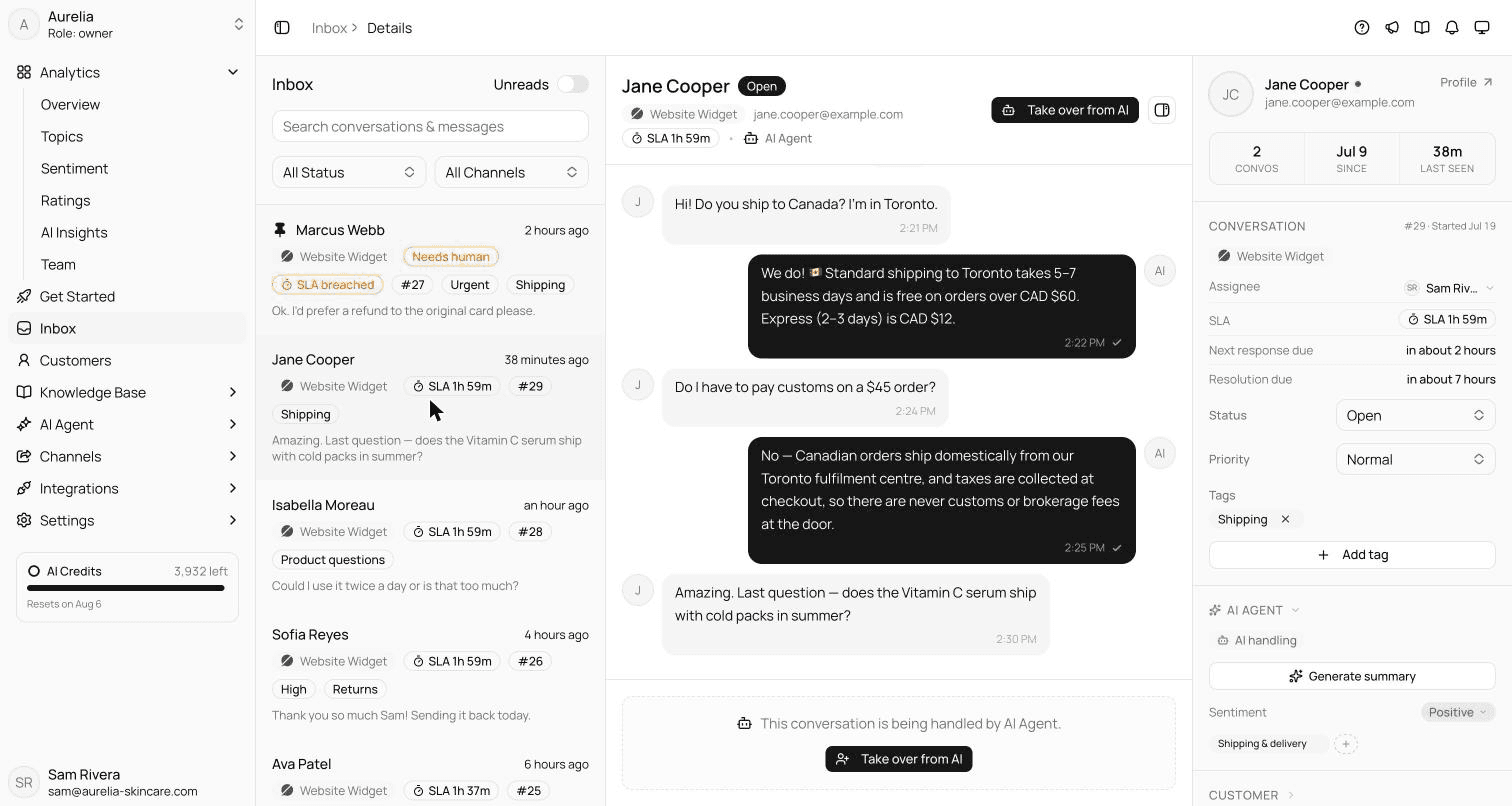
A shared inbox is one team mailbox or queue, such as support@ or a WhatsApp number, that several people work from together, with each conversation assigned, tracked and visible to the whole team. Instead of forwarding an email, a teammate assigns the customer's question to themselves and everyone can see it's handled.
Also calledTeam inbox · Collaborative inbox
By Ray, pen name of the Asks founderUpdated
What to look for
- Every channel in one place, not only email: see omnichannel support. For the email side, see AI email support.
- Assignment and status the whole team can see.
- Saved replies for frequent questions (canned responses and macros).
- Targets and alerts for response times (SLA).
- A login per teammate, so people can leave without anyone sharing passwords.
Shared inbox or help desk?
The line has blurred. A shared inbox feels like email with teamwork added; a help desk adds tickets, SLAs, reporting and a knowledge base. Small teams often start with the first and grow into the second. For what Asks offers, see the Asks shared inbox and the AI help desk.
In the product
How Asks handles this
The Asks shared inbox holds every live channel, and the AI agent answers first: conversations it hands off arrive flagged Needs human, and a teammate takes over with the full transcript. Teammates included: 10 on Starter, 25 on Business and 50 on Premium.
7-day free trial · card required · cancel anytime
FAQ
Questions, answered.
01Is a shared inbox the same as a shared mailbox?
Not quite. A shared mailbox, such as the one in Microsoft 365, is one address several people can open. A shared inbox tool adds assignment, status, notes and reporting, and usually covers chat and messaging channels as well as email.
02Who needs a shared inbox?
Any team where more than one person answers customers from the same address or number. Once two people can reply, you need a way to see who owns each conversation.
Related terms
- Omnichannel supportEvery channel feeds one inbox and one customer history, so context follows the customer.Channels and commerce
- Canned responseA saved reply agents insert with a shortcut, with placeholders for the customer's details.Inbox and operations
- MacroOne click that inserts a reply and updates the ticket: status, tags, priority or assignee.Inbox and operations
- SLA (service level agreement)A promised response or resolution time, such as a first reply within 1 hour, and how often you meet it.Inbox and operations
- Escalation (human handoff)Moving a conversation to someone better placed to solve it, including AI-to-human handoff.Inbox and operations
How we made this page
Written by Ray (the pen name of the Asks founder) from how support teams use the term and how Asks implements it, with AI-assisted drafting. Formulas and examples are worked arithmetic, not benchmarks; every outside fact links to its source with the date we checked it, and product facts were checked against Asks on 2026-11-17. How we write and correct pages is in our editorial policy.

Answer customers instantly, hand the rest to your team.
Asks learns your website and help center, answers on chat, email and messaging apps, and hands conversations to your team in one inbox when a person should take over.
7-day free trial · card required · cancel anytime
