Improved
September 2026: richer Meta messages, calmer follow-ups and photo search
Instagram, Messenger and WhatsApp messages now show up as they look, follow-ups never nudge a customer who's waiting on you, the agent finds products from a photo, and launchers get curated icons.
September was about the inbox: making every conversation readable, and making sure automation never gets in a waiting customer's way.
- Meta messages as they look: story replies, shared posts and reels, reactions, and WhatsApp locations and orders render as cards, with real customer names.
- Follow-ups and auto-resolve in one place, and a customer waiting on your team is never nudged or closed.
- Product search by photo against your Shopify catalog.
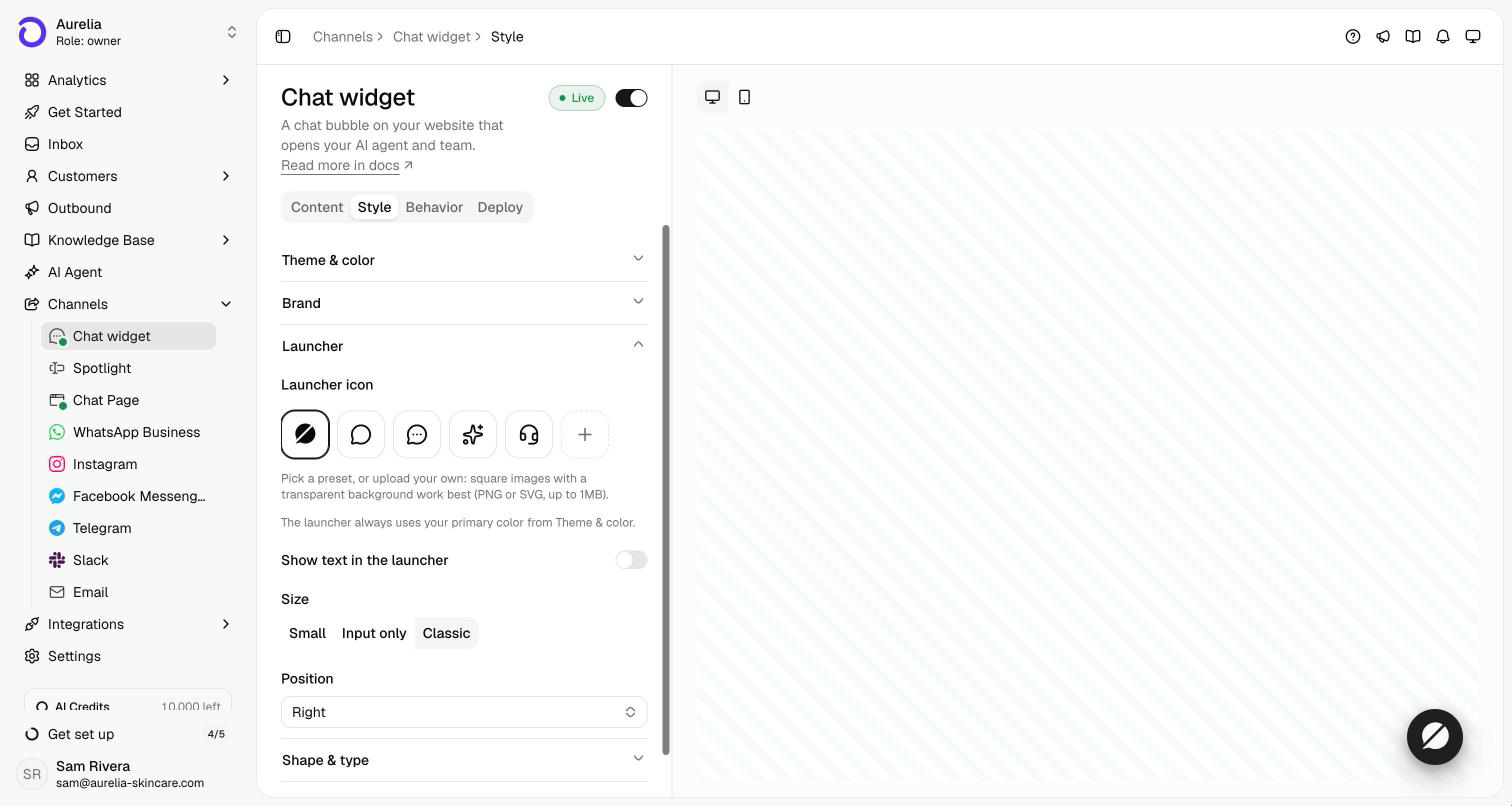
- Launcher icons: curated presets or your own upload, with an optional label.
Inbox
- Instagram, Messenger and WhatsApp messages as they look. Story replies and mentions, shared posts and reels, ad referrals, reactions and quoted replies show up as cards instead of placeholders, and so do WhatsApp locations, contacts and orders. Shopify products a customer shares resolve to the product, and customers show up with their real names.
- One place for follow-ups and auto-resolve. Settings → Workspace → Conversations now holds the follow-up and auto-resolve rules. A customer who is waiting on your team is never nudged or closed. Only conversations where the customer went quiet are.
- Close in bulk. Select several conversations and close them together. Owners and admins can close a conversation without taking it over first.
- A heads-up when a Meta channel has no agent. If WhatsApp, Instagram or Messenger is connected but the agent isn't switched on for it, its page now says so.
AI agent
- Product search by photo. When a customer sends a picture of a product, the agent compares it with your Shopify catalog and says plainly whether it found that exact item or only something similar.
Widget and dashboard
- Launcher icons and text. Pick a launcher icon from a curated set (or upload your own), and optionally show a short label next to it. Find it under the Chat widget's Style tab.
- Browser tabs that say where you are, with the page and workspace in every tab title.
Shopify
- Store owners join automatically. When an agency sets Asks up for a store, the store's owner joins that workspace as an admin when they open Asks.
- Smoother setup: password-protected stores build their agent during onboarding instead of stalling, and new workspaces are named after the store, not its myshopify handle.
- Trials per store. On Shopify billing, the 7-day trial belongs to the store, and the days left carry over if you switch plans during it.
← Newer · Oct 25, 2026Chat widget, Spotlight and Chat Page are now separate channelsOlder · Aug 31, 2026 →August 2026: identity verification, install guides and Bahasa Indonesia
Try it yourself
See what's new in your workspace
Everything on this page is live today. Asks trains on your website and resolves customer conversations on every channel — free to try, live in minutes.
More from the changelog
New · Nov 3, 2026Three months since launch: what we've shippedOur changelog went quiet after launch week, but the product didn't. We've published a note for each major launch from…New · Nov 2, 2026Tests: a simulated customer checks your agent after every changeDescribe a customer and the one thing your agent must get right. Another model plays that customer against your live …Improved · Oct 31, 2026October 2026: three new channels, campaigns and a refreshed widgetEmail, Slack and Telegram went live, alongside WhatsApp campaigns, Calendly booking and the MCP server. Also this mon…