To set up a Telegram customer support bot, create a bot in @BotFather with /newbot, copy the HTTP API token it gives you, and connect that token to a support tool that answers the bot's direct messages and lets your team take over. Telegram doesn't charge bots per message, and there's no 24-hour reply window.
The bot is the easy part: BotFather takes about a minute. The work is in what answers the messages, how your team steps in, and how customers find the bot, because a Telegram bot can't message anyone who hasn't started a chat with it first. This guide walks through all of it with Asks as the example, then covers Telegram Business auto-replies and the free options honestly.
Updated November 16, 2026. Telegram facts were checked against Telegram's Bot API documentation, Bot FAQ and Telegram Business announcement on 2026-11-16; Asks steps match the product and its Telegram docs on the same date.
How we made this page: the screenshots are from the Asks dashboard (our demo workspace), Telegram rules are linked to Telegram's own pages in Sources, and it was drafted with AI assistance under our editorial policy. Disclosure: Asks publishes this guide and sells one of the tools it describes; the free routes are in here too.
What a Telegram support bot can and can't do
A few platform rules shape every Telegram support setup, whichever tool you use:
- Customers start the conversation. A bot can only message people who opened it and tapped Start. There's no cold outreach, so your bot link has to be where customers already are.
- No reply deadline. Unlike WhatsApp, Instagram and Messenger, a regular Telegram bot has no 24-hour window. You can answer a message from last week, and so can the AI.
- Messages cost nothing. Telegram's Bot FAQ says bots "are able to message their users at no cost". The only paid option is paid broadcasts, for bots with at least 100,000 monthly active users sending more than about 30 messages a second, which a support bot won't need.
- Rate limits exist. Telegram asks bots to avoid more than one message per second in a single chat, and 20 messages per minute in a group.
- Files have limits. Through the standard Bot API, a bot can download files up to 20 MB and send files up to 50 MB.
- One-to-one chats are where support happens. Bots can live in groups, but customer support with private details belongs in direct messages. Asks's bot, for example, answers only private chats and posts a button to open one if someone adds it to a group.
Step 1: Create the bot in @BotFather
@BotFather is Telegram's official bot for creating bots.
- Open @BotFather in Telegram and send
/newbot. - Choose a display name customers will see, such as "Northwind Support".
- Choose a username that ends in
bot, such asnorthwind_support_bot. It becomes your link:t.me/northwind_support_bot. - BotFather replies with an HTTP API token that looks like
123456789:AAH…. Copy all of it, including the number and the colon.
Treat the token like a password: anyone who has it controls your bot. If it leaks, send /revoke to BotFather to get a new one (any tool using the old token stops receiving messages until you paste the new one), and /token shows it again if you lose it.
While you're there, give the bot a face with /setuserpic (your logo), and set the short texts customers see on its profile with /setdescription and /setabouttext. Some tools set these for you; Asks sets a command menu and a description when you connect, and keeps your name and picture.
Step 2: Connect the token to your support tool
In Asks, go to Channels → Telegram, paste the token and click Connect Telegram. Asks checks the token with Telegram and registers the bot, so there's no server to host and no webhook to configure.
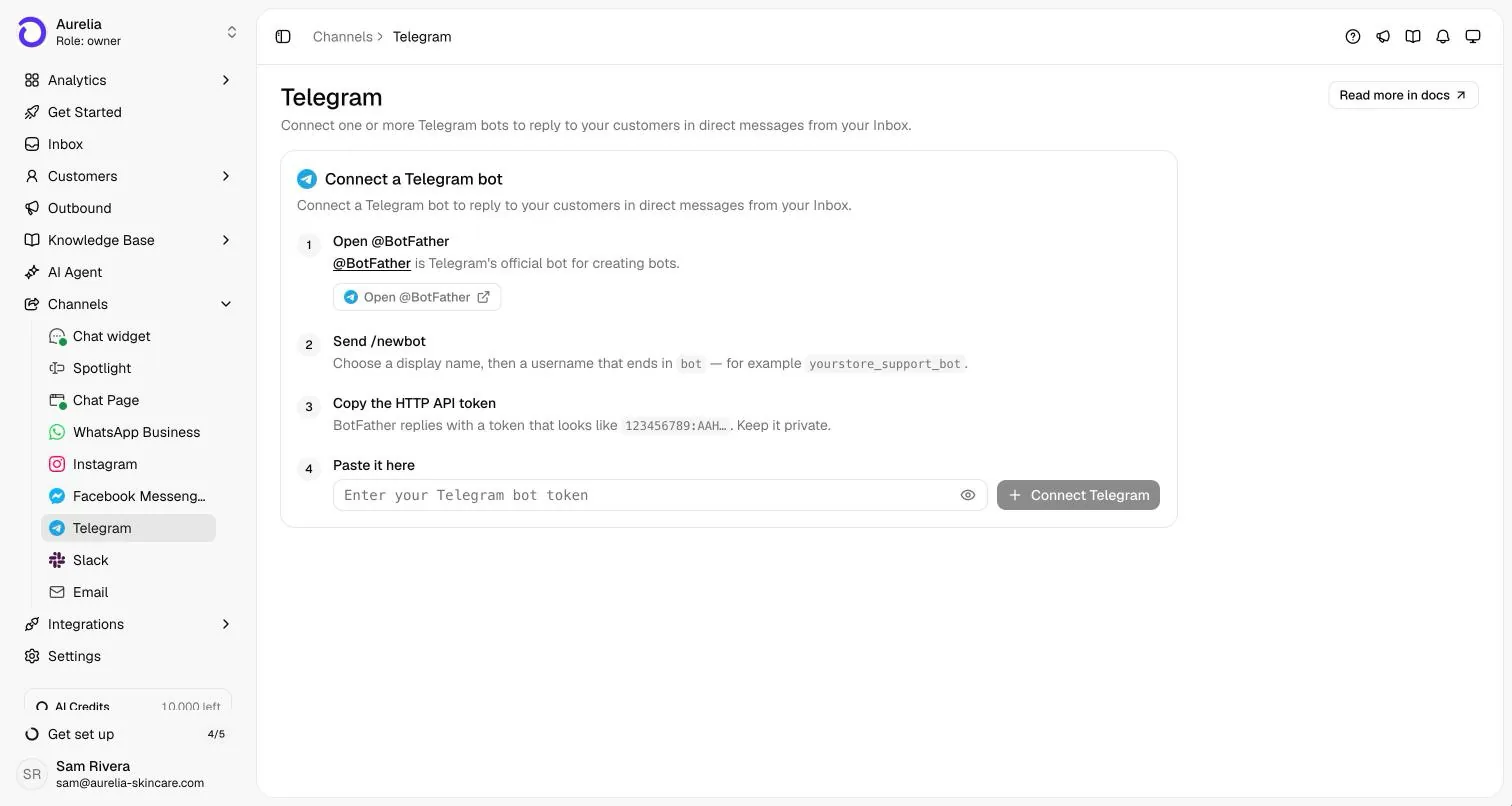
You can connect several bots, for example one per brand or region; each becomes its own channel. A bot can belong to one Asks workspace at a time.
Step 3: Teach the agent your business
An AI support bot is only as good as what it answers from. Before you switch it on, give the agent your real content: your website and help center (crawled and kept in sync), policy pages, and any documents your team already uses to answer questions. Write short articles for the questions your website doesn't answer, such as delivery times by region or what happens when a payment fails.
The same knowledge base serves every channel in Asks, so the answer a customer gets on Telegram matches the one on your website chat. Our guide to training an AI chatbot on your own data covers what to include and what to leave out.
Step 4: Turn on AI replies for Telegram
Connecting a bot doesn't switch the AI on. Until you do, messages land in your inbox for your team, which is a sensible way to watch real traffic for a day first. When you're ready, switch on Telegram under AI Agent → Deploy:
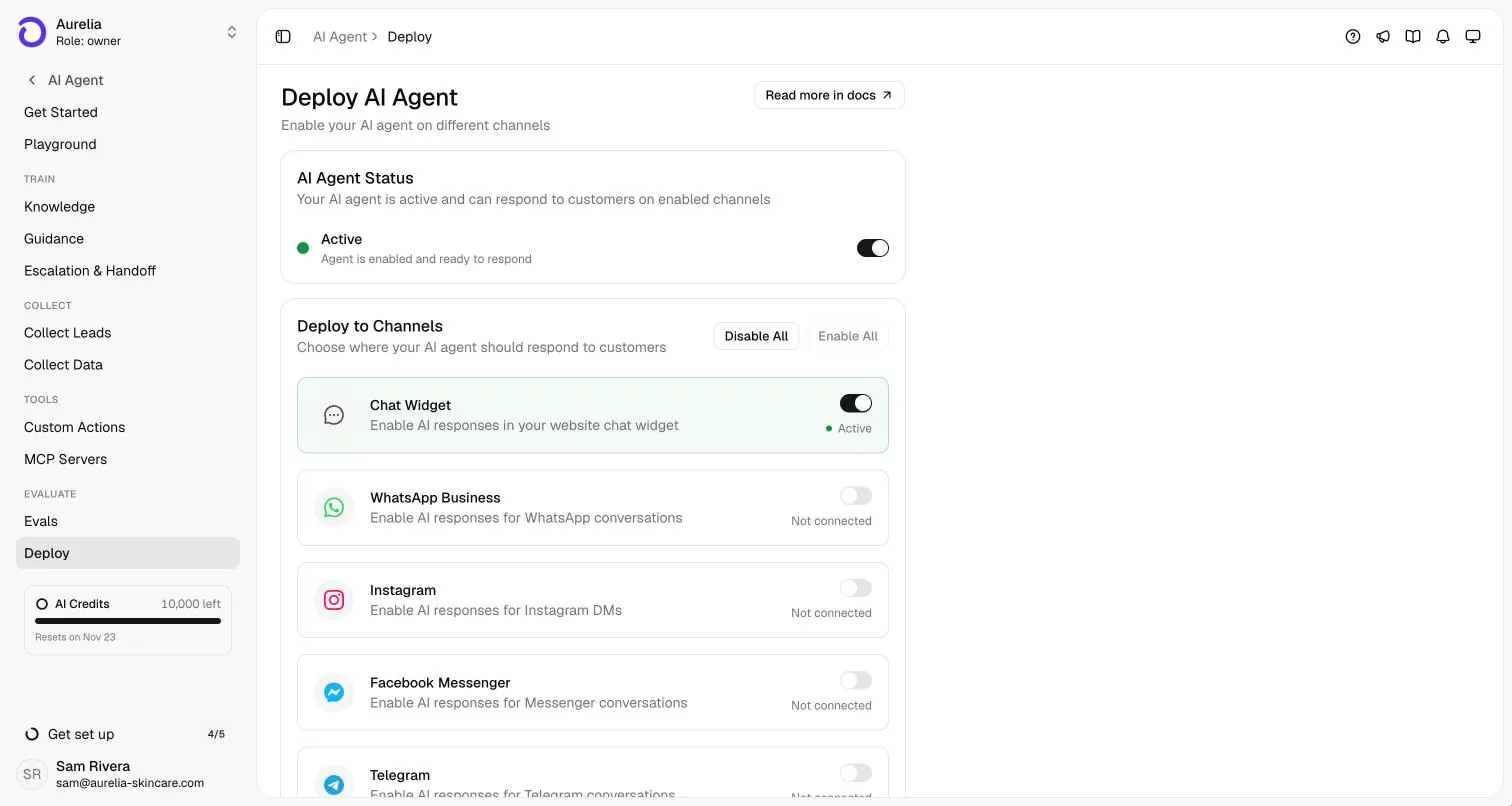
Step 5: Decide when a person takes over
Every support bot needs a way out. In Asks, Escalation & Handoff sets the rules: phrases that hand off immediately (such as "refund" or "talk to a human"), a cap on how many AI replies a conversation gets before a person steps in, business hours, and the message the customer sees when that happens.
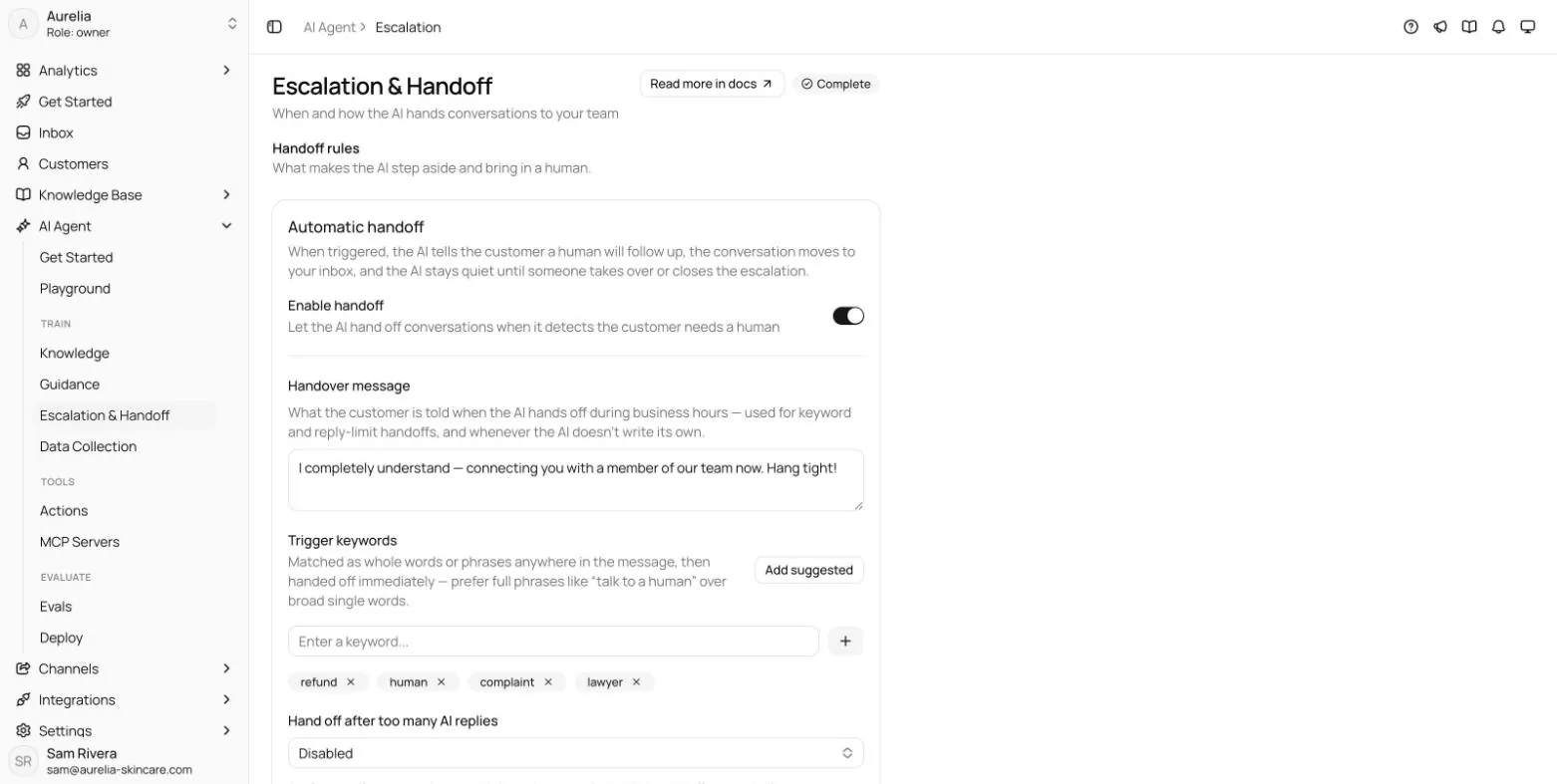
What makes a good handoff (the triggers, what the customer is told, what your team sees) is covered in our AI to human handoff guide.
Step 6: Share the bot where customers already are
Because customers have to start the chat, distribution is part of the setup:
- The link,
t.me/yourbot, on your website's contact page, in order confirmation emails, in your Instagram bio (and in your Instagram auto replies) and in your Telegram channel if you run one. - A QR code on packaging, receipts or a shop counter. Asks generates one you can download as a PNG.
- A source tag to see which placement works. In Asks, a link like
t.me/yourbot?start=instagram_bioshows "Started from link: instagram_bio" in the inbox's customer panel.
How the handoff to a shared inbox works
Every Telegram conversation lands in the same inbox as your website chat, WhatsApp, Instagram and email. When a teammate takes over, their replies, text and attachments, go out as the bot, so the customer stays in the same chat and never has to repeat themselves. The AI stays quiet until the conversation is handed back.
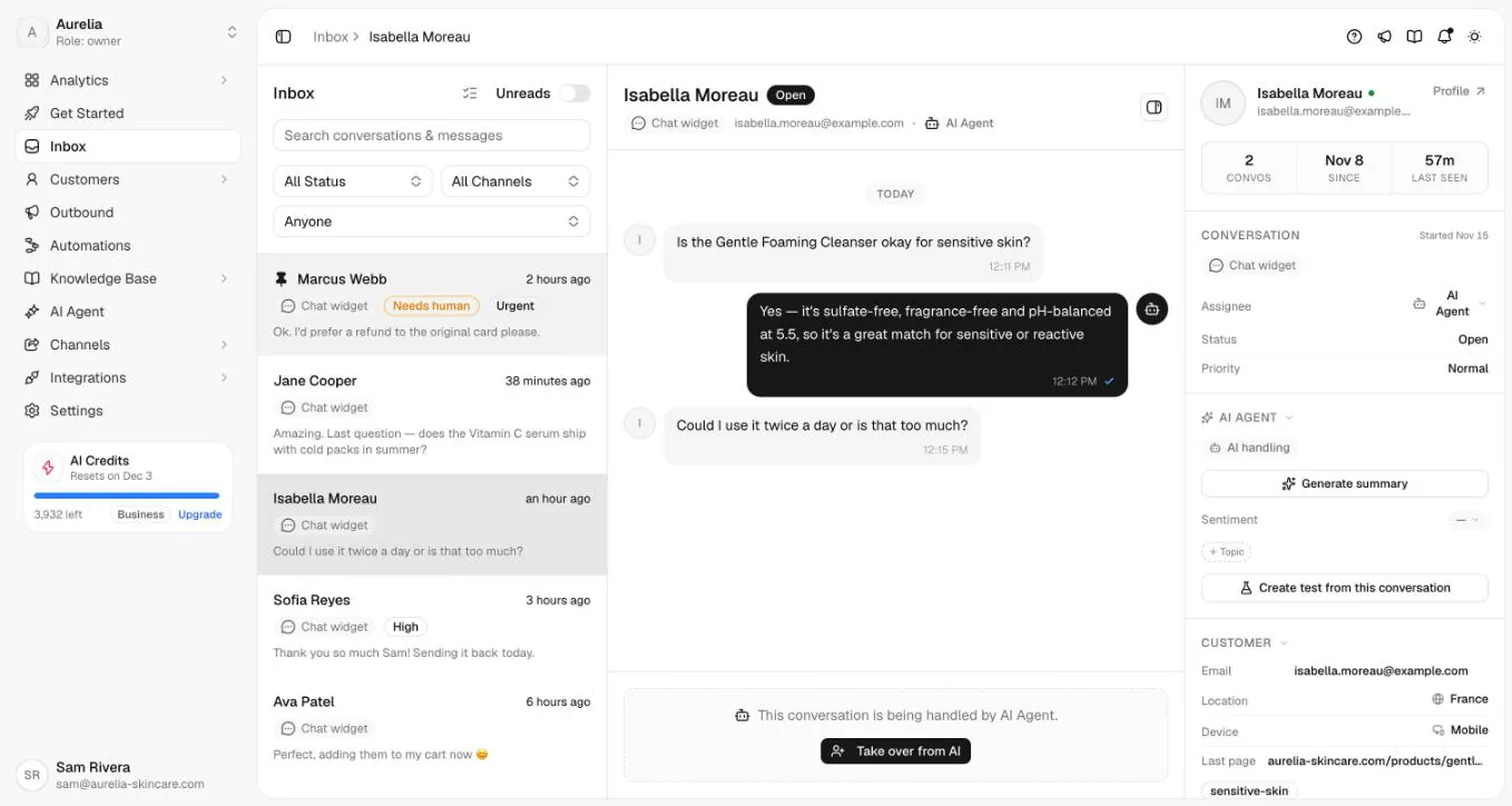
Two details matter in practice. If a customer blocks the bot, Asks shows a banner saying replies won't be delivered until they unblock it. And if someone revokes the token in BotFather, the bot's page shows an error with Update token, and Asks emails an alert when a connected bot stops working.
What customers see
On Telegram, the agent uses Telegram's own building blocks rather than plain text:
- Link buttons under a message, for a product page, a policy or order tracking.
- Product cards with a photo, name and price, and a View product button.
- Quick replies as buttons; tapping one sends it as the customer's message.
- Share my phone number, when the agent needs a phone number, so the customer can share the one on their Telegram account with one tap.
- Voice notes are transcribed so the agent can answer them, and photos, files and locations reach your inbox.
/start and /help get an instant welcome without using AI credits, and the bot shows "typing…" while the agent works on an answer.
Illustrative example (not a real customer conversation):
Customer: hi, my order hasn't arrived and it's been 9 days
Bot: Sorry about the wait. Standard delivery is usually 5–7 business days, so it's worth checking. Could you send your order number? It's in your confirmation email and starts with #.
Customer: #4471
Bot: Thanks. Order #4471 shipped on Monday and the carrier shows it at your local depot, out for delivery tomorrow. [Track the parcel] If it doesn't arrive by Friday, reply here and I'll pass you to our team for a replacement.
A reply like the second one depends on the agent being able to look up the order, which in Asks means the Shopify order tracking integration or a custom action that calls your order system. Without that, the agent should say what it can't see and hand off.
Telegram Business auto-replies vs an AI bot
Telegram also has auto-replies built into accounts, which is a different thing from a bot. Telegram Business (included with a Telegram Premium subscription, per Telegram's announcement) adds features to your own account:
| Telegram Business features | An AI support bot | |
|---|---|---|
| Account | Your personal Telegram account, upgraded | A separate bot account (@yourbot) |
| Greeting message | Sent to people who contact you for the first time | /start welcome, then real answers |
| Away message | Sent when you're closed or on vacation | Answers at any hour instead of saying you're away |
| Quick replies | Saved messages you send by typing / | Answers written from your knowledge base for each question |
| Opening hours, location, start page, chat links | Shown on your profile | Business info lives in the knowledge base |
| Team | One account; teammates would need its login | Shared inbox: several teammates reply as the bot |
| Cost | Telegram Premium subscription | Telegram is free for bots; you pay for the support tool, if any |
Telegram Business can also connect a bot to your personal account so the bot answers chats on your behalf. Under the Bot API's rules, a business bot can only send messages in private chats that had incoming messages in the last 24 hours, which brings back the reply window regular bots don't have.
Pick Telegram Business if you're a solo seller answering from your own account and canned greeting and away messages are enough. Pick a support bot once more than one person answers, once you want real answers rather than "we'll get back to you", or once Telegram is one channel among several.
Free options, honestly
There are genuinely free ways to run Telegram support. Here is what each costs you in practice:
- Answer from your own Telegram account. Free, immediate, and fine at low volume. It breaks when a second person needs to help or when you go on holiday.
- Telegram Business greeting and away messages. Included with Telegram Premium. Canned messages only; no answers.
- Build your own bot on the Bot API. The API is free and well documented, and open-source libraries exist for most languages. You host it, connect it to an AI model yourself (Telegram's own documentation welcomes third-party AI bots), and build handoff and an inbox. That's free in licences and expensive in engineering time.
- An open-source help desk with a Telegram inbox. Chatwoot, for example, connects a Telegram bot by its token, and its Community edition is free to self-host. You run the server; its Captain AI isn't included in the free edition. Our Chatwoot alternatives comparison has the details and current prices.
- A hosted AI support tool. Asks has a 7-day free trial (card required) and then paid plans, with AI credits included; see pricing. No hosted AI support tool stays free at real volume, because the AI itself costs money to run.
Limits to plan for
- Direct messages only. If you need an AI that answers inside a public Telegram group, a support bot built for DMs isn't the right tool.
- One workspace per bot. To use the same brand in two Asks workspaces, create a second bot.
- Token changes stop delivery. Revoking a token in BotFather cuts the connection until you paste the new one. Keep the token out of shared documents.
- No outbound campaigns on Telegram. Bots can't message people who never started a chat, so Telegram works for support and follow-ups inside existing chats, not cold announcements.
Frequently asked questions
Is there a free Telegram customer service bot?
The Telegram Bot API is free, so a bot you build and host yourself costs nothing in fees, and open-source help desks such as Chatwoot can connect a Telegram bot for free if you self-host. Hosted AI support tools aren't free at real volume: Asks offers a 7-day free trial (card required), then paid plans.
How do I create a Telegram bot for customer support?
Open @BotFather, send /newbot, pick a display name and a username ending in bot, and copy the HTTP API token. Then paste the token into your support tool (in Asks, Channels → Telegram), add your knowledge, set handoff rules and switch on AI replies.
Can a Telegram bot message customers first?
No. Telegram bots can only reply to people who have opened the bot and tapped Start. Put your bot link and QR code where customers will see them: your website, order emails, packaging and social profiles.
Can my team reply as the bot?
Yes, with a shared inbox. In Asks, a teammate takes over the conversation from the inbox and their replies are sent as the bot, so the customer stays in the same chat.
Does Telegram charge for bot messages?
No. Telegram says bots can message their users at no cost. The only paid feature is paid broadcasts, which lift the broadcast limit above about 30 messages per second for very large bots.
Does a Telegram support bot have a 24-hour reply window like WhatsApp?
A regular bot doesn't: you can reply to any conversation at any time. Business bots connected to a personal account through Telegram Business are different; they can only send messages in chats that had incoming messages in the last 24 hours.
Sources
Checked 2026-11-16.
- Telegram Bot FAQ (costs, rate limits, file sizes, paid broadcasts): core.telegram.org/bots/faq
- Telegram Bot API, business bots (24-hour rule): core.telegram.org/bots/api
- Telegram bot features, including AI agents: core.telegram.org/bots/features
- Telegram, "Telegram Business" announcement (March 31, 2024): telegram.org/blog/telegram-business
- Chatwoot, how to set up a Telegram channel: chatwoot.com/hc/user-guide
- Asks Telegram channel documentation: docs.asks.app/channels/telegram
Ray is the pen name of the founder of Asks, who writes here about the economics of customer support and AI agents. How we write
Put an AI support agent on your site today
Asks trains on your website, docs, and help center — then resolves customer conversations on every channel, and hands off to your team when it matters.