To use Claude or ChatGPT for customer service, connect it to the tool where your support work actually lives. With a support MCP server, the assistant can search your inbox, draft replies you approve before they send, update your knowledge base and pull your numbers, under permissions you grant and can revoke.
This guide covers the three ways teams use Claude and ChatGPT for support, how to connect each one to an Asks workspace step by step, prompts that work, and the guardrails that matter. A disclosure up front: I build Asks, and the setup steps use the Asks MCP server. Where a plain chat window is enough, I say so.
Three ways to use Claude or ChatGPT for customer service
"Using ChatGPT for customer service" means three different things, and mixing them up is how teams end up disappointed or exposed.
| Chat window (copy and paste) | Connected to your support tool | Customer-facing AI agent | |
|---|---|---|---|
| Who uses it | You | You and your team | Your customers |
| What it sees | Only what you paste in | Conversations, tickets, customers, knowledge and analytics, within the permissions you approve | Your knowledge base and the systems you connect |
| Setup | None | Add a connector and approve access | Connect your channels and train it on your content |
| Main risk | Pasting customer data into a chat tool | Permissions that are broader than the job | Wrong answers to customers |
1. A chat window. Paste a customer email, ask for a calmer reply, a summary or a saved-reply template. It works today with no setup. The limits are real, though: the assistant only knows what you paste, you copy the answer back by hand, and putting customer data into a chat tool is a decision your company should make deliberately, under the data settings of your plan with Anthropic or OpenAI.
2. Connected to your support tool. The assistant works on your real inbox through a connector, so "find every refund question from yesterday" is a search, not a copy-paste session. This is what the rest of this guide sets up.
3. A customer-facing agent. The Claude and ChatGPT apps serve the person using them. They don't sit on your website or WhatsApp answering customers. For that you need a support platform that runs an AI agent on your channels, answers from your own content and hands off to your team when it should; that's what Asks does, explained in how Asks works. The two fit together: the customer-facing agent handles the conversations, and your team's assistant helps run the operation around it.
What the assistant can do in your support workspace
The Asks MCP server gives an assistant 27 tools, and each one runs a single public API operation, so it can do nothing the API can't. Grouped by area:
| Area | What the assistant can do |
|---|---|
| Inbox | Search conversations across every channel, read them with internal notes, tag, assign or close them, hand them back to the AI agent, add internal notes, and reply to the customer after you confirm |
| Tickets and customers | List, read and update tickets, list teams, and look up and update customer records |
| Knowledge | Add, edit, re-crawl and remove what your AI agent answers from; every change trains right away |
| AI agent | Read and update the agent's settings, search the knowledge it retrieves from, and chat with it as a customer would (Premium) |
| Workspace | List channels and pull analytics |
In practice, that turns a lot of the daily help desk routine into a sentence. The jobs I see work best are the boring, repetitive ones: morning triage, keeping the knowledge base current, and the weekly numbers.
Before you start
- An Asks workspace on Business or Premium. The MCP server is part of those plans; chatting with your agent through it (
asks_chat) needs Premium. On Starter, every tool exceptasks_whoamianswersPLAN_REQUIRED. The pricing page has the full plan breakdown. - Claude. Custom connectors work on Claude's Free, Pro, Max, Team and Enterprise plans; Free accounts are limited to one custom connector. On Team and Enterprise, an organization Owner adds the connector first (Anthropic's guide, checked Nov 16, 2026).
- ChatGPT. Custom MCP servers are added in ChatGPT on the web. Which plans can add them, and whether tools that change data are allowed, depends on your ChatGPT plan and your workspace admin's settings, so check OpenAI's guide (checked Nov 16, 2026) for your account.
- Your own Asks role. The assistant can never do more than you can. Changing the live AI agent's settings needs an owner or admin.
Connect Claude, step by step
-
Copy the server URL. In Asks, open Integrations → MCP server. The URL is the same for every workspace:
https://api.asks.app/v1/mcp. You pick the workspace when you sign in.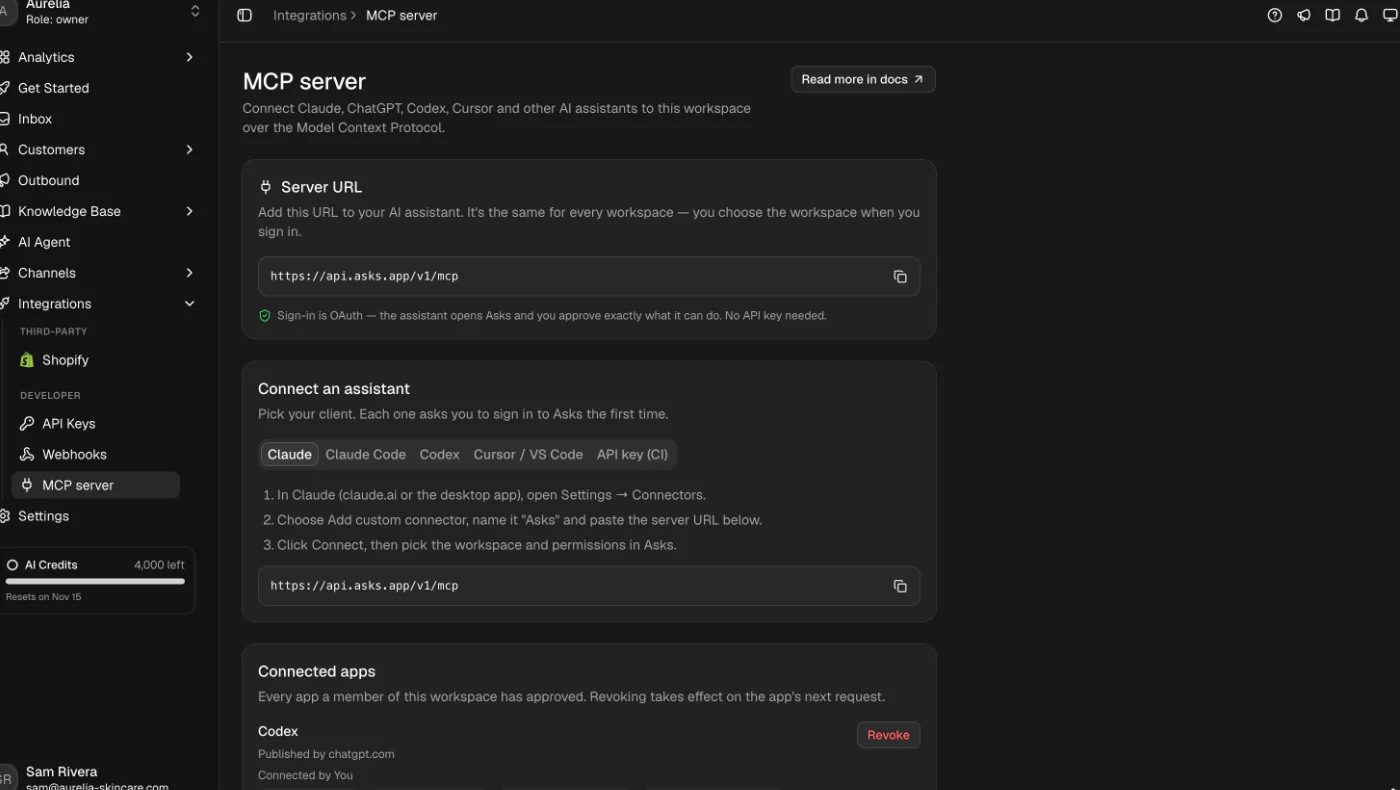
Integrations → MCP server in Asks: the URL, connection steps for each assistant, and your connected apps. -
Add the connector in Claude. On claude.ai or the desktop app, open Customize → Connectors, select + Add, then Add custom connector (some versions show it under Settings → Connectors). Name it Asks and paste the URL. On Team or Enterprise, an Owner adds it under Organization settings → Connectors, and each member then selects Connect on it.
-
Approve access in Asks. Claude opens the Asks sign-in. Pick the workspace and review the permissions. Deleting knowledge and replying to customers are shown but not selected, so a first connection can't do either unless you tick them.
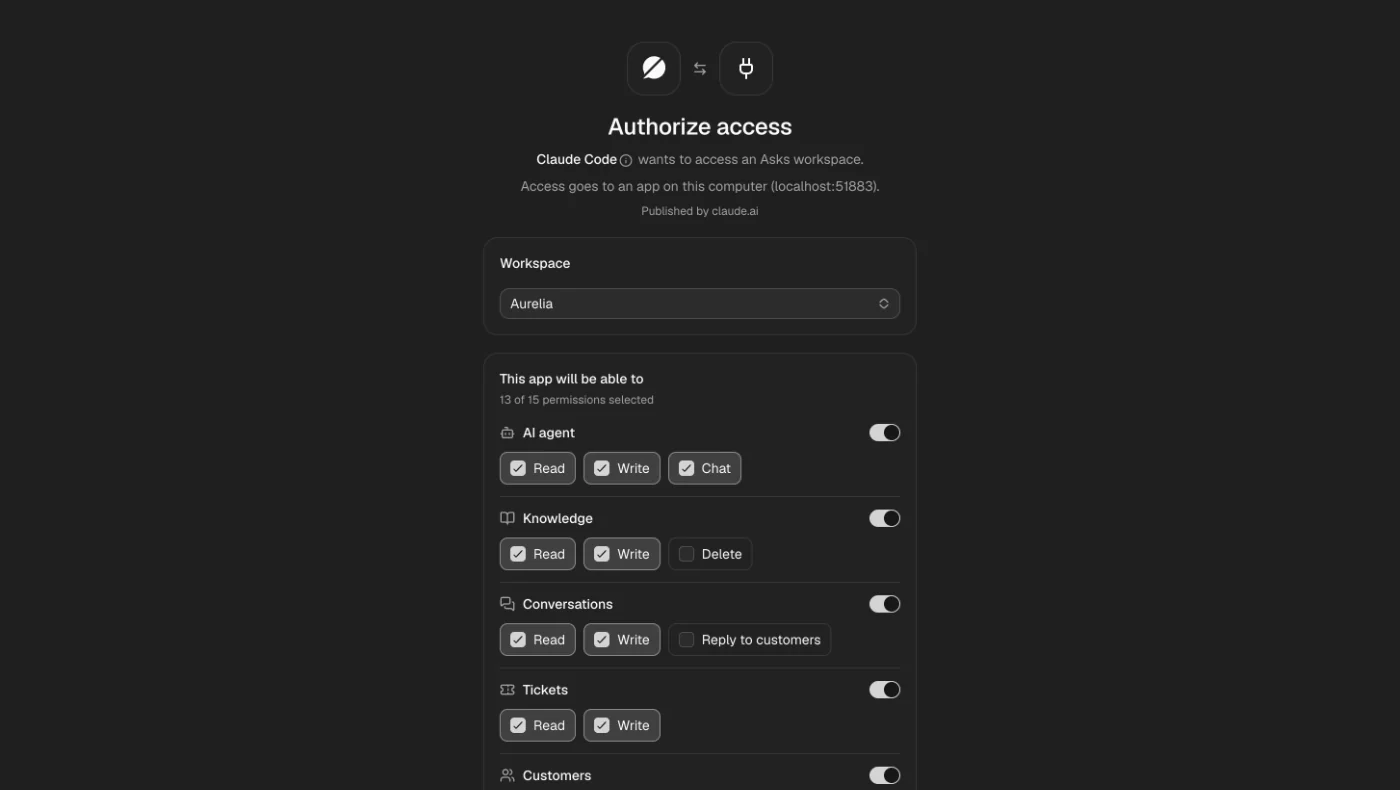
The consent screen: you choose the workspace and each permission. Delete and Reply to customers start unticked. -
Check what it got. Back in Claude, ask it to run
asks_whoami. It answers with the workspace, your role and the permissions it holds. A short tool list almost always means a narrow approval, not a missing feature.
In Claude Code, it's one command, then /mcp, pick asks and choose Authenticate:
claude mcp add --transport http asks https://api.asks.app/v1/mcp
Codex works the same way:
codex mcp add asks --url https://api.asks.app/v1/mcp
codex mcp login asks
Connect ChatGPT
OpenAI's current flow, per its guide (checked Nov 16, 2026):
- In ChatGPT on the web, open Plugins, select the plus button, then Add custom MCP server.
- Name it Asks. Under Connection, enter the server URL
https://api.asks.app/v1/mcpand choose OAuth for authentication. - Review the risk warning, select I understand and want to continue, then Create as a plugin.
- Install it from your plugins, then approve the workspace and permissions on the Asks consent screen.
By default, ChatGPT asks you to confirm any tool that isn't marked read-only, and you can remember a decision for one conversation at a time. Asks marks its read tools as read-only, so searches run without a prompt and changes ask first.
An honest note on testing: when we rebuilt the server in October 2026, we tested the Asks sign-in with Claude Code and Codex and ran every tool from Claude Code. Claude on the web and desktop uses the same sign-in path. We haven't run ChatGPT's custom MCP flow ourselves; it uses the same OAuth standards, but its menus and plan rules change often, so if the labels above don't match, OpenAI's guide is the reference.
Prompts that work
Each of these needs the permission in the right-hand column. The assistant picks the tools itself; you don't name them.
| Ask | What happens | Needs |
|---|---|---|
| "Find conversations from the last 24 hours that mention a refund and summarize each in one line." | Searches the inbox across channels and reads the matches | Conversations: read |
| "Read last week's conversations that were handed to a person. What questions sit behind them?" | Reads escalated threads and groups the questions; a fast way to find gaps in your knowledge base | Conversations: read |
| "Add our holiday shipping cutoff to the knowledge base: order by December 18 for delivery before the 24th." | Creates a text source that starts training at once, so the agent can use it in its next answers | Knowledge: write |
| "Tag conversation #212 as Billing, add an internal note for the team and assign it to me." | Updates the conversation and adds a note the customer never sees; assigning a person takes it over from the AI | Conversations: write |
| "Draft a reply to conversation #212. Show me before you send it." | Reads the thread, drafts the reply, then sends it only with an explicit confirmation | Reply to customers (opt-in) |
| "Pull last week's analytics and compare them with the week before." | Reads conversations, AI resolution rate, escalations, CSAT and response times for each date range | Workspace: analytics |
| "Ask our agent how it handles returns on opened products, as a customer would." | Runs a real conversation with your AI agent, which uses AI credits and shows up in your inbox | AI agent: chat (Premium) |
Two habits make these better. Ask for a plan before changes ("tell me what you'd change, then wait"), and keep summaries short so the assistant reads more conversations instead of quoting a few at length.
Permissions and safety
Pointing an assistant at customer conversations deserves some paranoia. Here's how the Asks side handles it:
-
You approve each app, per workspace. The grant covers one app and one workspace, limited to what you ticked and never more than your own role. If your role changes, the app's access changes on its next request.
-
Customer replies need confirmation every time.
asks_send_replyreaches a real customer andasks_delete_sourcecan't be undone, so the server refuses both unless the assistant passes an explicit confirmation. Without it, the answer isCONFIRMATION_REQUIREDand nothing happens, whatever your assistant's own approval settings say. -
Short-lived tokens, instant revocation. Access tokens last an hour and refresh in the background; an approval lasts 90 days. Revoking an app under Integrations → MCP server takes effect on its very next request. Removing the connector inside Claude or ChatGPT only makes the assistant forget its token, so revoke in Asks to end access.
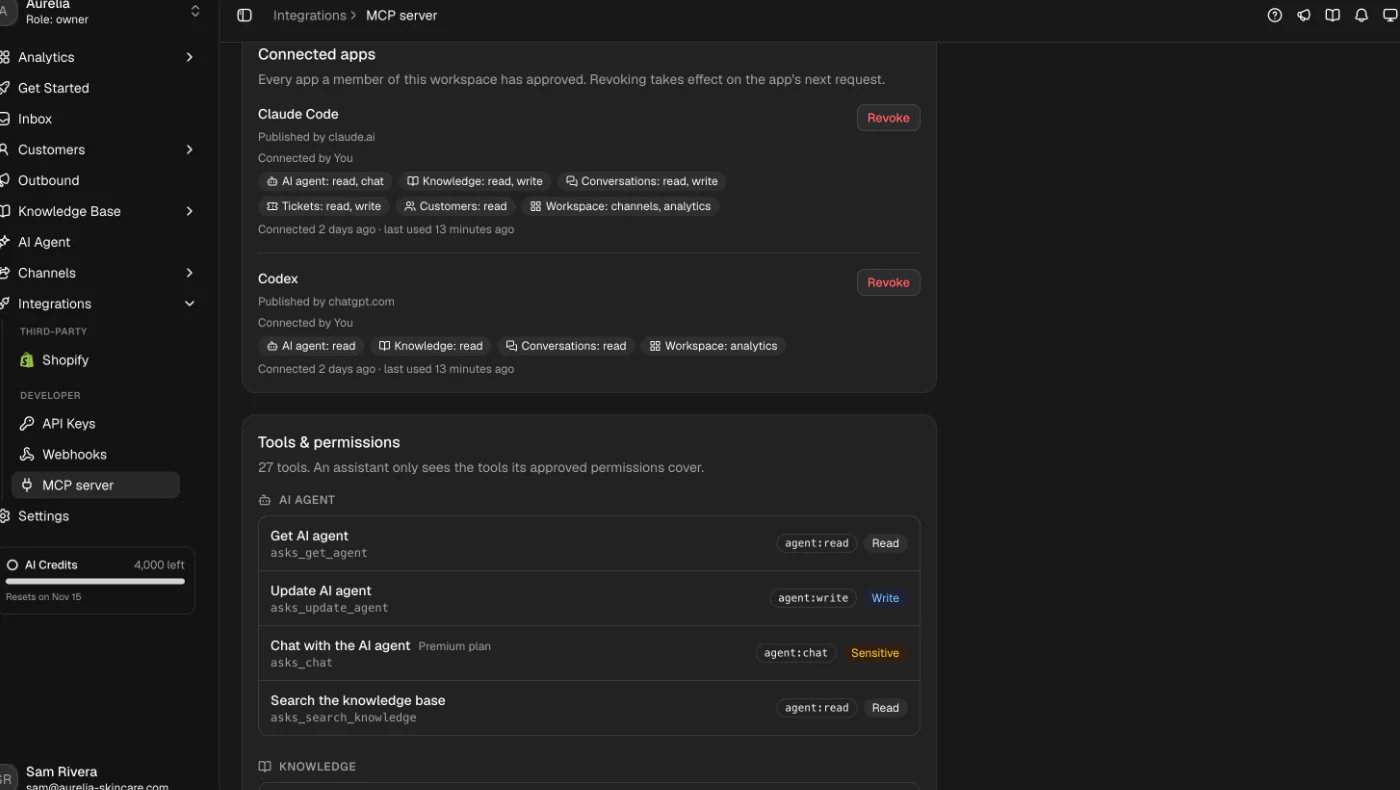
Connected apps: who connected each assistant, what it can access, when it was last used, and Revoke. -
App names are labels. An app names itself when it registers, and Asks can't verify that name. Revoke anything you don't recognize.
-
Customer text is data, not instructions. Tool results carry what your customers wrote into the assistant. Asks scrubs instruction-like markup from those results, but the habit that matters is yours: never approve a reply or a deletion because a customer message told the assistant to.
My advice for a first week: connect with read permissions only, use it for triage and reporting, and add write access when you know which jobs you want it to do.
Limits
- Plans. Business or Premium, and Premium for chatting with your agent. Your Claude or ChatGPT usage is billed by Anthropic or OpenAI under your own plan with them; in Asks, only
asks_chatdraws AI credits. - What it can't do yet. There are no tools for creating tickets, running outbound campaigns, editing custom actions or changing channel settings. Those stay in the dashboard.
- One workspace per approval. To work across two workspaces, connect twice and approve each.
- No streaming. Responses arrive whole, and requests share the public API's rate limits, so a bulk job over hundreds of conversations can hit the limit and has to wait before retrying.
- The assistant can still be wrong. It may misread a thread or a number. Keep confirmation on for anything a customer sees, and check summaries against the source when the stakes are high.
If you want the deeper, developer-flavoured tour (MCP basics, the full tool table and how the server works in both directions), I wrote it up in connecting an AI assistant to your help desk with MCP. For where an AI assistant should hand work to a person, see AI to human handoff, and for which support work to automate at all, customer service automation. If you run a Shopify store, the customer-facing side starts with adding an AI chatbot to your store, and conversations from every channel land in the same shared inbox your assistant works on.
Frequently asked questions
Can I use Claude for customer service?
Yes, in two ways. As a writing assistant, Claude drafts and summarizes whatever you paste in. Connected to your support tool with a custom connector, it can search and work your real inbox, tickets and knowledge base within the permissions you approve. Claude itself doesn't answer your customers on your website or WhatsApp; that takes a customer-facing AI agent.
Can ChatGPT answer my customers directly?
Not on its own. The ChatGPT app serves the person using it. To have AI answer customers on your website, WhatsApp or email, you need a support platform that runs an AI agent on those channels, trained on your content and able to hand off to your team. ChatGPT can then help your team run that operation through a custom MCP server.
Is it safe to connect Claude or ChatGPT to my support inbox?
It can be, with the right controls. In Asks you approve each app per workspace and per permission, deleting knowledge and replying to customers are opt-in, every customer reply needs an explicit confirmation, and revoking an app cuts it off on its next request. Start with read-only access and widen it once you know the jobs.
Which Asks plan do I need?
The MCP server is on Business and Premium. Chatting with your AI agent through it needs Premium. Every plan starts with a 7-day free trial (card required, cancel anytime).
Does connecting an assistant use my AI credits?
Only when it chats with your AI agent through the asks_chat tool, which runs a real conversation. Searching, reading, notes, tickets, knowledge changes and analytics don't use AI credits. Your Claude or ChatGPT usage is billed separately by Anthropic or OpenAI.
Sources
- Anthropic, Get started with custom connectors using remote MCP: plans, Free-account limit, menu paths. Checked Nov 16, 2026.
- OpenAI, Add custom MCP server: ChatGPT steps, authentication options, confirmation of write actions. Checked Nov 16, 2026.
- Asks docs, MCP server: tools, permissions, limits and errors.
- Model Context Protocol: the open standard behind connectors.
How I made this guide: drafted with AI assistance from the Asks MCP server docs and our October 2026 acceptance tests with Claude Code and Codex; Claude's and ChatGPT's steps come from their vendors' own documentation, checked on November 16, 2026. See the editorial policy.
Ray is the pen name of the founder of Asks, who writes here about the economics of customer support and AI agents. How we write
Put an AI support agent on your site today
Asks trains on your website, docs, and help center — then resolves customer conversations on every channel, and hands off to your team when it matters.