Copilot: your agent's brain, for your team
Suggest reply (Cmd+J), rewrites, and one-click conversation summaries in the inbox composer — powered by the same knowledge as the AI agent, and never billed as credits.
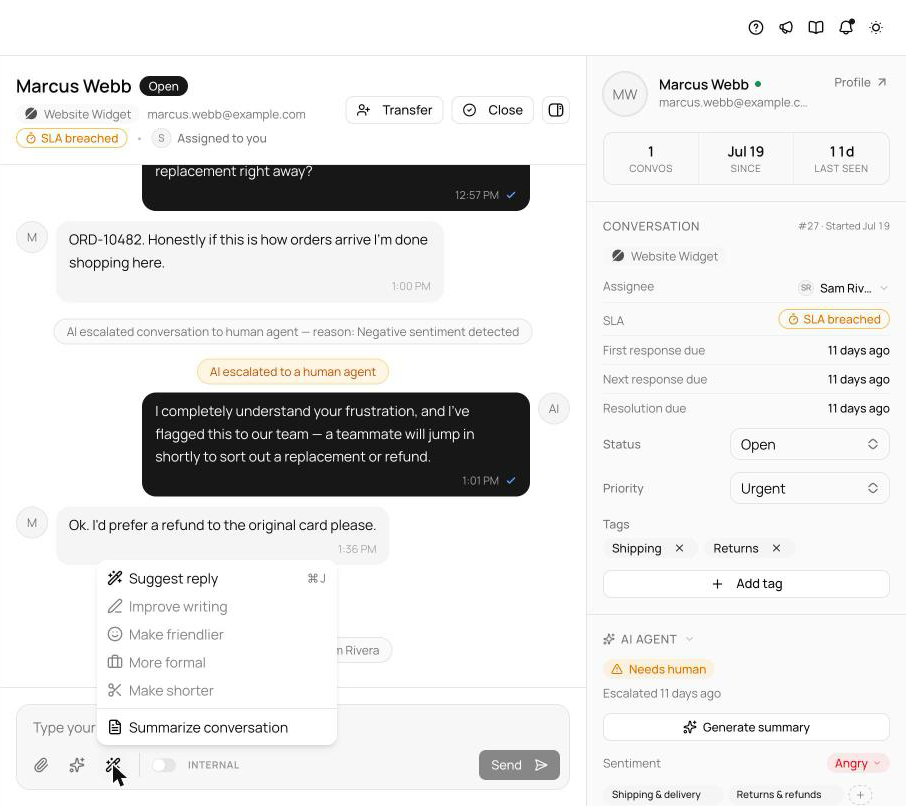
Even teams that keep a human on every conversation deserve the agent's knowledge. The inbox composer now has Copilot: Suggest reply(⌘J on an empty composer) drafts an answer from the same knowledge base and retrieval as the AI agent; rewrite actions polish a draft you've started; Summarize conversation condenses a long thread before you wade in.
Copilot is strictly advisory — it never escalates, resolves, or saves anything on its own, it works even where the autonomous agent is switched off, and drafts don't consume AI credits. The draft is yours to edit; the send button is still yours to press.
Suggest reply: the whole pipeline, read-only
Copilot lives behind the wand button in the reply composer, or ⌘ J. With an empty composer, Suggest replydrafts an answer using the full agent pipeline — the same knowledge base, the same retrieval the autonomous agent runs on — so a suggested draft is grounded in exactly what your agent knows, not a generic completion. The difference is authority: Copilot is strictly read-only. It never escalates, never resolves, never saves a lead, never triggers a custom action's side effects. It writes into your composer; everything after that is you.
Rewrites and summaries
With a draft already in the composer, the wand menu switches to rewrite operations that rework what you've typed — and ⌘ J follows suit, suggesting on empty and polishing on a draft. Summarize conversation condenses the whole thread into a Conversation summarydialog with a copy-to-clipboard button — worth reaching for before a transfer, or before wading into a long escalation. All of it works even on channels where the autonomous AI agent is switched off: teams that keep a human on every conversation still get the agent's knowledge at drafting time.
Hand back to AI, hardened
The same release firmed up the other direction of the handoff. Hand back to AIused to stall silently when the agent couldn't serve that channel; now it explains itself instead. When the handback succeeds, it writes an internal note — “Handed back to AI by {name}” — so the transcript records who returned the conversation, and the AI stays passive until the customer's next message rather than jumping in over the end of your exchange.
See what's new in your workspace
Everything on this page is live today. Asks trains on your website and resolves customer conversations on every channel — free to try, live in minutes.