The customer panel earns its place
The inbox side rail is now sectioned, collapsible, and customizable — and carries the AI's full handoff package: resolution state, summary, sentiment, topics, and captured details.
The right-hand panel in the inbox was rebuilt around what agents actually look for. Sections collapse, reorder, and hide — your arrangement persists — contact details copy on hover, and past conversations peek their last three messages on hover before you commit to the jump.
The new AI Agent section is the handoff package: how the conversation stands (AI handling, needs human and why, resolved and how confidently), the summary, sentiment you can correct with a click, detected language, topics, and everything the agent collected. Shopify customers bring a read-only card of their recent orders alongside.
Arrange it your way
The panel is now built from sections that collapse individually, and a Customize control at the bottom lets you hide the ones you never use and reorder the rest — the arrangement is saved per user, so your inbox stays yours. The small frictions went too: contact rows copy to the clipboard on hover, and the assignee changes in place — pick a teammate, or hand the conversation back to the AI, without leaving the panel. Past conversations are one click to open, and hovering one peeks a popover with its last three messages, so you know whether the jump is worth making before you make it.
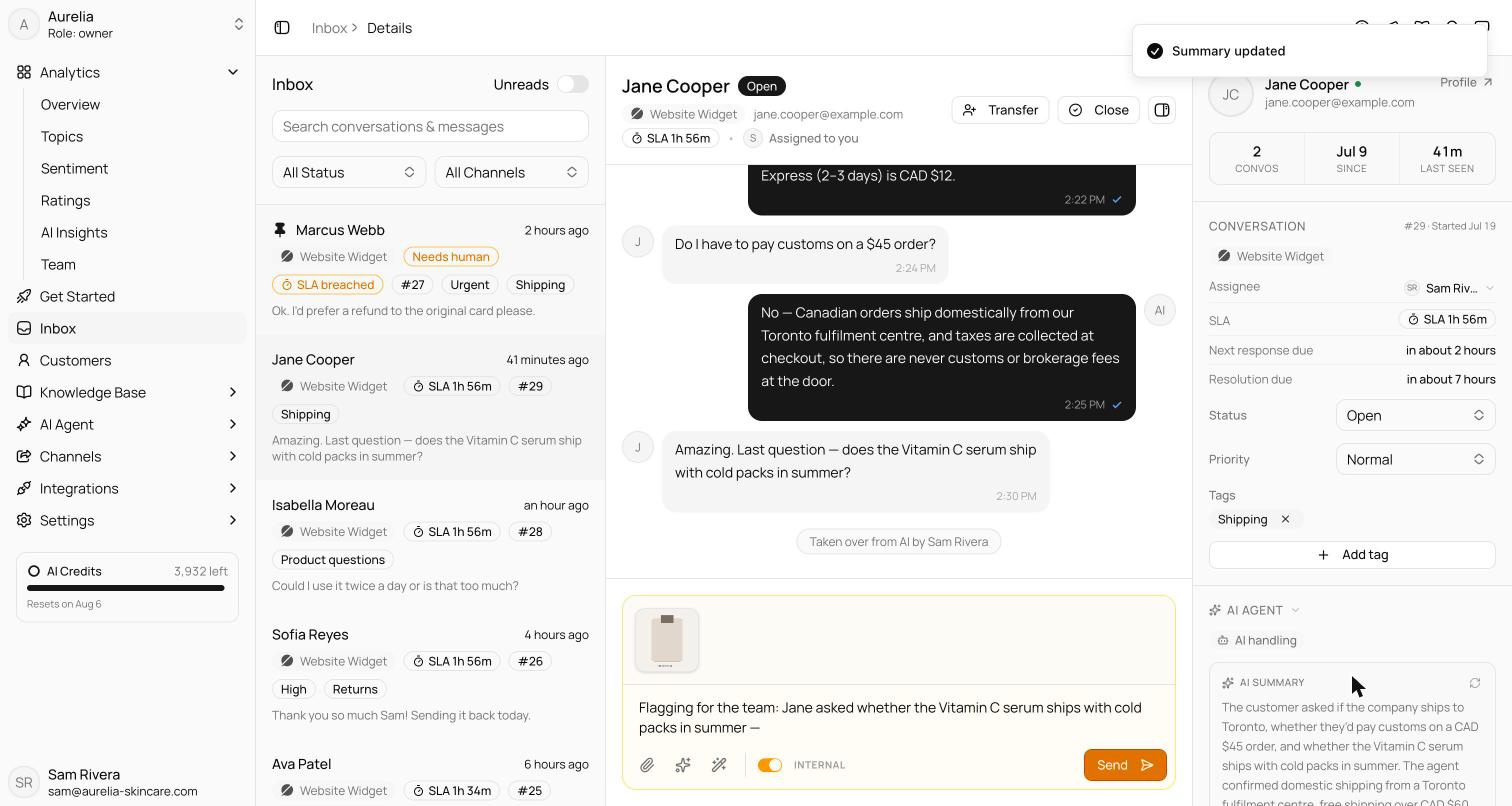
The AI Agent section is the handoff package
When a conversation reaches a human, the question is always the same: what happened before I got here? The new AI Agent section answers it in one place. A resolution chip states where things stand — AI handling, Needs human with the reason the AI escalated, Resolved with whether the customer confirmed it or the AI assumed it, or Closed unresolved. Below it:
- the AI summary, with generate and regenerate actions
- sentiment, correctable with a click
- the detected language
- topics you can add and remove
- insights the AI surfaced along the way
- details captured through data collection
Store-linked customers also bring a read-only Shopify orders card alongside, so order questions don't start with a tab switch.
Corrections that stick
Editing the AI's read of a conversation only helps if the AI doesn't immediately overwrite you. Hand-corrected sentiment is sticky: it holds until the customer sends a new message, at which point fresh input fairly reopens the question. Removed topics stay removed — the AI won't re-add a label you deliberately took off.
See what's new in your workspace
Everything on this page is live today. Asks trains on your website and resolves customer conversations on every channel — free to try, live in minutes.